ewQwe Identity — Introduction
ewQwe (pronounced */juːˈkwiː/ — you-kwee) Identity is an open-source credential verifier developed in the EU, compatible with the EUDI/eIDAS wallet ecosystem.
The project provides a complete solution — including a multi-lingual admin UI — for verifying digital credentials such as Proof of Age, Person Identification Data (PID), and Mobile Driving Licences (mDL).
Out of the box: age over 18 verification using the widely deployed France Identité Numérique wallet.
What it does
The Credential Verifier is a Rust server that accepts Verifiable Presentations from EUDI Wallets via OpenID4VP, validates their cryptographic integrity, and returns signed JWT attestations to Relying Parties.
It ships with an embedded multi-lingual admin UI — build the SPA, enable it in config, and it’s served at the server root URL with no separate frontend deployment.
A MIT-licensed demo webapp is also provided, showing how to embed credential verification into an existing web application.
Supported Standards
| Standard | Purpose |
|---|---|
| OpenID4VP 1.0 | Credential presentation protocol |
| ISO/IEC 18013-5 | mDoc / mDL credential format |
| ISO/IEC 18013-7 Annex B | Online mDoc presentation via OpenID4VP |
| SD-JWT VC | Selective Disclosure JWT credentials |
| HAIP | High Assurance Interoperability Profile (JAR, JWE, X.509) |
| EU Age Verification Profile | Privacy-preserving age checks (DSA-compliant) |
Components
| Component | Description | License |
|---|---|---|
| Credential Verifier | Core server: VP Token validation, signed JWT attestations, OpenID4VP transaction lifecycle | AGPL-3.0 |
| Admin UI | Embedded SPA: QR-code-driven verification dashboard, user management, audit journal, i18n | AGPL-3.0 |
| Demo Webapp | Relying Party demo — vanilla TypeScript SPA that requests credentials via OpenID4VP | MIT |
| Shared JS Library | TypeScript library: DCQL query builders, protocol profiles, API client | MIT |
| OpenID4VP Library | Reusable Rust crate: DCQL, JAR signing, JWE decryption, transaction stores | AGPL-3.0 |
| Digital Credential Library | Rust crate: SD-JWT VC and mDoc credential building, signing, verification | AGPL-3.0 |
Roadmap
Based on your role:
| Role | Start here |
|---|---|
| Deploying the verifier | Credential Verifier Server |
| Using the admin dashboard | Credential Verifier UI |
| Building a Relying Party | Demo Webapp then Demo Architecture |
| Understanding the standards | Protocols & Formats Summary |
License
The open-core crates are licensed under AGPL-3.0. The TypeScript packages (@ewqwe/digital-identity and demo-webapp) are licensed under MIT.
Enterprise Version
The enterprise version adds production-grade infrastructure:
| Feature | Enterprise Crate |
|---|---|
| OpenTelemetry (OTLP) tracing & metrics | ewqwe-enterprise-logging |
| PostgreSQL & Redis stores | ewqwe-enterprise-stores |
| APISIX/eIDAS authentication | ewqwe-enterprise-auth |
| mTLS, multi-tenancy, K8s Helm charts | ewqwe-enterprise-server |
Credential Verification as a Service is coming soon — check ewqwe.eu for updates.
Credential Verifier Server
The Credential Verifier is a Rust (actix-web) server that validates Verifiable Presentations from EUDI Wallets via OpenID4VP, cryptographically verifies them, and returns signed JWT attestations to Relying Parties.
It handles the full OpenID4VP transaction lifecycle — from generating authorization requests (with optional JAR signing for HAIP) to receiving VP Tokens, decrypting JWE, validating signatures, and issuing attestations.
Architecture
flowchart TD
    RP[Relying Party]
    Wallet[EUDI Wallet]
    Verifier[Credential Verifier
    Rust - actix-web]
    Store[Transaction Store
    SQLite - Redis]
    Journal[Hash-chained Journal]
    CA[Trusted Issuer CAs]

    RP -->|POST /ewqwe_api/verify| Verifier
    RP -->|POST /ewqwe_api/openid4vp/init| Verifier
    Wallet -->|POST /ewqwe_api/openid4vp/direct_post| Verifier
    Wallet -->|GET /ewqwe_api/openid4vp/request/<id>| Verifier

    Verifier --> Store
    Verifier --> Journal
    Verifier --> CA
What it verifies
| Format | Checks performed |
|---|---|
| mso_mdoc (COSE_Sign1) | IssuerAuth MSO signature via x5chain certificate chain. MSO digest against each disclosed IssuerSignedItem. DeviceSignature (holder binding) via SessionTranscript / OpenID4VP handover. MSO validUntil / validFrom expiry. |
| dc+sd-jwt | Issuer JWT signature via x5c certificate chain. _sd digest disclosure verification. KB-JWT holder binding (cnf.jwk, nonce, audience). exp claim expiry. |
The verification process:
- Parse VP Token (mDoc CBOR or SD-JWT compact serialization)
- Extract selectively-disclosed claims
- Check expiry against MSO validity period or JWT
exp - Verify nonce binding — the
stateparameter looks up the stored transaction nonce, validated against the KB-JWT orSessionTranscript - Validate signatures against the issuer’s certificate chain via the trusted CA directory
- Sign attestation — returns an ES256-signed JWT bound to the
transaction_id
API Endpoints
OpenID4VP Transaction Flow
| Method | Path | Description |
|---|---|---|
POST | /ewqwe_api/openid4vp/init | Create a new transaction. Accepts credential_type, profile, dcql_query. Returns transaction_id, request_uri, qr_code_data_url. |
GET | /ewqwe_api/openid4vp/request/{id} | Serve the authorization request (signed JAR for HAIP, plain JSON for Annex A). |
POST | /ewqwe_api/openid4vp/direct_post | Receive VP Token from wallet (the response_uri). |
GET | /ewqwe_api/openid4vp/status/{id} | Poll transaction status (pending, scanned, verified, failed, expired). |
Verification
| Method | Path | Description |
|---|---|---|
POST | /ewqwe_api/verify | Verify a VP Token. Accepts vp_token, state, client_id. Returns success, claims, attestation (signed JWT). |
POST | /ewqwe_api/dc_api/verify | Verify a DC API credential. Accepts device_response_b64 (pre-decrypted mDoc), nonce, doc_type. |
GET | /ewqwe_api/dc_api/nonce | Generate a DC API nonce for replay protection. |
Utility
| Method | Path | Description |
|---|---|---|
GET | /version | Server version. |
GET | /ewqwe_api/openid4vp/.well-known/jwks.json | Public JWK set (for JAR verification and JWE encryption). |
Journal
| Method | Path | Description |
|---|---|---|
GET | /ewqwe_api/journal/{username}/entries | List verification entries (paginated, filterable by date). |
GET | /ewqwe_api/journal/{username}/verify | Verify hash-chain integrity. |
GET | /ewqwe_api/journal/{username}/download | Download journal as JSON. |
Installation
Prerequisites
- Rust 1.70+
- pnpm >= 9 (for building the admin UI SPA)
The open-core uses SQLite and in-memory stores by default — no PostgreSQL or Redis needed for basic operation.
Quick Start (Docker)
docker pull ghcr.io/rd-ewqwe/ewqwe-identity:latest

docker run --rm -p 9888:9888 \
  -e PUBLIC_ROOT_URL="https://verifier.your-domain.com" \
  --name credential-verifier \
  ghcr.io/rd-ewqwe/ewqwe-identity:latest
Navigate to http://localhost:9888 and complete the one-time bootstrap to create an admin account.
See the Container README for persistent storage, TLS, Kubernetes, and production signer certificates.
Build from Source
# Build the server
cargo build --release -p ewqwe_credential_verifier_server

# Build the admin UI SPA (optional — see Credential Verifier UI page)
cd crates/ewqwe-credential-verifier-ui/ui
pnpm install && pnpm build
Start the server:
cargo run -p ewqwe_credential_verifier_server -- \
  crates/ewqwe-credential-verifier-server/credential-server.toml
As a Rust Dependency
[dependencies]
ewqwe_credential_verifier_client = { git = "https://github.com/rd-ewqwe/ewqwe-identity" }
Configuration
The server uses a TOML config file. It searches for credential-server.toml in the current directory, then at the platform-specific application support path.
Minimal Config (Development)
host_name = "0.0.0.0"
host_port = 9888
public_root_url = "http://localhost:9888"

[verifier_ui]
enabled = true
ui_dist_path = "../ewqwe-credential-verifier-ui/ui/dist"
Full Configuration Reference
host_name = "0.0.0.0"
host_port = 9443
public_root_url = "https://verifier.example.com:9443"
rust_log = "info,credential_verifier=debug"
# Authentication disabled for local dev:
disable_authentication = true
disabled_authentication_user = "local_tests_user"

# TLS (mutual TLS supported)
[tls_params]
server_private_key = "certs/server.key.pem"
server_certificate = "certs/server.cert.pem"
server_ca_chain = "certs/ca.chain.pem"
client_ca_cert_chain = "certs/client-ca.pem"     # mTLS clients

# OpenID4VP transaction handling
[openid4vp_config]
transaction_ttl_secs = 300                         # Default: 5 minutes

[openid4vp_config.transaction_store]
backend = "sqlite_file"                            # sqlite_memory | sqlite_file | redis | postgres
path = "transactions.db"

# HAIP: JAR signing and JWE decryption
[openid4vp_config.haip_config]
x509_cert_path = "certs/server.fullchain.pem"
x509_key_path = "certs/server.key.pem"

# Hash-chained audit journal
[journal_config]
enabled = true
backend = "sqlite_file"
path = "journal.db"

# Admin UI (see Credential Verifier UI page)
[verifier_ui]
enabled = true
app_name = "My Verifier"
session_secret = "..."                              # Generate: openssl rand -hex 64
ui_dist_path = "../ewqwe-credential-verifier-ui/ui/dist"

# OpenTelemetry (OTLP) — enterprise feature
[tracing_config]
service_name = "credential_verifier"

[tracing_config.otlp]
enabled = false
url = "http://localhost:4317"
Transaction Store Backends
| Backend | Use case | Availability |
|---|---|---|
sqlite_memory | Development / testing (default) | Open-core |
sqlite_file | Single-instance with persistence | Open-core |
redis | Multi-instance / HA with TTL-native expiry | Enterprise |
postgres | Enterprise deployments | Enterprise |
Verification Journal
The journal is an append-only, hash-chained audit log of every verification event. Each entry’s hash is chained to the previous entry, forming a tamper-evident chain.
Formula: entry_hash = SHA-256(previous_hash || attestation_signature_hash || created_at_iso8601)
The /ewqwe_api/journal/{username}/verify endpoint recomputes all hashes to detect tampering.
Security
Nonce Replay Prevention
The nonce is stored server-side in the transaction store. The verify endpoint receives the state field, loads the transaction, and compares the stored nonce against the holder-binding proof (KB-JWT nonce for SD-JWT VC, SessionTranscript nonce for mDoc). The nonce is never accepted from the HTTP request body.
Trusted Issuer CA Directory
All *.pem files in the configured issuers CA directory are loaded as trusted anchors at startup. Certs are cached — restart the server to pick up changes.
Related Pages
- Protocols & Formats Summary — protocol and format reference
- Credential Verifier UI — admin dashboard documentation
- Demo Webapp — Relying Party demo
Enterprise Version
PostgreSQL and Redis stores, OpenTelemetry (OTLP) tracing, APISIX/eIDAS authentication, mTLS, multi-tenancy, and K8s Helm charts are available in the enterprise version. Contact ewqwe.eu for details.
Credential Verifier UI
The Credential Verifier UI is a Vite+TypeScript+Tailwind SPA served directly by the credential verifier. It provides a self-contained UI for credential verification operators — no separate deployment is required.
The SPA is built from crates/ewqwe-credential-verifier-ui/ui/ and served from the root URL (/). All API endpoints are under /api/v1/.
Building the UI
The SPA must be built before the credential verifier can serve it.
cd crates/ewqwe-credential-verifier-ui/ui
pnpm install
pnpm build          # outputs to dist/
The credential-server.toml [verifier_ui] section tells the server where to find the built assets:
[verifier_ui]
ui_dist_path = "../ewqwe-credential-verifier-ui/ui/dist"
Paths are resolved relative to the directory containing the config file. The server logs a warning and skips serving the SPA if the directory is not found at startup.
Development Mode (Vite Dev Server)
Run the Vite dev server alongside the credential verifier for hot-module reload during UI development:
# Terminal 1 — credential verifier (API + OpenID4VP)
cd credential_verifier && cargo run -- --config credential-server.toml

# Terminal 2 — Vite dev server (proxies API to the verifier)
cd crates/ewqwe-credential-verifier-ui/ui && pnpm dev
Open http://localhost:5175 in your browser. The Vite proxy forwards /api/v1/*, /ewqwe_api/*, /.well-known/*, and /version to the credential verifier over HTTPS (secure: false trusts the self-signed dev certificate).
Enabling the Credential Verifier UI
Add the following section to credential-server.toml:
[verifier_ui]
enabled = true
app_name = "ACME.eu"                          # optional (default: "Credential Verifier UI")
# logo_url = "https://example.com/logo.png"   # optional logo
# session_secret = "<128 hex chars>"           # recommended for production
ui_dist_path = "../ewqwe-credential-verifier-ui/ui/dist"
When enabled = false (the default if the section is absent), all /api/v1/* routes return 404 and the SPA is not served.
Session Secret
Session cookies are signed and encrypted with a key derived from session_secret. When the key is not set, the server generates a random key at startup — all active sessions are invalidated on restart.
For production, generate a stable key:
openssl rand -hex 64
Paste the output as the value of session_secret.
Public URL
When the server is behind a reverse proxy or NAT, the auto-detected URL from the incoming request may not match the externally reachable address. Set public_url to the canonical HTTPS URL that wallets will use for the OpenID4VP redirect:
[verifier_ui]
public_url = "https://demo.ewqwe.local:9443"
When omitted, the URL is derived from the Host header of the incoming request.
Allowed Credential Types
Restrict which credential types can be requested from this server instance:
[verifier_ui]
allowed_credential_types = ["proof-of-age", "mdl"]
Valid values: "proof-of-age", "mdl", "national-id". An empty list (or omitting the key) allows all types.
This setting controls what appears in the dashboard’s credential type dropdown. Per-user restrictions can further narrow the selection (see Per-User Credential Permissions).
Database Backend
The Credential Verifier UI manages user accounts in a separate database from the main credential store. Four backends are supported:
| Backend | Use-case | Config |
|---|---|---|
sqlite_memory (default) | Development / testing | (no extra config needed) |
sqlite_file | Single-instance with persistence | path = "/var/lib/ewqwe/verifier_ui.db" |
postgres | Multi-instance / HA | url = "postgres://user:pw@host/db" |
mysql | MySQL / MariaDB environments | url = "mysql://user:pw@host/db" |
[verifier_ui.db]
backend = "sqlite_file"
path    = "/var/lib/ewqwe/verifier_ui.db"
[verifier_ui.db]
backend = "postgres"
url     = "postgres://ewqwe:secret@db.internal/ewqwe_verifierapp"
[verifier_ui.db]
backend = "mysql"
url     = "mysql://ewqwe:secret@db.internal/ewqwe_verifierapp"
Session Store Tradeoffs
The actix-session middleware manages HTTP sessions (authentication cookies). The credential verifier currently uses cookie-based session storage.
| Approach | Pros | Cons |
|---|---|---|
| Cookie (current) | Zero infrastructure — all session data travels in the encrypted cookie. No server-side store needed. | 4 KB size limit per cookie; no server-side revocation (session lives until expiry); every request carries full state. |
| Redis | TTL-native expiry; instant server-side revocation; suitable for distributed / multi-instance deployments. | Requires a running Redis instance; additional network hop per request. |
| SQL (SQLite/Postgres) | Reuses the same database already available; unlimited session size; server-side revocation. | No native TTL — requires a periodic cleanup job or trigger; extra write per request. |
For most single-instance deployments the cookie store is sufficient. For multi-instance or high-availability setups, consider adding Redis as a session backend (requires implementing the actix-session SessionStore trait for the chosen store).
First-Time Setup
On the first visit, navigate to https://<server>/.
Because no users exist yet, the app shows the bootstrap form. Fill in the admin email and a password of at least 12 characters.
This POST /api/v1/setup/bootstrap endpoint is automatically locked after the first admin is created — subsequent calls return 409 Conflict.
Roles
| Role | Permissions |
|---|---|
admin | Full access: user management, journal, QR generation |
verifier | QR generation and status polling only |
The first account created via bootstrap is always an admin with is_superadmin = true and cannot be deleted through the UI.
Generating a QR Code
- Sign in at
https://<server>/. - On the Home page, select the Credential Type from the dropdown (Proof of Age, mDL, or National ID).
- Click Generate QR Code.
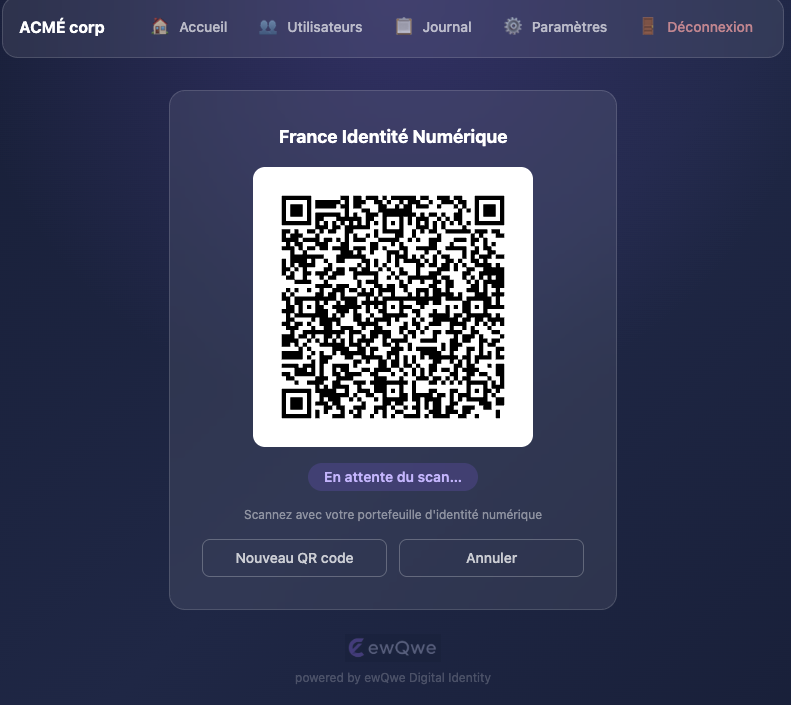
- A QR code is displayed for the selected credential type. The holder scans it with their digital wallet; the status badge updates automatically every 2 seconds:
| Status | Meaning |
|---|---|
pending | Waiting for the wallet to scan |
scanned | Wallet received the request |
verified | Credential verified — presentation accepted |
failed | Presentation was rejected |
expired | Transaction timed out (default TTL: 300 s) |
- Once
verified, click New Verification to start another session, or Cancel to return to the credential type selection.
Single-Credential Verifiers
When a user has only one allowed credential type (or the server is configured with a single type), the credential type dropdown and cancel button are hidden and the QR code is generated automatically on page load.
The credential type determines the OpenID4VP profile used:
| Credential Type | Profile | Namespace |
|---|---|---|
proof-of-age | Annex A (EU AV) | eu.europa.ec.av.1 |
mdl | HAIP | org.iso.18013.5.1.mDL |
national-id | HAIP | eu.europa.ec.eudi.pid.1 |
Admin: User Management
Navigate to Users (admin only) to:
- View all accounts, their role and active status.
- Add User — creates a new
verifieroradminaccount. - Edit — update name, role, active status, password, and allowed credential types.
- Delete — removes the account (superadmin is protected).
Password requirements: minimum 12 characters.
Per-User Credential Permissions
Each user can be restricted to specific credential types via the Allowed Credential Types checkboxes in the user modal. When all checkboxes are unchecked, the user inherits the server-level allowed_credential_types setting. When one or more are checked, QR generation is limited to those types only.
This allows an admin to, for example, let one operator verify only proof-of-age while another can also verify mDL and national IDs.
Admin: Settings
Navigate to Settings (admin only) to configure:
- Company Name — displayed in the navigation bar and login screen (default: “ACME.eu”).
- Logo URL — HTTPS URL or a
data:image/png;base64,…data URL. When blank, the built-in ewQwe logo is used. - Language — choose a specific UI language or use the browser default.
- Credential Claims — configure which PID (National ID) and mDL (Driver’s License) claims to request. Claims configuration is stored in the browser’s
localStorage.
Admin: Journal
Navigate to Journal (admin only) to browse the verification audit log. Each entry is attributed to the Credential Verifier UI user who initiated the transaction.
Available filters:
- Verifier — show entries belonging to a specific operator.
- From / To — date range filter.
Entries are paginated (50 per page). The journal backend must be enabled in the credential-server configuration (see [journal] section).
Internationalisation (i18n)
The UI fetches locale strings from:
GET /api/v1/i18n?lang=<code>
Supported language codes:
| Code | Language |
|---|---|
en | English (default) |
de | German |
fr | French |
it | Italian |
es | Spanish |
sv | Swedish |
pl | Polish |
cs | Czech |
hr | Croatian |
Language Detection
By default the app detects the browser’s language (navigator.language) and uses the closest supported locale, falling back to English. Users can override this in the Settings page by choosing a specific language from the dropdown, or selecting Default (browser language) to restore automatic detection.
The language preference is stored in localStorage (verifier_ui_lang) and persists across sessions.
Locale files are embedded in the binary at compile time fromcrates/ewqwe-verifier-app/src/static/i18n/ and served via GET /api/v1/i18n?lang=<code>.
API Reference
All API endpoints are under /api/v1/ and require Content-Type: application/json for POST/PUT requests. Sessions are managed via HttpOnly cookies.
Setup
| Method | Path | Body | Description |
|---|---|---|---|
POST | /api/v1/setup/bootstrap | {email, password, first_name, last_name?} | One-time admin creation |
GET | /api/v1/setup/status | — | {"bootstrapped": bool} — public endpoint |
Auth
| Method | Path | Body | Description |
|---|---|---|---|
POST | /api/v1/auth/login | {email, password} | Sign in, sets session cookie |
POST | /api/v1/auth/logout | — | Invalidate session |
GET | /api/v1/auth/me | — | Current user profile |
QR Code
| Method | Path | Body | Description |
|---|---|---|---|
POST | /api/v1/qr/generate | {credential_type?} | Start a new OpenID4VP transaction. credential_type: "proof-of-age" (default), "mdl", or "national-id". |
GET | /api/v1/qr/{id}/status | — | Poll transaction status |
generate response:
{
  "transaction_id": "...",
  "qr_code_data_url": "data:image/png;base64,...",
  "authorization_request_uri": "openid4vp://...",
  "expires_in": 300
}
Settings (public)
| Method | Path | Body | Description |
|---|---|---|---|
GET | /api/v1/settings | — | {"app_name": "...", "logo_url": "...|null", "allowed_credential_types": [...]} |
Admin Settings
Use these endpoints to manage the display settings for the credential verifier UI.
| Method | Path | Body | Description |
|---|---|---|---|
PUT | /api/v1/admin/settings | {app_name?, logo_url?} | Persist display settings |
status response:
{
  "status": "pending | scanned | verified | failed | expired",
  "expires_in": 287
}
Admin Users
| Method | Path | Body | Description |
|---|---|---|---|
GET | /api/v1/admin/users | — | List all users |
POST | /api/v1/admin/users | {email, password, first_name, last_name?, role?, allowed_credential_types?} | Create user |
PUT | /api/v1/admin/users/{id} | {first_name?, last_name?, role?, is_active?, new_password?, allowed_credential_types?} | Update user |
DELETE | /api/v1/admin/users/{id} | — | Delete user |
Admin Journal
| Method | Path | Query | Description |
|---|---|---|---|
GET | /api/v1/admin/journal | user_id, limit (≤200), offset | List journal entries attributed to QR app users |
i18n
| Method | Path | Query | Description |
|---|---|---|---|
GET | /api/v1/i18n | lang | Get locale strings JSON |
Demo Webapp (Relying Party)
The Demo Webapp is a vanilla TypeScript SPA that demonstrates how to integrate credential verification into your own web application. It’s MIT-licensed so you can freely adapt and embed it.
It implements the full OpenID4VP cross-device flow:
- Select a credential type (Proof of Age, mDL, or National ID)
- The webapp initiates a transaction with the Credential Verifier
- A QR code is displayed for the user to scan with their EUDI Wallet
- The wallet presents the credential to the verifier
- The webapp polls for the result and displays the verification outcome
Running
cd typescript
pnpm install
pnpm --filter @ewqwe/digital-identity build
pnpm --filter @ewqwe/demo-webapp dev    # https://localhost:5174
The demo webapp connects to the Credential Verifier at the URL configured in its environment. See the TypeScript workspace README for details.
Protocol Support
The webapp supports two OpenID4VP profiles, selected automatically based on credential type:
| Credential Type | Profile | Client ID Scheme | Response Mode |
|---|---|---|---|
| Proof of Age | EU Age Verification (Annex A) | redirect_uri | direct_post |
| mDL / National ID | HAIP | x509_san_dns | direct_post.jwt |
For details on these profiles, see the Protocols & Formats Summary.
Integration Pattern
The demo webapp demonstrates the standard integration pattern for a Relying Party:
// 1. Initiate a transaction
const init = await fetch("/api/openid4vp/init", {
  method: "POST",
  body: JSON.stringify({ credential_type: "proof-of-age" })
});
const { transaction_id, qr_code_data_url } = await init.json();

// 2. Display QR code for wallet scanning
displayQRCode(qr_code_data_url);

// 3. Poll for verification result
const status = await pollStatus(transaction_id);

// 4. Receive signed attestation
if (status.result === "verified") {
  const attestation = status.attestation; // Signed JWT
}
See the Demo Architecture page for the full system setup and testing flow.
Source Code
The demo webapp is in typescript/demo-webapp/. It uses:
@ewqwe/digital-identity— shared library for DCQL query building, protocol profiles, and the verifier API client- Vite — dev server and build tool
- Vanilla TypeScript — no framework
Demo Architecture
The demo system showcases a complete credential verification flow:
- Demo Webapp — a Relying Party SPA that requests credentials
- Credential Verifier — the backend that cryptographically verifies presentations
- Wallet — a mobile wallet app (EUDI Wallet, France Identité, or Age Verification App)
System Architecture
flowchart LR
    subgraph Browser["Browser"]
        Webapp["Demo Webapp<br/>TypeScript SPA"]
    end

    subgraph Server["Server"]
        Verifier["Credential Verifier<br/>Rust / actix-web"]
    end

    subgraph Mobile["Mobile Device"]
        Wallet["EUDI Wallet"]
    end

    Webapp -->|Init transaction| Verifier
    Webapp -->|Display QR code| Wallet
    Wallet -->|Scan QR, present credential| Verifier
    Webapp -->|Poll status| Verifier
    Verifier -->|Signed attestation| Webapp
The credential verifier serves both the verifier API and (when the admin UI is enabled) the embedded SPA at the root URL.
Setting Up
1. Start the Credential Verifier
cargo run -p ewqwe_credential_verifier_server -- \
  crates/ewqwe-credential-verifier-server/credential-server.toml
The development config uses HTTP on port 9888 with authentication disabled.
2. Start the Demo Webapp
cd typescript
pnpm install
pnpm --filter @ewqwe/digital-identity build
pnpm --filter @ewqwe/demo-webapp dev
The webapp runs at https://localhost:5174 and proxies API calls to the verifier.
3. Run a Wallet
For full end-to-end testing, you need a wallet on a mobile device (physical or emulator):
- EUDI Wallet — see EUDI Wallet on Android Studio
- Age Verification App — see Age Verification App on Android Studio
- France Identité — see France Identité Wallet
For local network setup connecting the emulator to the verifier, see Local Network Setup.
Port Assignments
| Component | Port | Description |
|---|---|---|
| Credential Verifier | 9888 (dev) | Verification server |
| Demo Webapp (Vite) | 5174 | RP web interface |
Next Steps
- User Journey — detailed protocol flows
- Protocols & Formats Summary — standards reference
- Credential Verifier Server — server configuration
User Journey
This page describes the end-to-end credential verification flow from the perspective of a Relying Party.
The Two Profiles
The EU Digital Identity ecosystem defines two main profiles:
| Profile | Purpose | Transport | Request Signing | Response |
|---|---|---|---|---|
| EU Age Verification (Annex A) | Privacy-preserving age checks | openid4vp:// deep link or QR, direct_post | None (redirect_uri scheme) | Plain VP Token |
| HAIP | High-assurance identity (PID, mDL) | openid4vp:// deep link or QR, direct_post.jwt | JAR with x5c certificate chain | JWE-encrypted VP Token |
For a detailed protocol and format reference, see the Protocols & Formats Summary.
OpenID4VP Cross-Device Flow (QR Code)
This is the primary production flow. The user scans a QR code on the Relying Party’s screen with their mobile wallet.
sequenceDiagram
    participant User
    participant RP as Relying Party
    participant Verifier as Credential Verifier
    participant Wallet as EUDI Wallet

    User->>RP: Visits website, clicks "Verify Age"
    RP->>Verifier: POST /ewqwe_api/openid4vp/init
    Verifier-->>RP: { transaction_id, qr_code_data_url, request_uri }
    RP->>User: Displays QR code

    User->>Wallet: Scans QR code
    Wallet->>Verifier: GET /ewqwe_api/openid4vp/request/{id}
    Verifier-->>Wallet: Authorization request (JAR or plain JSON)
    Wallet->>User: Consent dialog — "Share proof of age?"
    User->>Wallet: Approves

    Wallet->>Verifier: POST /ewqwe_api/openid4vp/direct_post (VP Token)
    Verifier->>Verifier: Validate signatures, expiry, nonce
    Verifier-->>Wallet: 200 OK

    RP->>Verifier: GET /ewqwe_api/openid4vp/status/{id} (polling)
    Verifier-->>RP: { status: "verified", attestation: "<signed JWT>" }
    RP->>User: Displays verification result
Verification Flow (Common to All)
Regardless of the transport (QR code, deep link, or DC API), the verification steps are the same:
- RP initiates a transaction with the Credential Verifier, specifying the credential type and claims
- Wallet presents the VP Token to the verifier (encrypted with JWE for HAIP, plain for Annex A)
- Verifier validates: decrypts JWE if present, verifies issuer signatures against the trusted CA directory, checks disclosure digests, validates holder binding (KB-JWT or DeviceSignature), and checks expiry
- Verifier returns a signed JWT attestation to the RP, confirming the verified claims
The RP uses the attestation for access control and session establishment.
Related Pages
- Protocols & Formats Summary — complete protocol and format reference
- Credential Verifier Server — server API and configuration
- Demo Webapp — reference implementation
Installing the EUDI Android Wallet on Android Studio
What is the EUDI Wallet?
The EUDI Wallet (European Digital Identity Wallet) is the official reference implementation of the EU Digital Identity Wallet, developed by the European Commission. It allows EU citizens to securely store and present digital credentials such as:
- EU Personal Identification Data (PID) - Digital identity credentials
- Mobile Driving Licence (mDL) - ISO 18013-5 compliant digital driving licences
- Age verification attestations - Proof of age without revealing exact birth date
The wallet implements key standards including OpenID4VP (for verifiable presentations), OpenID4VCI (for credential issuance), and ISO 18013-5 (for mDL). It serves as the reference implementation for testing interoperability with Relying Parties and Credential Verifiers.
The EUDI Android Wallet source code is open source and available on GitHub.
Important: EUDI Wallet vs. Age Verification App
There are two separate wallet applications with different purposes:
Wallet Profile Client ID Schemes Credentials URL Scheme EUDI Wallet HAIP (High Assurance) x509_san_dns,x509_hashPID, mDL, various eudi-openid4vp://Age Verification App Annex A redirect_uriProof of Age only av://The EUDI Wallet (this guide) does not support the
redirect_uriclient ID scheme mandated by the EU Age Verification Profile (Annex A). To test Annex A-compliant age verification, you need the Age Verification App instead.For testing with the EUDI Wallet, your Relying Party must:
- Use the
x509_san_dnsorx509_hashclient ID scheme- Sign Authorization Requests as JWTs with an
x5ccertificate chain in the header- Add your verifier’s root CA certificate to the wallet’s Reader Trust Store
See the User Journey for a detailed comparison of both profiles.
ewQwe Demo Setup
⚠️ FOR TESTING ONLY — The ewQwe fork uses debug-only CA pinning to trust the ewQwe self-signed test certificates. These modifications must not be used in production. Release builds use the standard EUDI trust store with no overrides.
This section describes how to run the ewQwe fork of the EUDI Wallet together with the ewQwe Relying Party Demo Webapp for end-to-end HAIP testing on a local Android emulator.
Repository: https://github.com/rd-ewqwe/eudi-app-android-wallet-ui/
ewQwe Demo Prerequisites
- Android Studio installed (see Installing Android Studio)
- ewQwe Demo Webapp running (see Demo Webapp)
- ewQwe Credential Verifier running on port 9443
Step 1: Clone the Repository
git clone https://github.com/rd-ewqwe/android-eudi-haip-wallet.git
cd android-eudi-haip-wallet
Step 2: Create and Start the Emulator
Run the provided setup script from the project root. The script requires a rootable (Google APIs, non-Play Store) system image:
./start_ewqwe_eudi_emulator.sh
What this script does:
- Installs the correct Android system image if not already present
- Creates a custom AVD named
EUDI_Dev_Device(Pixel 6 Pro profile) - Enables hardware keyboard passthrough for typing on the emulator
- Starts the emulator with
-writable-system(required for host mapping) - Maps
demo.ewqwe.localinside the emulator to your machine’s LAN IP address — this allows the wallet to reach your local dev servers
To map
demo.ewqwe.localmanually (if you already have a running emulator):adb root && adb shell "echo '10.0.2.2 demo.ewqwe.local' >> /etc/hosts"
Physical device? The emulator’s
10.0.2.2alias is emulator-only. For a physical Android device on your LAN, use Local Network DNS Setup instead.
Step 3: Build and Run the App
- Open the project in Android Studio
- Select the
appmodule and theEUDI_Dev_Deviceemulator - Click Run (▶️) to deploy and start the EUDI Wallet app
Step 4: Initialize Documents
Once the app is running on the emulator:
- Follow the on-screen prompts to create a PIN code
- Tap the “+” icon and select “Add a Document from List”
- Select both “mDL (MSO MDOC)” and “PID (MSO MDOC)” from the
https://euidw.devissuer - When prompted for the country, select “Form EU”
- Fill in the test form, submit it, and authorize the issuance
Step 5: Open the Relying Party Demo Webapp
- Open Chrome on the Android emulator
- Navigate to
https://demo.ewqwe.local:5174 - Proceed past the certificate warning (expected — the demo uses a self-signed certificate)
- The Demo Webapp should load
Step 6: Request HAIP Credentials
- From the webapp, select a HAIP credential type (mDL or National ID) and initiate a request
- This triggers a deep link that opens the EUDI Wallet
- The wallet validates the certificate chain against the ewQwe CA bundled in
assets/ewqwe_dev_cas/and proceeds - Approve the credential sharing in the wallet
- The webapp displays the verified claims
Debug Certificate Trust (Technical Details)
The ewQwe fork uses debug-only CA pinning instead of trust-all bypasses. In DEBUG builds only:
| Mechanism | File | What it does |
|---|---|---|
| CA-pinned TLS | network-logic/.../di/NetworkModule.kt | Loads assets/ewqwe_dev_cas/*.pem into a KeyStore and builds an X509TrustManager from it. Standard hostname verification still applies. No-op in RELEASE builds. |
| CA-pinned Reader Trust Store | core-logic/.../di/LogicCoreModule.kt | Passes the same CA certificates as trust anchors to ReaderTrustStore.getDefault(). JAR x5c chains are validated against these CAs. No-op in RELEASE builds; production trust anchors from WalletCoreConfigImpl.configureReaderTrustStore() apply instead. |
Adding a new developer CA: drop a .pem or .crt file into
resources-logic/src/main/assets/ewqwe_dev_cas/ and rebuild — no code change required.
Local Network DNS Setup
The x509_san_dns three-way binding rule means demo.ewqwe.local must be
DNS-resolvable on every device used for testing. There are two approaches:
Option A — Android Emulator (easiest)
The emulator uses 10.0.2.2 as its alias for the host machine. The setup script injects the
mapping automatically; to do it manually:
adb root && adb shell "echo '10.0.2.2 demo.ewqwe.local' >> /etc/hosts"
Option B — Physical Android Device via dnsmasq (LAN)
dnsmasq turns your dev Mac into a local DNS server that resolves demo.ewqwe.local to your
machine’s LAN IP for any device on the same Wi-Fi network.
1. Install and configure dnsmasq:
brew install dnsmasq

# Replace <YOUR-LAN-IP> with your machine's LAN address (e.g. 192.168.1.42)
# Find it with: ipconfig getifaddr en0
echo "address=/demo.ewqwe.local/<YOUR-LAN-IP>" >> /opt/homebrew/etc/dnsmasq.conf

sudo brew services restart dnsmasq
2. Verify it works on your Mac:
dig @127.0.0.1 demo.ewqwe.local
# Should resolve to your LAN IP
3. Point the Android device at your Mac’s DNS:
On the Android device: Settings → Wi-Fi → long-press your network → Modify network →
Advanced → IP settings: Static then set DNS 1 to <YOUR-LAN-IP>.
No root access required on the Android device. Any device on your Wi-Fi that uses this DNS setting will resolve
demo.ewqwe.localcorrectly.
Custom Hostnames
If you regenerate the test certificates with a different DNS SAN (e.g. your machine’s mDNS name),
update public_root_url in
credential_verifier/credential-server.toml to
match, and use the same hostname in your DNS setup.
Quick Start: Download APK Directly (No Build Required)
You don’t need to build the EUDI Wallet from source. The easiest way to install it is to download the pre-built APK directly from GitHub using Chrome on the Android emulator:
- Install Android Studio and create an emulator (see Setting Up an Android Emulator)
- Enable Developer Mode on the emulator (see Enabling Developer Mode) - this is required before installing external APKs
- Open Chrome on the emulator
- Navigate to EUDI Wallet Releases
- Download the latest APK (e.g.,
app-demo-debug.apk) - Open the downloaded file and tap Install
- If prompted about “unknown sources”, allow Chrome to install apps
Note: Use the
demovariant for testing with the EU demo infrastructure, ordevfor development environments.
This guide also explains how to build the wallet from source if you need to modify the code or debug the application.
Table of Contents
- ewQwe Demo Setup
- Local Network DNS Setup
- HAIP Profile Requirements
- Prerequisites
- Installing Android Studio
- Cloning and Building the EUDI Wallet
- Setting Up an Android Emulator
- Running on a Physical Device
- Enabling Developer Mode on Android
- Installing External APKs
- Debugging a Webapp with Android Studio
- Viewing EUDI Wallet Logs
- Adding Trusted Verifier Certificates
- Troubleshooting
- References
HAIP Profile Requirements
The EUDI Wallet implements the High Assurance Interoperability Profile (HAIP), which is more restrictive than the Annex A profile used by the Age Verification App. Your Relying Party must meet these requirements to work with the EUDI Wallet:
1. Client ID Scheme: x509_san_dns or x509_hash
The EUDI Wallet only accepts these client identifier schemes:
| Scheme | Format | Trust Verification |
|---|---|---|
x509_san_dns | x509_san_dns:<DNS> | Verifier’s certificate must have a dNSName SAN matching the client ID (e.g. x509_san_dns:demo.ewqwe.local for the demo certs) |
x509_hash | x509_hash:sha-256:base64url_encoded_hash | Verifier’s certificate must match the hash |
The redirect_uri scheme from Annex A is not supported by the EUDI Wallet.
The Three-Way Binding Constraint (x509_san_dns)
When using x509_san_dns, the wallet unconditionally enforces three conditions that form a
transitive equality chain:
| Property | Must equal | Enforced by |
|---|---|---|
client_id bare value (e.g. demo.ewqwe.local) | A dNSName entry in the leaf certificate SAN of the JAR’s x5c header | RequestAuthenticator in eudi-lib-jvm-openid4vp-kt |
response_uri hostname | The client_id bare value | RequestObjectValidator in eudi-lib-jvm-openid4vp-kt |
| TLS server cert SAN | The response_uri hostname | Standard TLS hostname verification |
By transitivity: the hostname where the wallet posts the VP Token must be a DNS SAN on the JAR signing certificate.
response_urivsrequest_uri— These are two distinct URLs that happen to share the same hostname in this project:
request_uri: the endpoint the wallet fetches the signed Authorization Request (JAR) fromresponse_uri: the endpoint the wallet posts the VP Token to (direct_post/direct_post.jwt)The host-match check applies to
response_uri, notrequest_uri.
Both checks live in the upstream Maven library eudi-lib-jvm-openid4vp-kt — they cannot be
bypassed through wallet application code. The practical consequence for local network testing is
that demo.ewqwe.local must be DNS-resolvable on every test device.
See Local Network DNS Setup for options.
2. Signed Authorization Request (JAR)
All Authorization Requests must be signed JWTs. The JWT header must include:
alg: Signing algorithm (e.g.,ES256for P-256 ECDSA)x5c: X.509 certificate chain as an array of base64-encoded certificates (leaf first)kid: Key identifier (typically the certificate’s thumbprint)
Example JWT header:
{
  "alg": "ES256",
  "typ": "oauth-authz-req+jwt",
  "x5c": [
    "MIIBtjCCAVygAwIBAgIUEo...",  // Leaf certificate
    "MIIBxjCCAWygAwIBAgIUAb..."   // Intermediate CA
  ],
  "kid": "7SJZ5d9..."
}
3. Response Mode: direct_post.jwt
The EUDI Wallet uses response_mode=direct_post.jwt, meaning the VP Token is wrapped in a signed JWT before being POSTed to the response_uri. Your RP must be able to unwrap and verify this JWT.
4. Reader Trust Store
The root CA that signed your verifier’s certificate must be present in the wallet’s Reader Trust Store. The EUDI Wallet comes pre-configured with EU PID issuer CAs, but does not include public CAs like Let’s Encrypt by default.
If your verifier uses a Let’s Encrypt certificate or a custom CA, you must rebuild the wallet with your root CA.
Why These Requirements?
The HAIP profile is designed for high-assurance credentials like PID and mDL, where:
- The verifier’s identity must be cryptographically proven (via certificate chain)
- Trust is established through a pre-defined set of trusted CAs
- Credential data requires stronger protection (JWT-wrapped responses)
For age verification scenarios where these high-assurance requirements are not necessary, use the Age Verification App with the simpler Annex A profile.
Prerequisites
Before you begin, ensure you have:
- macOS (Sonoma or later recommended) or Windows 10/11 or Linux
- At least 16 GB of RAM (recommended for running emulators)
- At least 20 GB of free disk space for Android Studio, SDKs, and emulators
- A stable internet connection for downloading SDKs and dependencies
- JDK 21 (Android Studio will manage this, but external builds may require it)
Minimum Device Requirements for EUDI Wallet
The EUDI Android Wallet requires:
- API level 29 (Android 10) or higher
Installing Android Studio
Android Studio is the official IDE for Android development, provided by Google. It includes everything you need to build, test, and debug Android applications. It runs on macOS, Windows, and Linux.
Step 1: Download Android Studio
- Visit the official Android Studio download page
- Click Download Android Studio
- Accept the terms and conditions
- Choose the appropriate version for your operating system:
macOS:
- Mac with Apple chip (M1, M2, M3, M4 - all Macs since late 2020)
- Mac with Intel chip (older Macs)
Windows:
- Download the
.exeinstaller (64-bit recommended)
Linux:
- Download the
.tar.gzarchive for your architecture
Step 2: Install Android Studio
macOS
- Open the downloaded
.dmgfile - Drag Android Studio to the Applications folder
- Launch Android Studio from the Applications folder
- If prompted with a security warning, click Open
Windows
- Run the downloaded
.exeinstaller - Follow the installation wizard
- Choose installation location (default is recommended)
- Select whether to import previous settings
Linux
-
Extract the
.tar.gzarchive:tar -xzf android-studio-*.tar.gz -
Move to
/opt(optional but recommended):sudo mv android-studio /opt/ -
Run the studio script:
/opt/android-studio/bin/studio.sh -
Optionally create a desktop entry via Tools → Create Desktop Entry
Step 3: Complete Setup Wizard (All Platforms)
- Follow the Setup Wizard:
- Choose Standard installation for most users
- Accept license agreements for SDK components
- Wait for the SDK and additional components to download
Step 4: Verify Installation
After installation completes:
- Android Studio opens to the Welcome screen
- You should see options like “New Project”, “Open”, and “More Actions”
- The Android SDK is installed at:
- macOS:
~/Library/Android/sdk - Windows:
%LOCALAPPDATA%\Android\Sdk - Linux:
~/Android/Sdk
- macOS:
Cloning and Building the EUDI Wallet
Step 1: Clone the wallet Repository
git clone https://github.com/eu-digital-identity-wallet/eudi-app-android-wallet-ui.git
cd eudi-app-android-wallet-ui
Step 2: Open in Android Studio
- Launch Android Studio
- Click Open
- Navigate to the cloned
eudi-app-android-wallet-uifolder - Click Open
- Wait for Gradle sync to complete (this may take several minutes on first run)
Step 3: Select Build Variant
The EUDI Wallet has different build configurations:
Product Flavors:
Dev- Connects to development environment servicesDemo- Connects to demo environment services
Build Types:
Debug- Full logging enabled (recommended for development)Release- No logging (production-ready)
To select a build variant:
- Go to Build → Select Build Variant
- In the Build Variants panel, find the
:appmodule - Click the dropdown under “Active Build Variant”
- Select your preferred variant (e.g.,
demoDebugfor testing)
Step 4: Build the Project
- Go to Build → Make Project (or press
Cmd + F9) - Wait for the build to complete
- Check the Build output window for any errors
Source: EUDI Wallet - How to Build
Setting Up an Android Emulator
An Android emulator allows you to run Android apps on your Mac without a physical device.
Step 1: Open Virtual Device Manager
- In Android Studio, click More Actions on the Welcome screen
- Or go to Tools → Device Manager if a project is open
- Click Virtual Device Manager
Step 2: Create a Virtual Device
- Click Create Virtual Device (or the + button)
- Choose a device definition:
- Select a phone like Pixel 7 or Pixel 8
- Devices with the Play Store icon (▶️) support Google Play Services
- For EUDI Wallet, choose a device with Play Store support
- Click Next
Step 3: Select a System Image
- Choose an Android version:
- API 34 (Android 14) or higher is recommended
- Ensure the ABI matches your Mac:
- arm64-v8a for Apple Silicon Macs (M1/M2/M3)
- x86_64 for Intel Macs
- Click Download if the image isn’t already installed
- Wait for the download to complete, then click Next
Step 4: Configure the Emulator
- Give your virtual device a name (optional)
- Adjust advanced settings if needed:
- RAM: 2048 MB minimum, 4096 MB recommended
- VM Heap: 512 MB minimum
- Graphics: Hardware (for better performance)
- Click Finish
Step 5: Launch the Emulator
- In the Device Manager, find your virtual device
- Click the Play button (▶️) to start the emulator
- Wait for Android to boot (first boot takes longer)
Source: Android Developers - Create and Manage Virtual Devices
Running on a Physical Device
Running on a physical Android device provides the most accurate testing experience.
Step 1: Enable Developer Mode
See the Enabling Developer Mode section below.
Step 2: Enable USB Debugging
- On your Android device, go to Settings → Developer options
- Enable USB debugging
- Optionally enable Install via USB for APK installation
Step 3: Connect Your Device
- Connect your Android device to your Mac via USB
- On your Android device, a prompt appears asking to Allow USB debugging
- Check Always allow from this computer (optional)
- Tap Allow
Step 4: Verify Connection
-
In Android Studio, your device should appear in the device dropdown (top toolbar)
-
Alternatively, run in Terminal:
~/Library/Android/sdk/platform-tools/adb devices -
You should see your device listed
Step 5: Run the App
- Select your device from the device dropdown
- Click Run (▶️) or press
Ctrl + R - The app will be installed and launched on your device
Enabling Developer Mode on Android
Developer Mode unlocks advanced options required for app development and APK installation.
Steps to Enable Developer Mode
- Open Settings on your Android device
- Scroll down and tap About phone (or About device)
- Find Build number (may be under Software information on Samsung devices)
- Tap “Build number” 7 times in quick succession
- You’ll see messages counting down: “You are now X steps away from being a developer”
- After 7 taps, you’ll see: “You are now a developer!”
- If prompted, enter your device PIN or password
Access Developer Options
After enabling Developer Mode:
- Go back to Settings
- Scroll down to find Developer options (usually near the bottom)
- Tap to open and configure developer settings
Key Developer Options
| Option | Description |
|---|---|
| USB debugging | Required for connecting to Android Studio |
| Install via USB | Allow APK installation over USB |
| Stay awake | Screen stays on while charging (useful during development) |
| Select debug app | Choose which app to debug |
| OEM unlocking | Required for bootloader unlocking (advanced) |
Source: Android Developers - Configure On-Device Developer Options
Installing External APKs
You can install APK files (Android Package files) from external sources like GitHub releases.
Important: Before installing external APKs on an emulator or physical device, you must first enable Developer Mode. This unlocks the ability to install apps from unknown sources.
Method 1: Download with Chrome on the Emulator (Recommended)
The simplest method - no ADB commands required:
- Start the Android emulator
- Enable Developer Mode on the emulator (tap Build Number 7 times in Settings > About)
- Open Chrome on the emulator
- Navigate to EUDI Wallet Releases
- Tap the APK file to download (e.g.,
app-demo-debug.apk) - Once downloaded, tap the notification or open from Downloads
- Tap Install when prompted
- If asked about “Install unknown apps”, enable it for Chrome and retry
Method 2: Using ADB (Android Debug Bridge)
This is the most reliable method for development:
# Navigate to your platform-tools directory (or add it to PATH)
cd ~/Library/Android/sdk/platform-tools

# Install an APK file
./adb install /path/to/your-app.apk

# For emulator, use the -e flag
./adb -e install /path/to/your-app.apk

# For specific device, use the -s flag with device serial
./adb -s <device_serial> install /path/to/your-app.apk

# Force reinstall (overwrite existing app)
./adb install -r /path/to/your-app.apk
Method 2: Drag and Drop (Emulator Only)
For Android emulators:
- Start the emulator
- Download the APK file to your Mac
- Drag and drop the APK file onto the emulator window
- The APK will be installed automatically
Method 3: Using Device File Manager
- Transfer the APK to your device (via USB, cloud storage, or download)
- Open a file manager app on your Android device
- Navigate to the APK file
- Tap the APK to install
- If prompted, enable “Install from unknown sources”
Installing EUDI Wallet APK from GitHub Releases
- Go to EUDI Wallet Releases
- Download the latest APK file (e.g.,
app-demo-debug.apk) - Install using one of the methods above
Debugging a Webapp with Android Studio
You can debug web applications running in Chrome on Android using Chrome DevTools and Android Studio.
Method 1: Chrome DevTools Remote Debugging
This is the most common method for debugging webapps:
Step 1: Enable USB Debugging
- Enable Developer Mode on your Android device (see above)
- Enable USB debugging in Developer options
- Connect your device via USB
Step 2: Enable Remote Debugging in Chrome
-
Open Chrome on your Android device
-
Navigate to your webapp URL
-
On your Mac, open Chrome and go to:
chrome://inspect/#devices -
Your Android device should appear with open tabs listed
-
Click Inspect next to the tab you want to debug
-
Chrome DevTools opens, connected to your mobile Chrome
Features Available
- Elements panel: Inspect and modify DOM
- Console: View logs and run JavaScript
- Network: Monitor network requests
- Sources: Debug JavaScript with breakpoints
- Performance: Profile rendering performance
- Application: Inspect storage, service workers, etc.
Method 2: Android Studio’s Chrome Tab Debugging
Android Studio can also connect to Chrome tabs:
- Connect your Android device
- In Android Studio, go to View → Tool Windows → App Inspection
- Select your device
- Choose the Chrome process
- Use the inspection tools to debug
Method 3: Debugging WebViews in Native Apps
If your webapp runs inside an Android app’s WebView:
-
The app must enable WebView debugging:
WebView.setWebContentsDebuggingEnabled(true); -
Connect your device via USB
-
Open
chrome://inspect/#devicesin Chrome on your Mac -
WebViews appear separately from Chrome tabs
-
Click Inspect to debug
Debugging Tips
| Scenario | Solution |
|---|---|
| Device not appearing | Ensure USB debugging is enabled; try different USB cable |
| Slow connection | Use USB 3.0 port; close unnecessary DevTools panels |
| Cannot inspect HTTPS | Ensure valid/trusted certificates or use --ignore-certificate-errors |
| Emulator debugging | Use 10.0.2.2 instead of localhost to access host machine |
Sources:
Viewing EUDI Wallet Logs
When debugging OpenID4VP flows or diagnosing wallet errors, you can inspect the EUDI Wallet’s runtime logs using Logcat — Android’s standard logging system. The easiest approach is to use the Logcat tab built into Android Studio (located in the bottom panel): select your emulator from the device dropdown, then filter by the wallet’s package name eu.europa.ec.euidiw to isolate its output. You can further narrow the results by searching for tags such as OpenId4Vp, PresentationManager, or WalletCore. Alternatively, you can use adb from the command line:
# Stream logs for the EUDI Wallet process only
adb logcat --pid=$(adb shell pidof eu.europa.ec.euidiw)

# Or filter by relevant tags
adb logcat -s "OpenId4VpManager" "PresentationManager" "WalletCore"

# Or grep for wallet-related keywords across all logs
adb logcat | grep -iE "eudi|openid4vp|presentation|mdoc|wallet"
Tip: If you installed
adbvia Android Studio, the binary is located at~/Library/Android/sdk/platform-tools/adb. Add it to yourPATHfor convenience.
Adding Trusted Verifier Certificates
When using the x509_san_dns client ID scheme for OpenID4VP, the EUDI Wallet validates the verifier’s x5c certificate chain against a built-in Reader Trust Store. By default, this trust store only contains EU PID Issuer CA certificates (e.g., pidissuerca02_eu, dc4eu, r45_staging). If your verifier uses a certificate signed by a different CA — such as Let’s Encrypt — the wallet will reject the request with:
CERTIFICATE_PATH_ERROR: Trust anchor for certification path not found.
Invalid resolution: InvalidJarJwt(cause=Untrusted x5c)
To fix this, you must build the wallet from source with your CA’s root certificate added to the trust store.
Step 1: Identify Your Root CA
Determine which root CA signed your verifier’s certificate. For a Let’s Encrypt certificate, inspect the chain:
openssl x509 -in your_fullchain.pem -noout -issuer
# issuer= /C=US/O=Let's Encrypt/CN=E7

# The E7 intermediate is signed by ISRG Root X1
Let’s Encrypt uses two root CAs:
- ISRG Root X1 (RSA) — signs E-series and R-series intermediates (via cross-sign)
- ISRG Root X2 (ECDSA) — signs E-series intermediates natively
Step 2: Download the Root CA Certificates
# Download ISRG Root X1
curl -s https://letsencrypt.org/certs/isrgrootx1.pem \
  -o resources-logic/src/main/res/raw/isrg_root_x1.pem

# Download ISRG Root X2
curl -s https://letsencrypt.org/certs/isrg-root-x2.pem \
  -o resources-logic/src/main/res/raw/isrg_root_x2.pem
Verify the downloaded certificates:
openssl x509 -in resources-logic/src/main/res/raw/isrg_root_x1.pem -noout -subject -issuer
# subject= /C=US/O=Internet Security Research Group/CN=ISRG Root X1
# issuer= /C=US/O=Internet Security Research Group/CN=ISRG Root X1
Step 3: Update the Reader Trust Store Configuration
Edit the WalletCoreConfigImpl.kt for your build flavor (e.g., demo):
core-logic/src/demo/java/eu/europa/ec/corelogic/config/WalletCoreConfigImpl.kt
Add your root certificates to the configureReaderTrustStore call:
configureReaderTrustStore(
    context,
    R.raw.pidissuerca02_cz,
    R.raw.pidissuerca02_ee,
    R.raw.pidissuerca02_eu,
    R.raw.pidissuerca02_lu,
    R.raw.pidissuerca02_nl,
    R.raw.pidissuerca02_pt,
    R.raw.pidissuerca02_ut,
    R.raw.dc4eu,
    R.raw.r45_staging,
    R.raw.isrg_root_x1,   // Let's Encrypt RSA root
    R.raw.isrg_root_x2    // Let's Encrypt ECDSA root
)
Step 4: Build and Install
./gradlew :app:installDemoDebug
This will build and install the updated wallet on your connected emulator or device. The wallet will now accept verifier certificates signed by Let’s Encrypt.
Note: If you use a different CA (e.g., your own self-signed root CA), follow the same steps: place your root CA
.pemfile inresources-logic/src/main/res/raw/and add its resource reference toconfigureReaderTrustStore(). Only root CA certificates need to be added — intermediates are validated through the x5c chain provided in the JAR JWT header. Source: EUDI Wallet Configuration Guide
Troubleshooting
Common Issues
Gradle Sync Failed
Error: Could not find com.android.tools.build:gradle:X.X.X
Solution:
- Check your internet connection
- Go to File → Invalidate Caches → Invalidate and Restart
- Try File → Sync Project with Gradle Files
Emulator Won’t Start
On Apple Silicon Macs:
- Ensure you downloaded an ARM64 system image
- Check Rosetta 2 is installed:
softwareupdate --install-rosetta
General:
- Increase RAM allocation in emulator settings
- Close other memory-intensive applications
- Try cold boot: Device Manager → Right-click device → Cold Boot Now
ADB Device Not Found
# Restart ADB server
~/Library/Android/sdk/platform-tools/adb kill-server
~/Library/Android/sdk/platform-tools/adb start-server
EUDI Wallet Build Errors
- Ensure JDK 21 is configured: Android Studio → Preferences → Build, Execution, Deployment → Build Tools → Gradle → Gradle JDK
- Try Build → Clean Project followed by Build → Rebuild Project
References
Official Documentation
- Android Studio Installation Guide - Google
- Android Virtual Device Manager - Google
- Configure Developer Options - Google
- ADB Command Reference - Google
- Chrome Remote Debugging - Google
EUDI Wallet Documentation
- EUDI Android Wallet Repository - European Commission
- EUDI Wallet How to Build Guide - European Commission
- EUDI Wallet Configuration Guide - European Commission
Additional Resources
- XDA Developers - Install Android Apps on macOS - Guide to running Android apps on Mac
- EUDI Wallet Architecture Reference Framework - Technical specifications
Installing the Age Verification App on Android Studio
What is the Age Verification App?
The Age Verification (AV) App is the official wallet application for the EU Age Verification Solution, developed under the EU Digital Identity framework. It is purpose-built for age verification only, implementing the EU Age Verification Profile (Annex A).
The AV App allows users to:
- Obtain Proof of Age attestations — via document scanning (NFC passport) or online issuance
- Present proof of age — to Relying Parties requesting age verification
- Preserve privacy — only reveals whether the user meets an age threshold, not their exact birth date
The AV App is a fork of the EUDI Wallet but configured specifically for the Annex A profile, with different trust settings, client ID schemes, and URL schemes.
The AV App Android source code is open source and available on GitHub.
Important: Age Verification App vs. EUDI Wallet
These are two separate wallet applications with fundamentally different profiles:
Feature Age Verification App EUDI Wallet Profile Annex A (Age Verification) HAIP (High Assurance) Client ID Scheme redirect_urix509_san_dns,x509_hashJAR (Signed Requests) Not required Required (JWT with x5cheader)URL Schemes av://,avsp://,openid4vp://eudi-openid4vp://,openid4vp://Credentials Proof of Age only PID, mDL, various Response Mode direct_postdirect_post.jwtLoA Substantial High PAR / DPoP Disabled Supported If your Relying Party targets the EUDI Wallet using
x509_hash(or legacyx509_san_dns) with signed JARs, see the EUDI Wallet guide instead.
ewQwe Demo Setup
This section describes how to run the AV App together with the ewQwe Relying Party Demo Webapp for end-to-end Annex A testing on a local Android emulator.
Repository: https://github.com/eu-digital-identity-wallet/av-app-android-wallet-ui
Prerequisites
- Android Studio installed (see EUDI Wallet guide — Installing Android Studio)
- ewQwe Demo Webapp running (see Demo Webapp)
- ewQwe Credential Verifier running on port 9443
Tip: Use the same
EUDI_Dev_Deviceemulator as the HAIP wallet. Both wallet apps can be installed simultaneously on the same emulator, anddemo.ewqwe.localwill already be mapped to the host machine if you previously ran./start_ewqwe_eudi_emulator.shfrom the HAIP repo. See the EUDI Wallet ewQwe Demo Setup for emulator setup instructions.
Step 1: Clone the Repository
git clone https://github.com/eu-digital-identity-wallet/av-app-android-wallet-ui.git
cd av-app-android-wallet-ui
Step 2: Build and Run the App
- Open the project in Android Studio
- Select the
appmodule and theEUDI_Dev_Deviceemulator (or any emulator withdemo.ewqwe.localmapped) - Select the
devDebugbuild variant (Build → Select Build Variant) - Click Run (▶️) to deploy and start the AV App
Step 3: Initialize Documents
Once the app is running:
- Follow the on-screen prompts to create a PIN code
- Obtain a Proof of Age credential from the dev issuer (
https://test.issuer.dev.ageverification.dev)
Step 4: Open the Relying Party Demo Webapp
- Open Chrome on the Android emulator
- Navigate to
https://demo.ewqwe.local:5174 - Proceed past the certificate warning (expected — the demo uses a self-signed certificate)
- The Demo Webapp should load
Step 5: Request Proof of Age
- From the webapp, select “Proof of Age” (Annex A profile) and initiate a credential request
- This displays a QR code or deep link that opens the AV App
- Thanks to the TLS trust bypass, the wallet accepts the self-signed certificate and proceeds
- Approve the credential sharing in the wallet
- The webapp displays the verified age verification result
Security Bypass (Technical Details)
The ewQwe fork adds a custom HttpClient configuration in NetworkModule.kt that trusts all TLS certificates and skips hostname verification:
val trustAllCerts = arrayOf<TrustManager>(
    object : X509TrustManager {
        override fun checkClientTrusted(chain: Array<out X509Certificate>?, authType: String?) {}
        override fun checkServerTrusted(chain: Array<out X509Certificate>?, authType: String?) {}
        override fun getAcceptedIssuers(): Array<X509Certificate> = arrayOf()
    }
)
// HttpClient configured with sslManager using trustAllCerts + HostnameVerifier { _, _ -> true }
The Annex A profile uses redirect_uri as client ID scheme — no x5c certificate chain or Reader Trust Store is involved, so no reader trust bypass is needed (unlike the HAIP wallet).
Quick Start: Download APK Directly (No Build Required)
The easiest way to install the AV App is to download the pre-built APK:
- Install Android Studio and create an emulator (see EUDI Wallet guide — Setting Up an Android Emulator)
- Enable Developer Mode on the emulator (see EUDI Wallet guide — Enabling Developer Mode)
- Open Chrome on the emulator
- Navigate to AV App Releases
- Download the latest APK (e.g.,
app-dev-debug.apk) - Open the downloaded file and tap Install
Note: Use the
devvariant for testing with the development infrastructure, ordemofor the demo environment. Both flavors supportredirect_uriclient ID scheme.
Annex A Profile: What Your RP Needs to Know
The AV App implements the Annex A profile, which is significantly simpler than the HAIP profile used by the EUDI Wallet. Here are the key implications for your Relying Party:
Client ID Scheme: redirect_uri
Per Annex A Section A.5, the client identifier scheme MUST be redirect_uri:
“The client identifier scheme MUST be
redirect_urifollowed by theresponse_uri”
This means:
- No signed JAR required — the Authorization Request is sent as plain query parameters
- No x5c certificate chain — the wallet identifies the RP by its redirect URI, not a certificate
- No Reader Trust Store modification — you do not need to add your CA to the wallet’s trust store
- Simpler implementation — no JWT signing infrastructure needed
The client_id in your Authorization Request must be the literal redirect_uri: prefix followed by the response_uri:
client_id=redirect_uri:https://your-rp.example.com/openid4vp/callback
response_uri=https://your-rp.example.com/openid4vp/callback
URL Schemes for Same-Device Flow
The AV App registers the following URL schemes for deep-linking (same-device flow):
| Scheme | Variable | Purpose |
|---|---|---|
av:// | AV_SCHEME | Primary AV App scheme |
avsp:// | AVSP_SCHEME | AV Service Provider scheme |
openid4vp:// | OPENID4VP_SCHEME | Standard OpenID4VP scheme |
eudi-openid4vp:// | EUDI_OPENID4VP_SCHEME | EUDI-compatible scheme |
mdoc-openid4vp:// | MDOC_OPENID4VP_SCHEME | mDoc presentation scheme |
For same-device flows, construct a deep link URL using one of these schemes:
av://?client_id=redirect_uri:https://rp.example.com/cb&response_uri=https://rp.example.com/cb&...
Response Mode: direct_post
The AV App uses response_mode=direct_post (not direct_post.jwt as in HAIP). The wallet POSTs the VP Token directly to the response_uri as plain form parameters — not wrapped in a JWT.
Credential Format
The AV App works with:
- Document type:
eu.europa.ec.av.1(Age Verification namespace) - Credential format: mDoc (ISO 18013-5 / CBOR encoded)
- Key claim:
age_over_18(boolean)
PAR and DPoP: Disabled
Per the Annex A profile, both Pushed Authorization Requests (PAR) and DPoP are explicitly disabled:
parUsage = NEVERuseDPoPIfSupported = false/DPoPUsage.Disabled
Building from Source
The AV App build process is identical to the EUDI Wallet. Follow the same Android Studio setup guide, but clone the AV App repository instead:
git clone https://github.com/eu-digital-identity-wallet/av-app-android-wallet-ui.git
cd av-app-android-wallet-ui
Build Variants (Flavors)
The AV App has two build flavors:
| Flavor | Issuer URL | Purpose |
|---|---|---|
dev | https://test.issuer.dev.ageverification.dev | Development / testing |
demo | https://issuer.ageverification.dev | Demo environment |
Build and install:
# Dev flavor
./gradlew :app:installDevDebug

# Demo flavor
./gradlew :app:installDemoDebug
AV App Configuration
The AV App configuration is centralized in WalletCoreConfigImpl.kt, with one implementation per flavor:
core-logic/src/dev/java/eu/europa/ec/corelogic/config/WalletCoreConfigImpl.ktcore-logic/src/demo/java/eu/europa/ec/corelogic/config/WalletCoreConfigImpl.kt
OpenID4VP Configuration (Default)
Both flavors are pre-configured for Annex A:
configureOpenId4Vp {
    withClientIdSchemes(
        listOf(
            ClientIdScheme.RedirectUri  // Annex A mandated scheme
        )
    )
    withSchemes(
        listOf(
            BuildConfig.OPENID4VP_SCHEME,      // openid4vp://
            BuildConfig.EUDI_OPENID4VP_SCHEME,  // eudi-openid4vp://
            BuildConfig.MDOC_OPENID4VP_SCHEME,  // mdoc-openid4vp://
            BuildConfig.AVSP_SCHEME,            // avsp://
            BuildConfig.AV_SCHEME               // av://
        )
    )
    withFormats(
        Format.MsoMdoc.ES256
    )
}
Using the Preregistered Client Scheme (Optional)
If your verifier requires a pre-registered client ID (e.g., for self-signed certificate setups), add the Preregistered scheme to the configuration:
const val OPENID4VP_VERIFIER_API_URI = "https://your-verifier.example.com"
const val OPENID4VP_VERIFIER_LEGAL_NAME = "Your Verifier"
const val OPENID4VP_VERIFIER_CLIENT_ID = "your-client-id"

configureOpenId4Vp {
    withClientIdSchemes(
        listOf(
            ClientIdScheme.Preregistered(
                listOf(
                    PreregisteredVerifier(
                        clientId = OPENID4VP_VERIFIER_CLIENT_ID,
                        verifierApi = OPENID4VP_VERIFIER_API_URI,
                        legalName = OPENID4VP_VERIFIER_LEGAL_NAME
                    )
                )
            )
        )
    )
}
Working with Self-Signed Certificates
If your verifier or issuer uses self-signed certificates (development only), see the official AV App configuration guide for instructions on configuring a custom HttpClient that trusts all certificates.
⚠️ Security Warning: Trusting all certificates disables TLS verification and must never be used in production.
Passport Scanning Issuance
The AV App supports issuing age verification credentials by scanning a physical passport via NFC. This requires a second issuer configuration:
override val passportScanningIssuerConfig: OpenId4VciManager.Config =
    OpenId4VciManager.Config.Builder()
        .withIssuerUrl(issuerUrl = "https://passport.issuer.dev.ageverification.dev")
        .withClientAuthenticationType(
            OpenId4VciManager.ClientAuthenticationType.None(
                clientId = "wallet-dev"
            )
        )
        .withAuthFlowRedirectionURI(BuildConfig.ISSUE_AUTHORIZATION_DEEPLINK)
        .withParUsage(OpenId4VciManager.Config.ParUsage.NEVER)
        .withDPoPUsage(OpenId4VciManager.Config.DPoPUsage.Disabled)
        .build()
The passport scanning flow includes face liveness detection and face matching, configured via faceMatchConfig.
Viewing Logs
Logs from the AV App can be viewed using Logcat in Android Studio, identical to the EUDI Wallet. See Viewing EUDI Wallet Logs for instructions.
Filter by the EudiWallet tag to see wallet-core events:
tag:EudiWallet
Key Differences from the EUDI Wallet (Summary)
| Aspect | AV App (Annex A) | EUDI Wallet (HAIP) |
|---|---|---|
| Trust model | No trust lists needed; redirect_uri identifies the RP | Requires root CA in Reader Trust Store |
| Request signing | Plain query parameters | Signed JAR with x5c certificate chain |
| Certificate requirements | Standard HTTPS (any CA) | Specific CA must be trusted by wallet |
| Implementation complexity | Low — no JWT signing needed | High — requires PKCS#8 keys, x5c chain |
| Credential types | eu.europa.ec.av.1 (age verification) | org.iso.18013.5.1.mDL, PID, various |
| Privacy features | Age threshold only (age_over_18) | Selective disclosure of any attribute |
| ZKP support | Yes (Longfellow circuits) | Not in current reference implementation |
| DC API | Enabled | Enabled |
References
Official AV App Documentation
- AV App Android Repository — Source code
- AV App Installation Guide — Build instructions
- AV App Configuration Guide — Configuration reference
- AV App Changelog — Version history
Age Verification Specifications
- EU Age Verification Portal — Main project site
- Annex A — Age Verification Profile — Technical specification
- Architecture and Technical Specifications — Overall architecture
Issuer Services
- AV Issuer Service — Credential issuance service
- AV Verifier UI — Reference verifier implementation
Running the Credential Verifier and the EUDI Wallet on a Local Network
This guide explains how to run a credential verifier server and the EUDI Android Wallet side-by-side on a local network using your own certificates, without any dependency on the European Commission’s hosted infrastructure.
Table of Contents
- Architecture Overview
- Would
x509_san_hashHelp? - Prerequisites
- Step 1 – Generate Certificates for
x509_san_hash - Step 2 – Configure the Credential Verifier
- Step 3 – Make the Verifier Reachable from the Android Device
- Step 4 – Configure the Wallet
- Step 5 – Build and Run the Wallet
- Step 6 – End-to-End Test
- Choosing Between
x509_san_dnsandx509_san_hash - Troubleshooting
- Security Notes
Architecture Overview
graph TD
    subgraph Mac["Developer machine (macOS)"]
        Verifier["credential_verifier\n(HTTPS :9443)\nserves QR code + OpenID4VP endpoint"]
    end

    subgraph Network["Local Wi-Fi network"]
        direction LR
        Verifier <-->|"HTTPS (JAR + vp_token POST)"| Wallet
    end

    subgraph Phone["Android device / emulator"]
        Wallet["EUDI Wallet\n(debug build)"]
    end
Flow summary:
sequenceDiagram
    participant Browser as Browser on Mac
    participant Verifier as Credential Verifier (Mac :9443)
    participant Wallet as EUDI Wallet (Android)

    Browser->>Verifier: Open UI – select credential type
    Verifier-->>Browser: Render QR code (haip-vp:// URI)

    Note over Wallet: User scans QR with wallet camera

    Wallet->>Verifier: GET request_uri (fetch signed JAR)
    Verifier-->>Wallet: Signed Request Object JWT<br/>(x5c contains local cert chain)

    Wallet->>Wallet: Validate JAR<br/>x509_san_hash: hash(x5c[0]) == client_id ✓<br/>ProfileValidation: mdlReaderAuth OID ✓

    Wallet->>Wallet: Show consent screen
    Wallet->>Wallet: User approves

    Wallet->>Verifier: POST response_uri<br/>{ vp_token, presentation_submission }
    Verifier-->>Wallet: 200 OK

    Verifier-->>Browser: WebSocket: presentation verified ✓
Would x509_san_hash Help?
Yes – x509_san_hash is the recommended approach for local-network development.
| Concern | x509_san_dns | x509_san_hash |
|---|---|---|
| CA certificate must be bundled in the wallet APK | Yes (rebuild required) | No |
| Hostname must be resolvable from the device | Yes (DNS or hosts trick) | No hostname check |
| Self-signed cert accepted | Only if CA is in ReaderTrustStore | Yes |
Certificate rotation breaks client_id | No | Yes (hash changes) |
| Works behind NAT / private IP | Extra DNS mapping needed | Yes |
With x509_san_hash:
- Generate a self-signed or private-CA cert for the verifier (see Step 1).
- Compute its SHA-256 fingerprint → that becomes
client_id. ClientIdScheme.X509Hashis already enabled in the defaultWalletCoreConfigImpl— no code change needed.- No CA needs to be added to
ReaderTrustStoreand no hostname matching is required.
Important caveat (wallet-core ≤ 0.25): Even with
x509_san_hash, the leaf certificate still passes throughProfileValidation(ISO 18013-5) because the wallet shares oneReaderTrustStorebetween the BLE proximity path and the remote OpenID4VP path. The leaf certificate must still:
- Include Extended Key Usage
mdlReaderAuthOID1.0.18013.5.1.6- Have valid SKI and AKI (AKI must reference the issuer’s SKI)
- Use ECDSA (P-256 / P-384 / P-521), not RSA
- Have a validity period ≤ 1 187 days
- Include
CNin the Subject
Prerequisites
| Tool | Notes |
|---|---|
openssl ≥ 3.x | brew install openssl@3 |
| Android Studio Meerkat+ | For building the wallet |
| Android device or emulator (API 29+) | Physical device recommended for QR scanning |
Step 1 – Generate Certificates for x509_san_hash
Save the following script as generate_local_certs.sh and run it from your verifier project
directory. It generates:
- A root CA (needed in
ReaderTrustStorebecause of the shared trust-store limitation above). - A leaf certificate that satisfies all ISO 18013-5
ProfileValidationrules and includes TLS SANs. - Prints the
x509_san_hashclient_idvalue you need to configure in the verifier.
#!/usr/bin/env bash
# generate_local_certs.sh
#
# Generates a Root CA + leaf certificate suitable for:
#   - x509_san_hash client_id scheme (EUDI wallet)
#   - HTTPS TLS (serverAuth EKU)
#   - ISO 18013-5 ProfileValidation (mdlReaderAuth OID, AKI/SKI, ECDSA, ≤1187 days)
#
# Usage:
#   chmod +x generate_local_certs.sh
#   ./generate_local_certs.sh [output_dir]
#
# Output:
#   <output_dir>/root.ca.pem          ← Add to wallet ReaderTrustStore
#   <output_dir>/server.key.pem       ← Private key for verifier
#   <output_dir>/server.cert.pem      ← Leaf certificate
#   <output_dir>/server.fullchain.pem ← leaf + root (use as x509_cert_path in verifier)
#
# The script prints the x509_san_hash client_id value at the end.

set -euo pipefail

OUT_DIR="${1:-local_certs}"
mkdir -p "$OUT_DIR"

# Detect local Wi-Fi IP (macOS: en0; Linux: first non-lo interface)
if [[ "$(uname)" == "Darwin" ]]; then
    LOCAL_IP="$(ipconfig getifaddr en0 2>/dev/null || echo "127.0.0.1")"
else
    LOCAL_IP="$(hostname -I | awk '{print $1}')"
fi

echo "=== Local IP: $LOCAL_IP ==="
echo "=== Output dir: $OUT_DIR ==="
echo ""

# ── 1. Root CA ─────────────────────────────────────────────────────────────────
echo "[1/4] Generating Root CA key and certificate..."

openssl genpkey \
    -algorithm EC \
    -pkeyopt ec_paramgen_curve:prime256v1 \
    -out "$OUT_DIR/root.key.pem"

openssl req -new -x509 \
    -days 1187 \
    -key "$OUT_DIR/root.key.pem" \
    -out "$OUT_DIR/root.ca.pem" \
    -subj "/CN=Local EUDI Verifier Root CA" \
    -addext "basicConstraints = critical, CA:TRUE, pathlen:0" \
    -addext "keyUsage = critical, keyCertSign, cRLSign" \
    -addext "subjectKeyIdentifier = hash"

echo "    ✓ root.ca.pem"

# ── 2. Leaf key ────────────────────────────────────────────────────────────────
echo "[2/4] Generating leaf key..."

openssl genpkey \
    -algorithm EC \
    -pkeyopt ec_paramgen_curve:prime256v1 \
    -out "$OUT_DIR/server.key.pem"

echo "    ✓ server.key.pem"

# ── 3. CSR ────────────────────────────────────────────────────────────────────
echo "[3/4] Generating CSR..."

openssl req -new \
    -key "$OUT_DIR/server.key.pem" \
    -out "$OUT_DIR/server.csr" \
    -subj "/CN=Local EUDI Verifier"

# Extensions file
# OID 1.0.18013.5.1.6 = mdlReaderAuth (REQUIRED by wallet ProfileValidation)
# OID 1.3.6.1.5.5.7.3.1 = serverAuth  (for HTTPS TLS)
# OID 1.3.6.1.5.5.7.3.2 = clientAuth  (optional but harmless)
cat > "$OUT_DIR/leaf_ext.cnf" <<EOF
[v3_leaf]
subjectKeyIdentifier   = hash
authorityKeyIdentifier = keyid:always
keyUsage               = critical, digitalSignature
extendedKeyUsage       = 1.3.6.1.5.5.7.3.1, 1.3.6.1.5.5.7.3.2, 1.0.18013.5.1.6
basicConstraints       = CA:FALSE
subjectAltName         = DNS:localhost, IP:127.0.0.1, IP:${LOCAL_IP}
EOF

echo "    ✓ server.csr"

# ── 4. Sign leaf with root CA ─────────────────────────────────────────────────
echo "[4/4] Signing leaf certificate with Root CA..."

openssl x509 -req \
    -sha256 \
    -days 1187 \
    -in "$OUT_DIR/server.csr" \
    -CA "$OUT_DIR/root.ca.pem" \
    -CAkey "$OUT_DIR/root.key.pem" \
    -CAcreateserial \
    -out "$OUT_DIR/server.cert.pem" \
    -extfile "$OUT_DIR/leaf_ext.cnf" \
    -extensions v3_leaf

echo "    ✓ server.cert.pem"

# Full chain: leaf first, then root (required by wallet x5c)
cat "$OUT_DIR/server.cert.pem" "$OUT_DIR/root.ca.pem" > "$OUT_DIR/server.fullchain.pem"
echo "    ✓ server.fullchain.pem"

# ── Print verification ─────────────────────────────────────────────────────────
echo ""
echo "=== Certificate details ==="
openssl x509 -in "$OUT_DIR/server.cert.pem" -noout -subject -dates
echo ""
echo "=== Extended Key Usage (must include 1.0.18013.5.1.6 = mdlReaderAuth) ==="
openssl x509 -in "$OUT_DIR/server.cert.pem" -noout -text | grep -A4 "Extended Key"

# ── Compute x509_san_hash client_id ──────────────────────────────────────────
HASH=$(openssl x509 -in "$OUT_DIR/server.cert.pem" -outform DER \
    | openssl dgst -sha256 -binary \
    | openssl base64 -A \
    | tr '+/' '-_' \
    | tr -d '=')

echo ""
echo "╔══════════════════════════════════════════════════════════════════════╗"
echo "║  x509_san_hash client_id (paste into verifier config)               ║"
echo "╠══════════════════════════════════════════════════════════════════════╣"
echo "║  x509_san_hash:${HASH}"
echo "╚══════════════════════════════════════════════════════════════════════╝"
echo ""
echo "Next steps:"
echo "  1. Copy ${OUT_DIR}/root.ca.pem to"
echo "     eudi-app-android-wallet-ui/resources-logic/src/main/res/raw/local_verifier_root_ca.pem"
echo "  2. Configure verifier: x509_cert_path = \"${OUT_DIR}/server.fullchain.pem\""
echo "  3. Configure verifier: client_id = \"x509_san_hash:${HASH}\""
echo "  4. Rebuild the wallet (see Step 4 of local_network.md)"
Run it:
chmod +x generate_local_certs.sh
./generate_local_certs.sh
Step 2 – Configure the Credential Verifier
Edit credential-server.toml (or your verifier’s equivalent config file):
# credential-server.toml  –  local development override

host_name = "0.0.0.0"
host_port = 9443

# Public URL reachable from the Android device (use your Mac's Wi-Fi IP)
public_root_url = "https://192.168.1.42:9443"

disable_authentication = true

[tls_params]
server_private_key  = "local_certs/server.key.pem"
server_certificate  = "local_certs/server.cert.pem"
server_ca_chain     = "local_certs/root.ca.pem"

[openid4vp_config.haip_config]
# Full chain used to sign the JAR (Authorization Request Object) – leaf first
x509_cert_path = "local_certs/server.fullchain.pem"
x509_key_path  = "local_certs/server.key.pem"

# Paste the value printed by generate_local_certs.sh
client_id = "x509_san_hash:<hash printed by the script>"
Start the verifier:
cargo run --bin credential-verifier -- --config credential-server.toml
Step 3 – Make the Verifier Reachable from the Android Device
graph LR
    subgraph Mac["Mac (Wi-Fi IP: 192.168.1.42)"]
        V["Verifier :9443"]
    end
    subgraph Router["Local Wi-Fi router"]
    end
    subgraph Device["Android device"]
        W["EUDI Wallet"]
    end

    V <-->|"Wi-Fi"| Router
    Router <-->|"Wi-Fi"| W
-
Find your Mac’s Wi-Fi IP:
ipconfig getifaddr en0 # e.g. 192.168.1.42 -
Make sure the Android device is on the same Wi-Fi network as the Mac.
-
Open the verifier’s firewall port (macOS):
# Allow incoming connections on port 9443 # System Settings → Network → Firewall → Options → Add credential-verifier -
Verify connectivity from the device: Open
https://192.168.1.42:9443in the Android browser. You’ll see a certificate warning (expected — the device doesn’t trust the local CA yet), but the connection should reach the verifier.
With
x509_san_hash, no DNS configuration is needed on the Android device. The IP address inpublic_root_urlis sufficient for the wallet to reach the verifier, and the wallet validates the certificate by its hash rather than its hostname.
Android Emulator Note
If using an emulator, the Mac’s IP is reachable via the special address 10.0.2.2:
public_root_url = "https://10.0.2.2:9443"
The leaf_ext.cnf in Step 1 already includes IP:127.0.0.1 and IP:<LOCAL_IP> in the SAN.
Add IP:10.0.2.2 if you need to support both physical device and emulator simultaneously.
Step 4 – Configure the Wallet
4a – Add the Root CA to ReaderTrustStore
Even with x509_san_hash, the wallet still runs ProfileValidation on the leaf certificate
(shared trust store limitation — see the caveat above). The root CA
must therefore be known to the wallet.
Copy the generated root CA into the wallet’s raw resources:
cp local_certs/root.ca.pem \
   eudi-app-android-wallet-ui/resources-logic/src/main/res/raw/local_verifier_root_ca.pem
Add it to WalletCoreConfigImpl in the flavour you are testing (demo or dev):
// core-logic/src/demo/java/eu/europa/ec/corelogic/config/WalletCoreConfigImpl.kt

configureReaderTrustStore(
    context,
    R.raw.pidissuerca02_eu,   // existing entries …
    // …
    R.raw.local_verifier_root_ca   // ← add this
)
4b – Allow Self-Signed TLS Certificates (HTTPS Transport)
The wallet’s Ktor HttpClient (in NetworkModule.kt) uses the Android system CA store for TLS.
To allow connections to your local verifier’s self-signed TLS certificate, replace
provideHttpClient with a dev-only trust-all variant:
// network-logic/src/main/java/…/NetworkModule.kt
// WARNING: only use this in debug/dev builds – never in production

@SuppressLint("TrustAllX509TrustManager", "CustomX509TrustManager")
@Single
fun provideHttpClient(json: Json): HttpClient {
    val trustAllCerts = arrayOf<TrustManager>(object : X509TrustManager {
        override fun checkClientTrusted(chain: Array<X509Certificate>, authType: String) {}
        override fun checkServerTrusted(chain: Array<X509Certificate>, authType: String) {}
        override fun getAcceptedIssuers(): Array<X509Certificate> = arrayOf()
    })
    return HttpClient(Android) {
        install(Logging) { level = LogLevel.ALL }
        install(ContentNegotiation) { json(json = json) }
        engine {
            sslManager = { conn ->
                conn.sslSocketFactory = SSLContext.getInstance("TLS").apply {
                    init(null, trustAllCerts, SecureRandom())
                }.socketFactory
                conn.hostnameVerifier = HostnameVerifier { _, _ -> true }
            }
        }
    }
}
A safer alternative: install only your local CA as a custom TrustManager instead of trusting all
certificates.
4c – client_id_scheme Configuration
Both X509SanDns and X509Hash are already enabled in the default WalletCoreConfigImpl.
No change is required for x509_san_hash support.
Step 5 – Build and Run the Wallet
cd eudi-app-android-wallet-ui
./gradlew installDemoDebug
Or use Android Studio → Run.
Step 6 – End-to-End Test
sequenceDiagram
    participant Browser as Browser (Mac)
    participant Verifier as Credential Verifier
    participant Wallet as EUDI Wallet (Android)

    Browser->>Verifier: Open https://192.168.1.42:9443
    Verifier-->>Browser: UI with credential type selection
    Browser->>Verifier: Select credential + Generate QR
    Verifier-->>Browser: QR code displayed

    Note over Wallet: User taps "Scan QR" in wallet

    Wallet->>Verifier: GET request_uri → Signed JAR
    Verifier-->>Wallet: JAR with x5c (local cert chain)

    Wallet->>Wallet: x509_san_hash: verify hash(x5c[0]) == client_id
    Wallet->>Wallet: ProfileValidation passes (mdlReaderAuth OID ✓)
    Wallet->>Wallet: Consent screen shown (verifier name from CN)
    Wallet->>Wallet: User approves

    Wallet->>Verifier: POST /response { vp_token, presentation_submission }
    Verifier-->>Wallet: 200 OK

    Verifier-->>Browser: Presentation verified ✓
Choosing Between x509_san_dns and x509_san_hash
Use x509_san_hash when:
  ✔ You have a self-signed or private-CA certificate
  ✔ You don't want to configure DNS on the Android device
  ✔ You are doing quick local development or integration testing
  ✔ The verifier's IP may change (the cert hash doesn't change with IP)

Use x509_san_dns when:
  ✔ You have a proper CA (internal or public) issuing verifier certificates
  ✔ You want certificate rotation to be transparent (CA trust persists)
  ✔ You are running a shared dev environment (multiple wallet builds connect)
  ✔ You are testing in a staging environment with a real domain
Troubleshooting
InvalidJarJwt(cause=Untrusted x5c)
-
Check the Extended Key Usage — must include
1.0.18013.5.1.6:openssl x509 -in local_certs/server.cert.pem -text -noout | grep -A5 "Extended Key"If
1.0.18013.5.1.6is missing, regenerate with the script in Step 1. -
Check AKI/SKI are present:
openssl x509 -in local_certs/server.cert.pem -text -noout | grep -A3 "Subject Key\|Authority Key" -
Confirm the root CA is in
ReaderTrustStoreand the wallet was rebuilt. -
Confirm validity ≤ 1 187 days:
openssl x509 -in local_certs/server.cert.pem -noout -dates
CertPathValidatorException: Trust anchor not found
- Root CA is not in
ReaderTrustStoreand not inx5c. - Include root in
x5c(useserver.fullchain.pemforx509_cert_path).
ERR_CERT_AUTHORITY_INVALID in Browser
Expected — the browser doesn’t trust your local CA. The wallet handles TLS separately via the
custom TrustManager (Step 4b). To silence the browser warning, install root.ca.pem in macOS
Keychain.
Wallet Cannot Reach the Verifier
- Check Mac firewall: System Settings → Network → Firewall — port 9443 must be open.
- Both devices must be on the same Wi-Fi network (check for AP client isolation).
- Test:
curl -k https://192.168.1.42:9443/from the Mac.
x509_san_hash client_id Mismatch
Recompute the hash and compare:
openssl x509 -in local_certs/server.cert.pem -outform DER \
    | openssl dgst -sha256 -binary \
    | openssl base64 -A \
    | tr '+/' '-_' \
    | tr -d '='
Security Notes
- Never ship the trust-all
TrustManagerin a production build. Guard it withif (BuildConfig.DEBUG)or a debug-only source set. - The local CA and private keys generated by the script are for development only.
disable_authentication = trueincredential-server.tomldisables mutual TLS. Do not use this in production.
Last updated: April 2026
Relying Party Requirements for the EUDI Android Wallet
This document describes all the technical requirements a Relying Party (RP) / Verifier must fulfil for its OpenID4VP Authorization Requests to be accepted by the EUDI Android Wallet.
Table of Contents
- JOSE and X5C – Technical Background
- Supported Client Identifier Schemes
- x509_san_dns vs x509_san_hash
- X.509 Certificate Profile
- Trust Anchor Configuration in the Wallet
- Same-Device Flow
- Cross-Device OpenID4VP Flow
- Cross-Device Proximity Flow (ISO 18013-5 BLE/NFC)
- Credential Format Requirements
- Credential Revocation Behaviour
- Summary of Hard Requirements
- Common Error Messages and Their Causes
- Known Limitations and GitHub Issues
- Glossary
- Reference Specifications
1. JOSE and X5C – Technical Background
1.1 JSON Object Signing and Encryption (JOSE)
JOSE is the umbrella term for a family of IETF standards that define how to represent content protected by integrity, encryption, and key operations using JSON-based data structures. The four core RFCs are:
| Standard | RFC | Purpose |
|---|---|---|
| JWS – JSON Web Signature | RFC 7515 | Represent signed content. Defines Compact, JSON Flattened, and JSON General serialisations. |
| JWE – JSON Web Encryption | RFC 7516 | Represent encrypted content. |
| JWK – JSON Web Key | RFC 7517 | Represent cryptographic keys as JSON. |
| JWT – JSON Web Token | RFC 7519 | Claims-based tokens as a JWS (or JWE) payload. |
| JWA – JSON Web Algorithms | RFC 7518 | Registry of algorithms usable with JOSE (e.g. ES256). |
An OpenID4VP Request Object is a JWT, i.e. a signed token whose header specifies the algorithm
and key material (x5c), and whose payload carries the OpenID4VP claims (client_id,
presentation_definition, nonce, etc.).
1.2 The x5c JOSE Header Parameter
Defined in RFC 7515 §4.1.6, the x5c
parameter contains the X.509 certificate chain whose leaf certificate holds the public key used to
verify the JWT’s signature.
JOSE Header
{
  "alg": "ES256",                      ← signing algorithm
  "typ": "oauth-authz-req+jwt",        ← media type
  "x5c": [
    "<base64(DER(leaf certificate))>", ← [0] leaf – public key for sig verification
    "<base64(DER(intermediate CA))>",  ← [1] optional intermediate(s)
    "<base64(DER(root CA))>"           ← [2] root (recommended, not strictly required by RFC)
  ]
}
Why does the wallet require x5c?
The HAIP profile mandates that the RP authenticates itself through an X.509 certificate chain
embedded in x5c, rather than a pre-registered key. The wallet uses the x5c chain to:
- Verify the JWT signature using the public key in
x5c[0](the leaf certificate). - Establish RP identity – either by matching the leaf’s DNS Subject Alternative Name against
client_id(x509_san_dns) or by matching a SHA-256 hash of the leaf againstclient_id(x509_san_hash). - Validate certificate chain trust using the wallet’s configured trust store
(
configureReaderTrustStore). - Enforce ISO 18013-5 certificate profile rules via
ProfileValidation(see Section 4).
1.3 JAR – JWT-Secured Authorization Request
The Request Object is specifically a JAR (RFC 9101),
i.e. a JWT that contains all the parameters of an OAuth 2.0 / OpenID Authorization Request. The
wallet fetches the JAR from request_uri (a URL reference pattern) or receives it inline in the
request parameter. Unsigned (plain JSON) requests are rejected.
2. Supported Client Identifier Schemes
The wallet is configured in WalletCoreConfigImpl as follows (both demo and dev flavours):
configureOpenId4Vp {
    withClientIdSchemes(
        listOf(
            ClientIdScheme.X509SanDns,  // "x509_san_dns"
            ClientIdScheme.X509Hash     // "x509_san_hash"
        )
    )
    withSchemes(listOf(
        BuildConfig.OPENID4VP_SCHEME,       // "openid4vp"
        BuildConfig.EUDI_OPENID4VP_SCHEME,  // "eudi-openid4vp"
        BuildConfig.MDOC_OPENID4VP_SCHEME,  // "mdoc-openid4vp"
        BuildConfig.HAIP_OPENID4VP_SCHEME   // "haip-vp"
    ))
    withFormats(Format.MsoMdoc.ES256, Format.SdJwtVc.ES256)
}
The Preregistered scheme is supported at the library level but requires a static verifier entry in
the wallet build — it is not enabled in production.
3. x509_san_dns vs x509_san_hash
Both schemes embed the signing certificate chain in x5c and require the same X.509 profile.
The difference is how the wallet resolves and trusts the RP’s identity.
3.1 x509_san_dns
client_id = "x509_san_dns:<hostname>"
- Trust mechanism — CA-based. The wallet validates the
x5cchain against the trust anchors inReaderTrustStore(configureReaderTrustStore). - Identity binding. The wallet verifies that the hostname embedded in
client_idappears as a DNS Subject Alternative Name (SAN) in the leaf certificate (x5c[0]). - Implications:
- The CA root certificate must be bundled in the wallet APK at build time.
- The RP hostname must be resolvable from the Android device.
- Certificate rotation is transparent — the CA trust persists as long as the same CA signs the new certificate.
- Ideal for production deployments with a well-known CA.
3.2 x509_san_hash
client_id = "x509_san_hash:<base64url(SHA-256(DER-encoded leaf certificate))>"
- Trust mechanism — certificate pinning. The wallet computes SHA-256 of the DER-encoded leaf
certificate in
x5c[0]and checks it matches the hash inclient_id. No CA lookup is performed for identity binding. - Identity binding. The
client_idis the fingerprint. Possession of the matching private key proves identity. - Implications:
- No CA certificate needs to be in
ReaderTrustStorefor the hash check itself (the chain must still be validated per Section 5). - No hostname matching is required.
- The
client_idmust be recomputed on every certificate rotation. - Ideal for local/dev environments with self-signed certificates.
- No CA certificate needs to be in
3.3 Side-by-side comparison
| Property | x509_san_dns | x509_san_hash |
|---|---|---|
| Trust root | CA in ReaderTrustStore | SHA-256 fingerprint of leaf cert |
client_id content | hostname (matches DNS SAN) | base64url(SHA-256(DER leaf)) |
| Certificate rotation | Transparent | Requires new client_id |
| Pre-bundled CA required | Yes | No (still needed for chain validation — see §5) |
| Hostname verification | Yes (DNS SAN must match) | No |
| Works with self-signed / private-CA certs | Limited | Yes |
| Good for production | Yes | Less convenient |
| Good for local dev / local network | Limited | Yes |
Practical rule: use
x509_san_dnsin production with a well-known CA, andx509_san_hashin development / local-network environments.
4. X.509 Certificate Profile
The leaf certificate (x5c[0]) is validated by two independent layers:
- JAR/JWS layer — signature verification using the public key in the leaf cert.
- ISO 18013-5
ProfileValidationlayer — invoked throughReaderTrustStore. This is the source of mostUntrusted x5cerrors.
4.1 Mandatory Extensions
| Extension | Requirement |
|---|---|
| Subject Key Identifier (SKI) | Must be present |
| Authority Key Identifier (AKI) | Must be present and must reference the issuer’s SKI |
Common Name (CN) | Must be present in the Subject (used as the displayed verifier name in the UI) |
| Key Usage | Must include digitalSignature |
| Extended Key Usage | Must include OID 1.0.18013.5.1.6 (mdlReaderAuth) |
4.2 Prohibited Critical Extensions
The following extensions must not be marked critical:
policyMappingsnameConstraintspolicyConstraintsinhibitAnyPolicyfreshestCRL
4.3 Signature Algorithm
The certificate must be signed with one of:
ecdsa-with-SHA256ecdsa-with-SHA384ecdsa-with-SHA512
RSA signature algorithms are not supported.
4.4 Validity Period
The validity period of the leaf certificate must not exceed 1 187 days (~3.25 years).
4.5 Chain Requirements
- The
x5carray must contain the chain leaf first. - Including intermediate certificates is strongly recommended.
- The root CA must be resolvable either from
x5citself or fromReaderTrustStore. In practice, include the root inx5c.
4.6 Summary OpenSSL Extensions Block
[ reader_leaf ]
subjectKeyIdentifier   = hash
authorityKeyIdentifier = keyid:always
keyUsage               = critical, digitalSignature
extendedKeyUsage       = 1.0.18013.5.1.6   # mdlReaderAuth — MANDATORY
basicConstraints       = CA:FALSE
# validity ≤ 1187 days; signature algorithm must be ECDSA
⚠️ The
mdlReaderAuthOID (1.0.18013.5.1.6) is the most common omission causingInvalidJarJwt(cause=Untrusted x5c). See eudi-lib-android-wallet-core#247.
5. Trust Anchor Configuration in the Wallet
ReaderTrustStore is configured in WalletCoreConfigImpl:
configureReaderTrustStore(
    context,
    R.raw.pidissuerca02_cz,
    R.raw.pidissuerca02_ee,
    R.raw.pidissuerca02_eu,
    R.raw.pidissuerca02_lu,
    R.raw.pidissuerca02_nl,
    R.raw.pidissuerca02_pt,
    R.raw.pidissuerca02_ut,
    R.raw.dc4eu,
    R.raw.r45_staging
)
Key facts:
- Only the root CA certificate needs to be in
ReaderTrustStore; intermediates may be inx5c. ReaderTrustStoreis shared between the proximity BLE path and the OpenID4VP remote path. Because the proximity path enforces the ISO 18013-5 profile (includingmdlReaderAuthOID), this OID is also enforced for remote OpenID4VP in current releases.ReaderTrustStoreis initialised once at startup. A rebuild is required to add a new PEM file.- The wallet’s Ktor
HttpClientuses the Android system CA trust store for TLS — this is a separate mechanism fromReaderTrustStore. A certificate valid forReaderTrustStoredoes NOT automatically work for TLS (and vice versa).
6. Same-Device Flow
6.1 Overview
In the same-device flow the RP website and the wallet run on the same Android device. The RP
triggers the wallet via a deep link (Android Intent URI) using one of the registered URI schemes.
The wallet processes the request, collects user consent, and POSTs the VP Token directly to the RP’s
response_uri. If the RP returns a redirect_uri in its response body, the wallet navigates to it
after the presentation, returning control to the RP’s app or browser tab.
6.2 Sequence Diagram
sequenceDiagram
    participant Browser as RP Web Page (Same Device)
    participant OS as Android OS / Intent System
    participant Wallet as EUDI Wallet App
    participant RPServer as RP Backend Server

    Browser->>RPServer: POST /authorize (initiate presentation)
    RPServer-->>Browser: { request_uri, deep_link_uri }

    Browser->>OS: Trigger deep link<br/>haip-vp://?client_id=rp.example.com<br/>&client_id_scheme=x509_san_dns<br/>&request_uri=https://rp.example.com/req/abc

    OS->>Wallet: Launch wallet with deep link URI

    Wallet->>RPServer: GET https://rp.example.com/req/abc
    RPServer-->>Wallet: Signed Request Object JWT (JAR)

    Wallet->>Wallet: Validate JWT signature (ES256)<br/>Verify x5c chain vs ReaderTrustStore<br/>Check client_id == cert DNS SAN<br/>Enforce ProfileValidation (mdlReaderAuth OID)

    Wallet->>Wallet: Show consent screen<br/>(verifier name from CN, trusted badge if isVerified)
    Wallet->>Wallet: User approves + biometric confirmation

    Wallet->>RPServer: POST https://rp.example.com/response<br/>{ vp_token, presentation_submission, state }
    RPServer-->>Wallet: 200 OK { "redirect_uri": "haip-vp://callback?response_code=xyz" }

    Wallet->>OS: Open redirect_uri (Intent)
    OS->>Browser: Return to RP web page / app
6.3 URI Scheme Requirements
The wallet registers Android intent filters for the following URI schemes. The RP MUST use one of them to trigger the wallet:
| URI Scheme | Purpose |
|---|---|
haip-vp:// | HAIP-specific OpenID4VP (recommended for HAIP-compliant RPs) |
openid4vp:// | Standard OpenID4VP scheme |
eudi-openid4vp:// | EUDI-specific OpenID4VP scheme |
mdoc-openid4vp:// | mDoc-specific OpenID4VP scheme |
The host component is treated as a wildcard (*) — the wallet accepts any host for these schemes.
Example deep-link URI:
haip-vp://?client_id=rp.example.com
          &client_id_scheme=x509_san_dns
          &request_uri=https%3A%2F%2Frp.example.com%2Frequest%2Fabc123
For scalability, use request_uri by reference — embedding the full Request Object JWT in the URI
bloats it.
6.4 Authorization Request Parameters
| Parameter | Requirement |
|---|---|
client_id | REQUIRED. For x509_san_dns: exact DNS hostname matching the SAN of the leaf cert in x5c. For x509_san_hash: base64url(SHA-256(DER(leaf_cert))). |
client_id_scheme | REQUIRED. MUST be x509_san_dns or x509_san_hash. |
request_uri | STRONGLY RECOMMENDED. URL from which the wallet fetches the signed Request Object. MUST use https://. |
request | Alternative to request_uri. JWT by value. Same signing requirements. |
response_type | REQUIRED. MUST be vp_token. |
response_mode | REQUIRED. MUST be direct_post or direct_post.jwt. |
response_uri | REQUIRED when response_mode is direct_post. HTTPS endpoint for the VP Token POST. |
nonce | REQUIRED. Cryptographically random, single-use. |
state | RECOMMENDED. Opaque value for session correlation. |
presentation_definition | REQUIRED (unless using dcql_query). |
dcql_query | REQUIRED (alternative to presentation_definition). |
⚠️ HAIP requirement: The
request_uriendpoint MUST return a signed JAR. Unsigned JSON is rejected.
6.5 Request Object Signing Requirements
| Property | Requirement |
|---|---|
alg (JOSE header) | MUST be ES256 (ECDSA P-256). All other algorithms are rejected. |
x5c (JOSE header) | REQUIRED. Array: [leaf_DER_base64, intermediate_DER_base64?, root_DER_base64?] |
kid (JOSE header) | OPTIONAL. If present, must identify the leaf certificate. |
iss (JWT claim) | MUST equal client_id. |
aud (JWT claim) | SHOULD be the wallet identifier or omitted. |
exp (JWT claim) | REQUIRED. Request Object must have an expiry time. |
iat (JWT claim) | REQUIRED. Issuance time. |
nonce (JWT claim) | REQUIRED. Same value as the nonce query parameter. |
6.6 TLS / Transport Security Requirements
| Endpoint | TLS Requirement |
|---|---|
request_uri endpoint | Valid TLS certificate from a publicly-trusted CA (Android system store). TLS 1.2 min; TLS 1.3 recommended. |
response_uri endpoint | Valid TLS certificate from a publicly-trusted CA. |
| Any server the wallet connects to | No self-signed certificates; no private/internal CAs (unless wallet is reconfigured). |
The wallet’s Ktor HttpClient uses the unmodified Android TLS stack (NetworkModule.kt).
Connections to servers with self-signed or privately-rooted TLS certificates fail at the TLS layer.
The wiki (how_to_build.md) documents a trust-all workaround for development using
ClientIdScheme.Preregistered.
6.7 Credential / Presentation Definition Requirements
MSO mDOC (ISO 18013-5)
Use presentation_definition with format.mso_mdoc or a DCQL query.
| DocType | Description |
|---|---|
eu.europa.ec.eudi.pid.1 | EUDI Person Identification Data (PID) |
org.iso.18013.5.1.mDL | Mobile Driving Licence |
org.iso.23220.2.photoid.1 | Photo ID |
org.iso.23220.photoID.1 | Photo ID (alternative) |
eu.europa.ec.eudi.tax.1 | Tax document |
eu.europa.ec.eudi.iban.1 | IBAN |
eu.europa.ec.eudi.hiid.1 | Health Insurance ID |
eu.europa.ec.eudi.ehic.1 | European Health Insurance Card |
eu.europa.ec.eudi.pda1.1 | Portable Document A1 |
eu.europa.ec.eudi.por.1 | Power of Representation |
eu.europa.ec.eudi.msisdn.1 | MSISDN |
SD-JWT VC
Use presentation_definition with format.vc+sd-jwt or a DCQL query.
| VCT | Description |
|---|---|
urn:eudi:pid:1 | EUDI PID – SD-JWT VC format |
urn:eu.europa.ec.eudi:tax:1 | Tax document |
urn:eu.europa.ec.eudi:iban:1 | IBAN |
urn:eu.europa.ec.eudi:hiid:1 | Health Insurance ID |
urn:eu.europa.ec.eudi:ehic:1 | European Health Insurance Card |
urn:eu.europa.ec.eudi:pda1:1 | Portable Document A1 |
urn:eu.europa.ec.eudi:por:1 | Power of Representation |
urn:eu.europa.ec.eudi:msisdn:1 | MSISDN |
urn:eu.europa.ec.eudi:pseudonym_age_over_18:1 | Age-over-18 pseudonym |
6.8 Response Endpoint Requirements
The wallet POSTs the VP Token as application/x-www-form-urlencoded to response_uri.
- MUST be an
https://URL. - MUST accept POST bodies containing:
vp_token— VP Token (mDoc DeviceResponse as base64url CBOR, or SD-JWT VC string).presentation_submission— PresentationSubmission JSON object.state— if provided in the original request, echoed back.
- MUST respond with HTTP 200 OK.
- MAY include a JSON body with
redirect_urifor same-device return:{ "redirect_uri": "haip-vp://callback?response_code=abc" } - MUST NOT use 301/302 redirects.
6.9 Redirect URI Requirements
After posting the VP Token, the wallet follows the redirect_uri returned by the RP:
- MUST be a URI the Android OS can route (typically
https://App Link or custom URI scheme). - MUST NOT be a
javascript:URI. - The wallet opens the URI via Android Intent; unresolvable URIs are silently absorbed.
- The
redirect_uriand verifier name (from leaf certCN) are shown on the success screen.
6.10 Verifier Trust Indication
The wallet displays a verified badge when the RP’s certificate chain validates:
val isTrusted = requestedDocuments.requestedDocuments
    .firstOrNull()?.readerAuth?.isVerified == true
verifierIsTrusted = isTrusted
The verifier name comes from readerAuth.readerCommonName (the CN of the leaf certificate).
An unverifiable RP shows an unverified warning; the user can still consent.
7. Cross-Device OpenID4VP Flow
7.1 Overview
The RP is on a different device (desktop browser, web kiosk) while the wallet is on the user’s
phone. The RP renders a QR code. The user scans it with the wallet. The wallet fetches the
Request Object over HTTPS, collects consent, and POSTs the VP Token to response_uri.
There is no redirect_uri in the cross-device variant.
7.2 Sequence Diagram
sequenceDiagram
    participant Desktop as RP Desktop Browser
    participant RPServer as RP Backend Server
    participant Wallet as EUDI Wallet (Android)

    Desktop->>RPServer: POST /authorize (initiate presentation)
    RPServer-->>Desktop: { request_uri, qr_content }
    Desktop->>Desktop: Render QR Code encoding Authorization Request URI

    Note over Wallet: User scans QR code with wallet

    Wallet->>Wallet: Parse scanned URI<br/>e.g. haip-vp://?client_id=rp.example.com<br/>&client_id_scheme=x509_san_dns<br/>&request_uri=https://rp.example.com/req/xyz

    Wallet->>RPServer: GET https://rp.example.com/req/xyz
    RPServer-->>Wallet: Signed Request Object JWT (JAR)

    Wallet->>Wallet: Validate JWT (ES256)<br/>Verify x5c chain vs ReaderTrustStore<br/>Check client_id == cert DNS SAN<br/>Enforce mdlReaderAuth OID
    Wallet->>Wallet: Show consent screen
    Wallet->>Wallet: User approves + biometric confirmation

    Wallet->>RPServer: POST https://rp.example.com/response<br/>{ vp_token, presentation_submission, state }
    RPServer-->>Wallet: 200 OK (no redirect_uri in cross-device)

    RPServer->>Desktop: WebSocket / SSE / polling: presentation verified
    Desktop->>Desktop: Show success / grant access
7.3 QR Code Requirements
- The QR code MUST encode a URI using a wallet-registered scheme:
haip-vp,openid4vp,eudi-openid4vp, ormdoc-openid4vp. - Use
request_uriby reference (not inline JWT — too large for reliable QR scanning). - Minimum QR code size: 200 × 200 px; higher recommended.
- Regenerate QR code per session (new
nonceandrequest_uri) to prevent replay.
Example QR content:
haip-vp://?client_id=rp.example.com
          &client_id_scheme=x509_san_dns
          &request_uri=https%3A%2F%2Frp.example.com%2Frequest%2Fxyz789
          &response_type=vp_token
          &response_mode=direct_post
7.4 request_uri Endpoint Requirements
| Requirement | Detail |
|---|---|
| Protocol | MUST be https:// with a publicly-trusted TLS certificate |
| Content-Type | MUST be application/oauth-authz-req+jwt or application/jwt |
| Body | MUST be a signed Request Object JWT. Plain JSON objects are rejected. |
| Authentication | MUST NOT require authentication from the wallet (unauthenticated GET) |
| Single-use | SHOULD invalidate the URI after first fetch |
| TTL | SHOULD be ≤ 5 minutes on the JWT exp claim |
7.5 Response Endpoint
Identical to the same-device response endpoint (§6.8) with one
difference: do not return a redirect_uri in the cross-device flow. Notify the desktop browser
via WebSocket, Server-Sent Events (SSE), or polling.
8. Cross-Device Proximity Flow (ISO 18013-5 BLE/NFC)
8.1 Overview
The proximity flow implements ISO/IEC 18013-5 mDOC presentation over BLE or NFC. Key difference from the OpenID4VP flows: the wallet generates the QR code — not the RP. The RP reader scans the wallet’s QR, connects over BLE, and exchanges data locally.
- Wallet = mDOC holder device (BLE peripheral / NFC card emulator).
- RP reader = mDOC reader device (BLE central / NFC reader).
8.2 Sequence Diagram
sequenceDiagram
    participant Wallet as EUDI Wallet (Holder Device)
    participant Reader as RP Reader (Verifier Device)

    Wallet->>Wallet: User opens Proximity screen
    Wallet->>Wallet: EudiWallet.startProximityPresentation()
    Wallet->>Wallet: Generate DeviceEngagement CBOR (ISO 18013-5 §8)
    Wallet->>Wallet: Render QR Code (DeviceEngagement CBOR)

    Reader->>Wallet: Scan Wallet QR code (or NFC tap)
    Reader->>Reader: Parse DeviceEngagement structure
    Reader->>Wallet: BLE connection (mDOC Session Establishment)
    Wallet->>Wallet: TransferEvent.Connected

    Reader->>Wallet: Send mdoc Request<br/>(ReaderAuthentication + requested namespaces)
    Wallet->>Wallet: TransferEvent.RequestReceived<br/>Verify ReaderAuth cert chain vs IACA trust store<br/>Extract readerCommonName → verifierIsTrusted

    Wallet->>Wallet: Show consent screen
    Wallet->>Wallet: User approves + biometric confirmation

    Wallet->>Wallet: Generate DeviceResponse CBOR<br/>(DeviceAuthentication signed with device key)
    Wallet->>Reader: Send mdoc Response over BLE

    Reader->>Reader: Verify DeviceResponse (IssuerSigned + DeviceSigned)
    Reader->>Reader: Extract attributes, finalise verification

    Wallet->>Wallet: TransferEvent.ResponseSent → Success screen
8.3 Device Engagement QR Code (Generated by the Wallet)
The wallet generates the QR code encoding the DeviceEngagement CBOR per ISO 18013-5 §8.3.1.
The RP reader MUST:
- Implement ISO 18013-5 QR-code engagement parsing.
- Parse CBOR
DeviceEngagementto extract BLE connection parameters. - Initiate BLE central role and connect to the wallet.
The wallet also supports NFC engagement via NfcEngagementService (HCE).
8.4 Reader Authentication Requirements
The RP reader MUST include a ReaderAuthentication structure in the mdoc request
(ISO 18013-5 §9.1.4):
ReaderAuthentication = [
  "ReaderAuthentication",
  SessionTranscript,
  ItemsRequestBytes
]
The wallet evaluates readerAuth.isVerified:
- The reader certificate (
x5chain) MUST chain to an IACA root inReaderTrustStore. - The
ReaderAuthenticationMUST be signed with ES256 (ECDSA P-256 + SHA-256). - The displayed verifier name comes from the
CNof the reader certificate’s Subject.
8.5 IACA Trust Store (Proximity — Bundled PEM Files)
| File | Description |
|---|---|
pidissuerca02_cz.pem | PID Issuer CA – Czech Republic |
pidissuerca02_ee.pem | PID Issuer CA – Estonia |
pidissuerca02_eu.pem | PID Issuer CA – EU (EUDIW) |
pidissuerca02_lu.pem | PID Issuer CA – Luxembourg |
pidissuerca02_nl.pem | PID Issuer CA – Netherlands |
pidissuerca02_pt.pem | PID Issuer CA – Portugal |
pidissuerca02_ut.pem | PID Issuer CA – UT (test) |
dc4eu.pem | DC4EU root CA |
r45_staging.pem | R45 staging root CA |
If the reader certificate does not chain to one of these roots, verifierIsTrusted = false.
The wallet still presents the request but the UI shows an unverified warning.
8.6 BLE and NFC Transport Requirements
| Feature | Requirement |
|---|---|
| BLE | REQUIRED. Reader MUST support BLE central role. |
| BLE version | BLE 4.2+; BLE 5.0 recommended. |
| NFC | OPTIONAL. ISO 14443 Type 4 compliant. |
| BLE MTU | SHOULD negotiate ≥ 512 bytes. |
| BLE GATT | MUST implement ISO 18013-5 GATT service and characteristic UUIDs. |
8.7 mdoc Request Structure
SessionData {
  DeviceRequest {
    version: "1.0",
    docRequests: [{
      itemsRequest: {
        docType: "eu.europa.ec.eudi.pid.1",
        nameSpaces: {
          "eu.europa.ec.eudi.pid.1": {
            "family_name": false,
            "given_name":  false,
            "birth_date":  false
          }
        }
      },
      readerAuth: {
        x5chain: [ <DER-encoded reader cert> ],
        signature: <ES256 over ReaderAuthentication CBOR>
      }
    }]
  }
}
9. Credential Format Requirements
| Format | Encoding | Signing Algorithm | Wallet Support |
|---|---|---|---|
| MSO mDOC (ISO 18013-5) | CBOR | ECDSA P-256 (ES256) | ✅ Full |
| SD-JWT VC | JSON + JWS | ECDSA P-256 (ES256) | ✅ Full |
Only ES256 is supported. Requests specifying RS256, PS256, or EdDSA in vp_formats will
not match any credential.
Credential policy: PID documents are OneTimeUse with 10–60 credentials batched per flavour.
Each presentation consumes one credential. The RP MUST NOT expect the same key/certificate in
multiple presentations.
10. Credential Revocation Behaviour
The wallet checks document status every 15 minutes (configurable via WalletCoreConfig.revocationInterval).
| Status | Behaviour |
|---|---|
| Valid | Document available for presentation. |
| Invalid (revoked) | Excluded from consent screen; cannot be presented. |
| Suspended | Excluded from consent screen. |
If all matching documents for the requested credential type are revoked, the wallet presents the user
with a NoData state. The RP MUST handle VP Token responses where the requested credential is absent.
11. Summary of Hard Requirements
| # | Requirement | Flow |
|---|---|---|
| R1 | RP MUST use URI scheme haip-vp, openid4vp, eudi-openid4vp, or mdoc-openid4vp | Same-device, Cross-device OID4VP |
| R2 | client_id_scheme MUST be x509_san_dns or x509_san_hash | Same-device, Cross-device OID4VP |
| R3 | Request Object MUST be a signed JWT with alg: ES256 | Same-device, Cross-device OID4VP |
| R4 | x5c JOSE header MUST contain the full certificate chain (leaf first) | Same-device, Cross-device OID4VP |
| R5 | For x509_san_dns: client_id MUST exactly match the DNS SAN of the leaf certificate | Same-device, Cross-device OID4VP |
| R6 | Leaf certificate MUST contain Extended Key Usage mdlReaderAuth OID 1.0.18013.5.1.6 | All OID4VP flows |
| R7 | Leaf certificate MUST have valid SKI and AKI (AKI must point to issuer’s SKI) | All OID4VP flows |
| R8 | Leaf certificate MUST include Key Usage digitalSignature | All OID4VP flows |
| R9 | Leaf certificate validity period MUST NOT exceed 1 187 days | All OID4VP flows |
| R10 | All RP HTTPS endpoints MUST have publicly-trusted TLS certificates | All OID4VP flows |
| R11 | response_mode MUST be direct_post or direct_post.jwt | Same-device, Cross-device OID4VP |
| R12 | response_uri MUST be an HTTPS endpoint accepting application/x-www-form-urlencoded POST | Same-device, Cross-device OID4VP |
| R13 | Cross-device QR code MUST encode an OpenID4VP URI using a wallet-registered scheme | Cross-device OID4VP |
| R14 | Reader certificate MUST chain to an IACA root in the wallet’s trust store for trusted status | Proximity BLE |
| R15 | Reader MUST sign ReaderAuthentication with ES256 | Proximity BLE |
| R16 | Reader MUST implement ISO 18013-5 BLE GATT profile | Proximity BLE |
| R17 | Credential format MUST be MSO mDOC (ES256) or SD-JWT VC (ES256) | All flows |
| R18 | nonce MUST be present and single-use | All OID4VP flows |
| R19 | Self-signed TLS or request-signing certificates are NOT accepted in production | All flows |
12. Common Error Messages and Their Causes
| Error | Likely Cause | Fix |
|---|---|---|
InvalidJarJwt(cause=Untrusted x5c) | Missing mdlReaderAuth OID, missing root CA in ReaderTrustStore, or missing SKI/AKI | Add OID 1.0.18013.5.1.6 to leaf cert; add CA to trust store |
CertPathValidatorException: Trust anchor not found | Root CA not in ReaderTrustStore and not in x5c | Include root in x5c and/or ReaderTrustStore |
Field 'vp_formats' is required … but it was missing | OpenID4VP 1.0 client_metadata incomplete | Add vp_formats to client_metadata |
InvalidJarJwt(cause=…) with x509_san_dns | DNS SAN in leaf cert does not match client_id hostname | Ensure leaf cert’s DNS SAN equals client_id |
| Validity period check failure | Leaf cert validity > 1 187 days | Re-issue with -days 1187 or shorter |
| Signature algorithm mismatch | Cert signed with RSA | Use ECDSA P-256/P-384/P-521 |
| TLS handshake failure | Private/self-signed TLS cert on RP server | Use publicly-trusted TLS cert; or trust-all HttpClient for dev |
13. Known Limitations and GitHub Issues
| Issue | Description | Status |
|---|---|---|
| eudi-app-android-wallet-ui#500 | TrustStore update with new PEM does not make verifier request trusted | Closed – resolved by correct cert profile |
| eudi-lib-android-wallet-core#230 | configureReaderTrustStore has no effect / Untrusted x5c | Closed – mdlReaderAuth OID + valid AKI/SKI required |
| eudi-lib-android-wallet-core#247 | ReaderTrustStore shared between proximity and remote VP – mdlReaderAuth OID enforced for all flows | Open – separate trust stores on the roadmap |
| eudi-app-android-wallet-ui#439 | Wallet incompatible with verifier 0.6.0 (OpenID4VP draft vs 1.0) | Closed – wallet updated to OpenID4VP 1.0 |
14. Glossary
| Term | Definition |
|---|---|
| HAIP | High Assurance Interoperability Profile. A profile of OpenID4VP mandating X.509 certificate-based RP authentication, direct_post response mode, and ES256 signing. Defined by the OpenID Foundation and referenced by the EUDI ARF. |
| OpenID4VP | OpenID for Verifiable Presentations. A protocol built on OAuth 2.0 allowing a Verifier (RP) to request credential presentation from a Wallet. |
| JOSE | JSON Object Signing and Encryption. Umbrella term for RFC 7515 (JWS), RFC 7516 (JWE), RFC 7517 (JWK), RFC 7518 (JWA), RFC 7519 (JWT). |
| JWS | JSON Web Signature (RFC 7515). Defines how to represent signed content, including Compact Serialization (header.payload.signature). |
| JWT | JSON Web Token (RFC 7519). A signed (JWS) or encrypted (JWE) token carrying JSON claims. |
| JAR | JWT-Secured Authorization Request (RFC 9101). An Authorization Request whose parameters are embedded in a signed JWT. |
| x5c | JOSE header parameter (RFC 7515 §4.1.6) containing an X.509 certificate chain (base64-DER, leaf first) used to verify the JWT’s signature. |
| client_id | The identifier of the RP in an OpenID4VP Authorization Request. In HAIP its value is constrained by client_id_scheme. |
| client_id_scheme | Defines how client_id is interpreted. This wallet supports x509_san_dns and x509_san_hash. |
| x509_san_dns | Client ID scheme where the RP’s identity is a DNS name matching the Subject Alternative Name of the leaf cert in x5c. |
| x509_san_hash | Client ID scheme where client_id is base64url(SHA-256(DER(leaf_cert))). Certificate pinning without CA lookup. |
| Request Object | A signed JWT (JAR) containing all OpenID4VP Authorization Request parameters. Served from request_uri. |
| request_uri | URL from which the wallet fetches the signed Request Object. Keeps the Authorization Request URI (and QR code) compact. |
| response_uri | HTTPS endpoint where the wallet POSTs the VP Token. Used with response_mode: direct_post. |
| response_mode | How the wallet returns the VP Token. direct_post = wallet POSTs to response_uri. direct_post.jwt = encrypted POST. |
| VP Token | Verifiable Presentation Token. The wallet’s response containing disclosed credential attributes signed by the holder’s device key. |
| Presentation Definition | JSON structure (DIF Presentation Exchange) specifying which credential types and attributes the RP requests. |
| DCQL | Digital Credential Query Language. Alternative to Presentation Definition for specifying requested credentials. Part of OpenID4VP. |
| MSO mDOC | Mobile Security Object Mobile Document. Credential format defined by ISO 18013-5. CBOR-encoded. |
| SD-JWT VC | Selective Disclosure JSON Web Token Verifiable Credential. JWT-based credential with selective disclosure. |
| ES256 | ECDSA with P-256 and SHA-256. The only signing algorithm supported by this wallet for credential formats and request signing. |
| IACA | Issuer Authority Certificate Authority. Root CA for the mDOC ecosystem. Proximity reader certs must chain to a trusted IACA. |
| ReaderAuthentication | ISO 18013-5 structure signed by the RP reader to prove its identity. Contains session transcript and request bytes. |
| DeviceEngagement | ISO 18013-5 CBOR structure generated by the wallet encoding BLE/NFC connection parameters. Displayed as a QR code for the RP to scan in the proximity flow. |
| Device Engagement QR | QR code generated by the wallet (not the RP) in the proximity flow. The RP reader scans it to initiate BLE. |
| ReaderTrustStore | Wallet-side store of trusted CA certificates. Configured via configureReaderTrustStore(…). Shared between proximity and remote OpenID4VP paths. |
| ProfileValidation | ISO 18013-5 certificate validation logic enforced by ReaderTrustStore. Requires mdlReaderAuth OID, valid SKI/AKI, etc. |
| mdlReaderAuth OID | OID 1.0.18013.5.1.6. Extended Key Usage value required by ISO 18013-5 for reader certificates. Also enforced for remote OpenID4VP (see §4). |
| SAN | Subject Alternative Name. X.509v3 extension containing additional identities (DNS, IP, email) for the certificate subject. |
| DPoP | Demonstration of Proof of Possession. Mechanism binding access tokens to a client key pair. Used in OpenID4VCI issuance (DPopConfig.Default). |
| PAR | Pushed Authorization Request (RFC 9126). Client pushes Authorization Request to the server before redirecting the user. Supported in issuance (ParUsage.IF_SUPPORTED). |
| Wallet Attestation | Signed JWT from the Wallet Provider attesting to the wallet instance’s authenticity. Required for OpenID4VCI issuance. |
| Nonce | Cryptographically random, single-use value in an Authorization Request. The wallet binds the VP Token to the nonce, preventing replay. |
| verifierIsTrusted | Boolean set by the wallet when the RP’s cert chain validates against ReaderTrustStore. Shown as a verified badge in the UI. |
| same-device flow | OpenID4VP flow where the RP web page and wallet run on the same mobile device. RP triggers the wallet via deep link / Android Intent. |
| cross-device flow | Flow where the RP (website or reader) is on a different device from the wallet. For OpenID4VP: RP shows a QR; wallet scans it. For proximity: wallet shows a QR; RP reader scans it. |
| deep link | Android Intent URI that launches a specific app screen. The wallet registers haip-vp://, openid4vp://, eudi-openid4vp://, mdoc-openid4vp://. |
| BLE | Bluetooth Low Energy. Wireless transport for ISO 18013-5 proximity presentation (wallet = peripheral, RP reader = central). |
| HCE | Host Card Emulation. Android feature letting the device emulate an NFC card. Used by NfcEngagementService for proximity NFC engagement. |
| redirect_uri | URI returned by the RP server (in the VP Token POST response body) to which the wallet navigates after a successful same-device presentation. |
| PID | Person Identification Data. Primary eID credential in the EUDI ecosystem. DocType eu.europa.ec.eudi.pid.1 (mDOC); VCT urn:eudi:pid:1 (SD-JWT VC). |
15. Reference Specifications
| Specification | URL |
|---|---|
| OpenID4VP 1.0 | https://openid.net/specs/openid-4-verifiable-presentations-1_0.html |
| HAIP profile | https://openid.net/specs/openid4vc-high-assurance-interoperability-profile-1_0.html |
| ISO/IEC 18013-5:2021 (mDL/mDOC) | https://www.iso.org/standard/69084.html |
| ISO/IEC 18013-7 (Online mDOC) | https://www.iso.org/standard/82772.html |
| RFC 7515 – JWS | https://www.rfc-editor.org/rfc/rfc7515 |
| RFC 7517 – JWK | https://www.rfc-editor.org/rfc/rfc7517 |
| RFC 7518 – JWA | https://www.rfc-editor.org/rfc/rfc7518 |
| RFC 7519 – JWT | https://www.rfc-editor.org/rfc/rfc7519 |
| RFC 9101 – JAR | https://www.rfc-editor.org/rfc/rfc9101 |
| RFC 9126 – PAR | https://www.rfc-editor.org/rfc/rfc9126 |
| DIF Presentation Exchange 2.0 | https://identity.foundation/presentation-exchange/spec/v2.0.0/ |
| SD-JWT VC | https://www.ietf.org/archive/id/draft-ietf-oauth-sd-jwt-vc-08.txt |
| EUDI ARF | https://eu-digital-identity-wallet.github.io/eudi-doc-architecture-and-reference-framework/ |
| eudi-lib-android-wallet-core | https://github.com/eu-digital-identity-wallet/eudi-lib-android-wallet-core |
Last updated: April 2026
Summary of Protocols and Formats
This page summarises the protocols, standards, credential formats, and implementation profiles used in the EU Digital Identity ecosystem. It serves as a compact reference; detailed user journeys and flow diagrams are in the User Journey.
Protocols — ISO/IEC 18013-7 Annexes
ISO/IEC 18013-7 defines how mobile driving licences (mDLs) and generic mDocs are presented over the internet (remote presentation), extending the proximity-based protocols of ISO/IEC 18013-5. Three distinct annexes define different transport and invocation mechanisms.
Annex A: REST API (Device Retrieval)
| Aspect | Detail |
|---|---|
| Invocation | HTTP POST directly to a wallet endpoint or proxy server |
| Request payload | CBOR-encoded DeviceRequest (ISO 18013-5) |
| Response payload | CBOR-encoded DeviceResponse |
| Encryption | Network-layer session encryption (no standardised session protocol) |
| Trust model | No global trust list; verifier authenticates via TLS |
| Developer impact | Requires CBOR parsing, COSE cryptography, and session key establishment at the network layer |
| Wallet support | None of the major EUDI wallets (France Identité, EUDI Wallet DE, IT Wallet, Spanish EUDIW) implement Annex A |
Annex B: OpenID4VP (OpenID for Verifiable Presentations)
| Aspect | Detail |
|---|---|
| Invocation | Universal / deep links (openid4vp://), request_uri fetch, HTTP direct_post |
| Request payload | DCQL query (JSON); legacy PEX supported as fallback |
| Response payload | vp_token containing mDoc or SD-JWT, optionally JWE-encrypted (direct_post.jwt) |
| Request signing | JAR (JWT Secured Authorization Request, RFC 9101) — required by HAIP |
| Trust model | Verifier identity verified via X.509 certificates or redirect URI matching |
| Developer impact | Requires JWT/JWE handling, DCQL evaluation, and OpenID4VP state management |
| Wallet support | All major EUDI wallets |
Annex C: W3C Digital Credentials API (DC API)
Annex C defines two sub-protocols that both run over the W3C Digital Credentials API
(navigator.credentials.get({ digital: ... })). The browser/OS handles wallet discovery,
invocation, and user consent via a credential chooser, then delivers the request to the
user-selected wallet.
Sub-protocol A: Raw ISO mDoc (org-iso-mdoc)
The classic ISO 18013-7 Annex C payload: a CBOR-structured request with HPKE encryption.
| Aspect | Detail |
|---|---|
| Protocol identifier | org-iso-mdoc |
| Invocation | Browser API: navigator.credentials.get({ digital: { requests: [...] } }) |
| Request payload | ["dcapi", { nonce, recipientPublicKey }] (CBOR) + CBOR DeviceRequest — both base64url-encoded as opaque strings in the data field |
| Response payload | HPKE-encrypted mDoc inside the ["dcapi", { enc, cipherText }] CBOR wrapper — returned as an opaque string in the data field |
| Encryption | HPKE (X25519 + HKDF-SHA256 + AES-128-GCM) |
| Wallet support | Rare — most wallets do not implement a separate CBOR/HPKE code path just for Annex C |
Sub-protocol B: OpenID4VP over DC API (openid4vp-v1-*)
This is what wallets actually implement. The verifier sends a standard OpenID4VP Authorization
Request (with dcql_query, nonce, client_metadata), and the wallet returns a VP Token
— all tunnelled through the DC API instead of via openid4vp:// deep links or direct_post.
| Aspect | Detail |
|---|---|
| Protocol identifiers | openid4vp-v1-unsigned, openid4vp-v1-signed, openid4vp-v1-multisigned (see OpenID4VP §A.1) |
| Invocation | Browser API: navigator.credentials.get({ digital: { requests: [...] } }) |
| Request payload | Standard OpenID4VP Authorization Request parameters as JSON in the data field: response_type, response_mode, nonce, dcql_query, client_metadata, optionally client_id and request for signed requests |
| Response payload | OpenID4VP Authorization Response containing the vp_token, optionally JWE-encrypted (response_mode: "dc_api.jwt"): the encrypted JWT is returned as a JSON string in the data field |
| Response modes | dc_api (unencrypted JSON, not recommended) or dc_api.jwt (JWE-encrypted Authorization Response — the wallet encrypts the vp_token using the verifier’s public key from client_metadata.jwks, per OpenID4VP §8.3) |
| Wallet support | Theoretical — not yet confirmed in production. The EUDI Wallet Core library includes DC API handling code, but production wallets (France Identité, EUDI Wallet DE, IT Wallet, Spanish EUDIW) do not yet recognize the openid4vp protocol identifier inside the DC API handler. See the demo webapp page for details. |
Summary comparison
| Aspect | org-iso-mdoc | openid4vp-v1-* |
|---|---|---|
| Payload format | CBOR (["dcapi", ...]) | JSON (OpenID4VP) |
| Encryption | HPKE (mandatory) | JWE (dc_api.jwt, mandatory by modern profiles) |
| Request structure | encryptionInfo + deviceRequest CBOR blobs | dcql_query, nonce, client_metadata |
| Response structure | CBOR-encoded HPKE ciphertext | JWE-encrypted VP Token |
| Wallet implementation | Separate code path (CBOR + COSE + HPKE) | Reuses OpenID4VP logic from Annex B |
| Adoption | Low | Not yet demonstrated in production — documented as broken on Android 15+ in practice (see the demo webapp page) |
In short: “Wraps OpenID4VP as dc_api.jwt” means the wallet receives a standard OpenID4VP
Authorization Request through the DC API, processes it with its existing OpenID4VP handler,
then encrypts the resulting VP Token as a JWE (using response_mode: dc_api.jwt) before
returning it through the DC API.
OpenID4VP Profiles
EU Age Verification Profile (EU-AV Blueprint)
| Aspect | Detail |
|---|---|
| Purpose | Privacy-preserving, anonymous age checks (e.g. “Over 18” for online services) |
| Driven by | Digital Services Act (DSA) |
| Primary method | ISO/IEC 18013-7 Annex C (W3C DC API) |
| Fallback method | OpenID4VP Annex B (redirect_uri scheme, no JAR, direct_post) |
| Request signing | No JAR — deliberately omitted to prevent verifier tracking |
| Privacy model | Double-blind: verifier gets binary yes/no without user identity; issuer cannot see where credential is used |
| Client ID scheme | redirect_uri (fallback only) |
| Credential format | mso_mdoc (eu.europa.ec.av.1) |
| Wallet support | AV-compatible wallets (EUDI Wallet Referenz, AVI) via Annex B deep-link fallback. Annex C (W3C DC API) is the specified primary method, but no wallet has demonstrated working Annex C support in production as of mid-2026. |
High Assurance Interoperability Profile (HAIP)
| Aspect | Detail |
|---|---|
| Purpose | High-security credential exchange for PID, mDL, and other sensitive credentials |
| Managed by | OpenID Foundation |
| Request signing | Strict JAR required — verifier MUST authenticate via EU Trust List X.509 certificates |
| Response encryption | JWE (direct_post.jwt) — mandatory |
| Client ID schemes | x509_san_dns, x509_hash, x509_san_uri |
| Credential formats | mso_mdoc (mDL, PID) and dc+sd-jwt (PID) |
| Query language | DCQL (mandated by EUDIW per ARF) |
| Wallet support | All major EUDI wallets (France Identité, EUDI Wallet DE, IT Wallet, Spanish EUDIW) |
Credential Formats
mso_mdoc (ISO/IEC 18013-5)
| Aspect | Detail |
|---|---|
| Data model | CBOR-encoded DeviceResponse containing one or more Document objects |
| Issuer signature | COSE_Sign1 — the Mobile Security Object (MSO) over the issuer-signed data |
| Device signature | COSE_Sign1 — DeviceSignature over DeviceAuthentication (includes SessionTranscript) |
| Selective disclosure | MSO contains SHA-256 digests of each claim issuer-signed item; wallet discloses only requested items |
| Key binding | DeviceKey in MSO → DeviceSignature proves holder possession of corresponding private key |
| Used by | mDL, PID, EU Age Verification, National ID, EHIC, and most other EUDI credentials |
| Namespace | e.g. org.iso.18013.5.1 (mDL), eu.europa.ec.av.1 (Age Verification) |
SD-JWT VC (Selective Disclosure JWT for Verifiable Credentials)
| Aspect | Detail |
|---|---|
| Standard | IETF SD-JWT VC |
| Data model | JWT-encoded verifiable credential with selectively-disclosable claims |
| Issuer signature | JWT signed with issuer’s private key (x5c certificate chain) |
| Holder binding | KB-JWT (Key Binding JWT) — proves holder possession of the bound key |
| Selective disclosure | _sd digests in the issuer JWT; wallet reveals only requested salted digests |
| Key binding | cnf (confirmation) claim in issuer JWT → holder proves possession of corresponding private key via KB-JWT |
| Used by | PID (HAIP profile), National ID, EHIC, and other EUDI credentials in the HAIP profile |
| vct | e.g. urn:eu.europa.ec.eudi:pid:1 (PID), urn:eu.europa.ec.eudi:ehic:1 (EHIC) |
Key Differences: mso_mdoc vs SD-JWT VC
| Aspect | mso_mdoc | SD-JWT VC |
|---|---|---|
| Encoding | CBOR (binary) | JSON / JWT (text) |
| Issuer signature | COSE_Sign1 (CBOR) | JWT (JSON) |
| Holder binding | DeviceSignature over SessionTranscript | KB-JWT |
| Selective disclosure | MSO digest-based | _sd digests |
| Namespace | ISO namespace strings | vct (Verifiable Credential Type) |
| Session binding | OpenID4VP Handover (SessionTranscript) | KB-JWT nonce + audience |
| Web-friendliness | Requires CBOR/COSE libraries | Works with standard JWT libraries |
EUDI Wallet Implementation Matrix
Wallet support for ISO/IEC 18013-7 annexes across major European member states, based on observed behaviour in testing and public documentation (as of May 2026):
| Scheme | Transport | Payload | Trust | France | Germany | Italy | Spain |
|---|---|---|---|---|---|---|---|
| ISO 18013-7 Annex A | HTTP REST API | CBOR DeviceRequest/Response | Network-layer encryption | ❌ Not implemented | ❌ Not implemented | ❌ Not implemented | ❌ Not implemented |
| ISO 18013-7 Annex B | openid4vp://, direct_post | DCQL (JSON) | JAR + TLS | ✅ Production, DCQL + JAR | ✅ Beta/Sandbox, DCQL + JAR | ✅ Production, DCQL + JAR | ✅ Pilot, DCQL + JAR |
| ISO 18013-7 Annex C | navigator.credentials.get() | Sub-protocol A: CBOR ["dcapi",...] + HPKE | |||||
Sub-protocol B: OpenID4VP JSON + JWE (dc_api.jwt) | Web origins + App Links | ⚠️ Sub-protocol B: in development — EUDI Wallet Core added DC API support, but the openid4vp protocol identifier is not yet recognised by production wallets (see note below) | |||||
| ❌ Sub-protocol A: not implemented | ⚠️ Sub-protocol B: in development (same limitation) | ||||||
| ❌ Sub-protocol A: not implemented | ⚠️ Sub-protocol B: in development (same limitation) | ||||||
| ❌ Sub-protocol A: not implemented | ⚠️ Sub-protocol B: in development (same limitation) | ||||||
| ❌ Sub-protocol A: not implemented |
Note on Annex C: While the EUDI Wallet Core library includes DC API plumbing, production wallets reject the
openid4vpprotocol identifier with “Unsupported protocol” errors. The W3C DC API Annex C flow is therefore not functional with any current EUDI wallet. All wallets use Annex B (deep-link OpenID4VP) for production flows. See the demo webapp page for the full technical analysis. | OpenID4VP HAIP | OpenID4VP,direct_post.jwt| DCQL | Strict JAR + EU Trust List | ✅ DCQL + strict JAR | ✅ DCQL + strict JAR | ✅ DCQL + strict JAR | ✅ DCQL + strict JAR | | EUDIW EU-AV Blueprint | Priority: Annex C → Annex B | DCQL (minimal disclosure) | No JAR | ✅ Drops JAR for privacy | ✅ Drops JAR for privacy | ✅ Drops JAR for privacy | ✅ Core focus, drops JAR |
Note: This matrix reflects observed wallet behaviour from testing and public documentation, not formal compliance certifications. Wallet capabilities evolve rapidly — consult each member state’s latest wallet release notes for current status.
References
- ISO/IEC 18013-5 — mDL data model and mDoc format
- ISO/IEC 18013-7 — mDoc online presentation
- OpenID4VP 1.0 — OpenID for Verifiable Presentations
- RFC 9101 — JAR — JWT Secured Authorization Request
- RFC 9180 — HPKE — Hybrid Public Key Encryption
- SD-JWT VC — Selective Disclosure JWT for Verifiable Credentials
- W3C Digital Credentials API — browser API for credential presentation
- EU Age Verification Profile — EU AV specification
- High Assurance Interoperability Profile (HAIP) — high-security credential exchange
- EUDI Wallet ARF — Architecture and Reference Framework
- ISO 18013-7 — detailed reference
- Full reference list — all authoritative sources
ISO/IEC 18013-7 — mDoc Online Presentation
This reference covers ISO/IEC 18013-7, the standard for presenting mobile driving licences (mDLs) and generic mDocs over the internet, and its relationship with the OpenID4VP profiles used in the EUDI ecosystem.
Overview
ISO/IEC 18013-7 extends the proximity-based protocols of ISO/IEC 18013-5 to remote presentation over the internet. It defines three annexes, each with a different transport and invocation mechanism:
| Annex | Name | Transport | Wallet Adoption |
|---|---|---|---|
| Annex A | REST API (Device Retrieval) | HTTP POST with raw CBOR | ❌ None of the major EUDI wallets |
| Annex B | OpenID4VP (Online Presentation) | openid4vp:// URIs, direct_post | ✅ All major EUDI wallets |
| Annex C | W3C Digital Credentials API | navigator.credentials.get() | ✅ All major EUDI wallets |
Terminology note: In the France Identité ecosystem and other national mDL deployments, “ISO 18013-7 (Annex B)” is used as an umbrella term for the entire online mDoc presentation flow. Annex C defines the
["dcapi", ...]CBOR wrapper that carries the DeviceRequest/DeviceResponse inside the browser API — it is the encoding layer, not a standalone profile.
Annex A: REST API (Device Retrieval)
Pure HTTP-based remote device retrieval: the verifier sends a CBOR-encoded DeviceRequest via HTTP POST to a wallet endpoint or proxy server, and receives a CBOR DeviceResponse in the HTTP response.
| Aspect | Detail |
|---|---|
| Invocation | HTTP POST directly to wallet endpoint or proxy |
| Request | CBOR DeviceRequest (ISO 18013-5) |
| Response | CBOR DeviceResponse |
| Encryption | Network-layer session encryption (no standardised protocol) |
| Trust | No global trust list; verifier authenticates via TLS |
| Developer impact | Requires CBOR parsing, COSE cryptography, and session key establishment at network layer |
| Wallet support | None — France Identité, EUDI Wallet DE, IT Wallet, Spanish EUDIW do not implement Annex A |
Implementation status in ewQwe: ❌ Not implemented. No wallet supports Annex A; the standard is not used by any major EUDI wallet.
Annex B: OpenID4VP (Online Presentation)
Standardises mDoc presentation over the OAuth 2.0 / OpenID Connect framework. The verifier acts as an OAuth 2.0 client, building an Authorization Request URI that the wallet processes.
Flow
sequenceDiagram
    participant RP as Relying Party
    participant Wallet as Wallet

    RP->>Wallet: openid4vp:// URI (QR / link)<br/>(or request_uri fetch)
    Note over Wallet: User selects credential,<br/>consents to release
    Wallet-->>RP: POST /direct_post (VP Token)<br/>(optionally JWE-encrypted)
    Note over RP: Validate signatures + nonce
    Note over RP: RP processes credential claims
| Aspect | Detail |
|---|---|
| Invocation | Universal / deep links (openid4vp://), request_uri fetch, HTTP direct_post |
| Request | DCQL query (JSON); legacy PEX supported as fallback |
| Response | vp_token containing mDoc or SD-JWT, optionally JWE-encrypted (direct_post.jwt) |
| Request signing | JAR (JWT Secured Authorization Request, RFC 9101) |
| Trust model | Verifier identity verified via X.509 certificates or redirect URI matching |
| Developer impact | Requires JWT/JWE handling, DCQL evaluation, OpenID4VP state management |
| Wallet support | All major EUDI wallets |
Profiles Using Annex B
Two profiles use Annex B transport — see OpenID4VP Profiles below.
Annex C: W3C Digital Credentials API (DC API)
Moves the request mechanism into the client-side browser using navigator.credentials.get(). The browser and OS handle wallet invocation.
Flow
sequenceDiagram
    participant RP as Relying Party (Browser)
    participant Wallet as Wallet (OS-level)

    RP->>Wallet: navigator.credentials.get()<br/>{ digital: { requests: [{<br/>    protocol: "org-iso-mdoc",<br/>    data: { encryptionInfo,<br/>           deviceRequest }<br/>  }] } }
    Note over Wallet: User selects credential,<br/>consents to release
    Wallet-->>RP: Promise resolves with CBOR<br/>["dcapi", { enc, cipherText }]
    Note over RP: HPKE-decrypt DeviceResponse<br/>Verify signatures
    Note over RP: RP processes credential claims
| Aspect | Detail |
|---|---|
| Invocation | Browser API: navigator.credentials.get({ digital: ... }) |
| Request payload | ["dcapi", { nonce, recipientPublicKey }] + CBOR DeviceRequest |
| Response payload | HPKE-encrypted mDoc inside ["dcapi", { enc, cipherText }] |
| Encryption | HPKE (X25519 + HKDF-SHA256 + AES-128-GCM) |
| Transport | Browser/OS handles wallet invocation; BLE proximity checks + relay servers for cross-device |
| Trust model | Trust based on web origins and platform-verified App Links |
| Developer impact | Minimal — browser handles wallet discovery and session binding |
| Wallet support | All major EUDI wallets (wraps OpenID4VP request as dc_api.jwt) |
Annex C Request Format
The request is two base64url-encoded CBOR blobs:
encryptionInfo — tells the wallet how to encrypt the response:
["dcapi", { nonce: bstr, recipientPublicKey: COSE_Key }]
deviceRequest — what to present, per ISO 18013-5:
{
  "version": "1.0",
  "docRequests": [{
    "docType": "eu.europa.ec.av.1",
    "itemsRequest": {
      "nameSpaces": {
        "eu.europa.ec.av.1": { "age_over_18": true }
      }
    }
  }]
}
Annex C Response Format
The wallet returns an HPKE-encrypted response:
["dcapi", { enc: bstr, cipherText: bstr }]
The RP HPKE-decrypts using its private key to obtain the CBOR DeviceResponse.
OpenID4VP Profiles
Two profiles use Annex B transport. For a detailed comparison see the Protocols & Formats Summary.
- EU Age Verification (EU-AV) Blueprint — privacy-preserving age checks driven by the DSA. Uses Annex B as a fallback with
redirect_urischeme, no JAR, plaindirect_post. The primary method is Annex C (DC API). - High Assurance Interoperability Profile (HAIP) — high-security credential exchange for PID and mDL. Requires strict JAR signing with X.509 certificates (
x509_san_dnsorx509_hash), and JWE-encrypted responses (direct_post.jwt).
References
- ISO/IEC 18013-5:2021 — mDL data model
- ISO/IEC 18013-7:2025 — mDoc online presentation
- OpenID4VP 1.0
- Full reference list
DCQL Age Verification Queries
This document defines the Digital Credentials Query Language (DCQL) queries used in the EU Age Verification system, implementing the EU Age Verification Profile.
Related Documentation:
- For complete credential attribute specifications and authoritative references, see Credential Specifications
- For acronyms and terminology, see the Glossary
Overview
DCQL (Digital Credentials Query Language) is defined in OpenID4VP Section 6. It allows Relying Parties to specify which credentials and claims they require from the Wallet.
For age verification, we primarily request the age_over_18 claim from the EU Age Verification namespace.
Credential Namespaces
DCQL queries reference credential attributes using namespace paths. The primary namespaces for age verification are:
| Namespace | Description | Specification |
|---|---|---|
eu.europa.ec.av.1 | EU Age Verification namespace (Proof of Age) | EU Age Verification Profile |
org.iso.18013.5.1 | ISO mDL namespace (Mobile Driver License) | ISO/IEC 18013-5:2021 |
For complete attribute listings and encoding formats, see Credential Specifications.
Age Verification DCQL Query
Minimal Age Verification Request
The simplest age verification request asks only for age_over_18:
{
  "credentials": [
    {
      "id": "proof_of_age",
      "format": "mso_mdoc",
      "meta": {
        "doctype_value": "eu.europa.ec.av.1"
      },
      "claims": [
        {
          "path": ["eu.europa.ec.av.1", "age_over_18"]
        }
      ]
    }
  ]
}
Age Verification with Age Over 21
For jurisdictions requiring age 21+:
{
  "credentials": [
    {
      "id": "proof_of_age",
      "format": "mso_mdoc",
      "meta": {
        "doctype_value": "eu.europa.ec.av.1"
      },
      "claims": [
        {
          "path": ["eu.europa.ec.av.1", "age_over_21"]
        }
      ]
    }
  ]
}
Age Verification with Value Matching
Request age verification only if the claim value is true:
{
  "credentials": [
    {
      "id": "proof_of_age",
      "format": "mso_mdoc",
      "meta": {
        "doctype_value": "eu.europa.ec.av.1"
      },
      "claims": [
        {
          "path": ["eu.europa.ec.av.1", "age_over_18"],
          "values": [true]
        }
      ]
    }
  ]
}
Fallback: mDL Age Verification
If the user doesn’t have an EU Proof of Age but has an mDL:
{
  "credentials": [
    {
      "id": "age_from_mdl",
      "format": "mso_mdoc",
      "meta": {
        "doctype_value": "org.iso.18013.5.1.mDL"
      },
      "claims": [
        {
          "path": ["org.iso.18013.5.1", "age_over_18"]
        }
      ]
    }
  ]
}
Multiple Credential Options
Request age proof from either EU AV or mDL (Wallet chooses one):
{
  "credentials": [
    {
      "id": "eu_age_proof",
      "format": "mso_mdoc",
      "meta": {
        "doctype_value": "eu.europa.ec.av.1"
      },
      "claims": [
        {
          "path": ["eu.europa.ec.av.1", "age_over_18"]
        }
      ]
    },
    {
      "id": "mdl_age_proof",
      "format": "mso_mdoc",
      "meta": {
        "doctype_value": "org.iso.18013.5.1.mDL"
      },
      "claims": [
        {
          "path": ["org.iso.18013.5.1", "age_over_18"]
        }
      ]
    }
  ],
  "credential_sets": [
    {
      "options": [
        ["eu_age_proof"],
        ["mdl_age_proof"]
      ]
    }
  ]
}
Complete OpenID4VP Authorization Request
Same-Device Flow
GET /authorize?
  response_type=vp_token
  &response_mode=fragment
  &client_id=redirect_uri%3Ahttps%3A%2F%2Frp.example.com%2Fcallback
  &redirect_uri=https%3A%2F%2Frp.example.com%2Fcallback
  &nonce=n-0S6_WzA2Mj
  &dcql_query=%7B%22credentials%22%3A%5B%7B%22id%22%3A%22proof_of_age%22%2C%22format%22%3A%22mso_mdoc%22%2C%22meta%22%3A%7B%22doctype_value%22%3A%22eu.europa.ec.av.1%22%7D%2C%22claims%22%3A%5B%7B%22path%22%3A%5B%22eu.europa.ec.av.1%22%2C%22age_over_18%22%5D%7D%5D%7D%5D%7D
Decoded dcql_query:
{
  "credentials": [
    {
      "id": "proof_of_age",
      "format": "mso_mdoc",
      "meta": {
        "doctype_value": "eu.europa.ec.av.1"
      },
      "claims": [
        {
          "path": ["eu.europa.ec.av.1", "age_over_18"]
        }
      ]
    }
  ]
}
Cross-Device Flow
GET /authorize?
  response_type=vp_token
  &response_mode=direct_post
  &client_id=redirect_uri%3Ahttps%3A%2F%2Frp.example.com%2Fpost
  &response_uri=https%3A%2F%2Frp.example.com%2Fpost
  &nonce=n-0S6_WzA2Mj
  &state=eyJhb...6-sVA
  &dcql_query=...
Key differences from same-device:
response_mode=direct_postinstead offragmentresponse_uriinstead ofredirect_uristateparameter for session correlation
VP Token Response
The Wallet returns a VP Token containing the presentation:
{
  "proof_of_age": ["<base64url-encoded DeviceResponse>"]
}
The DeviceResponse is a CBOR-encoded structure as defined in ISO/IEC 18013-5.
TypeScript Implementation Example
// Build DCQL query for age verification
function buildAgeVerificationQuery(minAge: 18 | 21 = 18): DCQLQuery {
  return {
    credentials: [
      {
        id: "proof_of_age",
        format: "mso_mdoc",
        meta: {
          doctype_value: "eu.europa.ec.av.1"
        },
        claims: [
          {
            path: ["eu.europa.ec.av.1", `age_over_${minAge}`]
          }
        ]
      }
    ]
  };
}

// Build complete authorization request
function buildAuthorizationRequest(
  flow: "same-device" | "cross-device",
  callbackUrl: string,
  minAge: 18 | 21 = 18
): OpenID4VPRequest {
  const nonce = crypto.randomUUID();
  const dcqlQuery = buildAgeVerificationQuery(minAge);

  if (flow === "same-device") {
    return {
      response_type: "vp_token",
      response_mode: "fragment",
      client_id: `redirect_uri:${callbackUrl}`,
      redirect_uri: callbackUrl,
      nonce,
      dcql_query: dcqlQuery
    };
  } else {
    return {
      response_type: "vp_token",
      response_mode: "direct_post",
      client_id: `redirect_uri:${callbackUrl}`,
      response_uri: callbackUrl,
      nonce,
      state: crypto.randomUUID(),
      dcql_query: dcqlQuery
    };
  }
}
References
- EU Age Verification Profile - Annex A
- OpenID4VP 1.0 - DCQL
- ISO/IEC 18013-5 - mDL
- Full reference list
Credential Specifications
This document covers both the technical construction of credential formats and the type-specific attribute schemas for all credential types used in this project.
The system supports credentials from the EUDI Wallet ecosystem, organized by category:
Government:
- Mobile Driver’s License (mDL) — Full driving licence with optional age verification attributes
- Person Identification Data (PID/National ID) — EU digital identity (mso_mdoc and SD-JWT VC)
- Proof of Age (EU AV) — Dedicated privacy-preserving age verification attestation
- Tax Identification — Tax number attestation (mso_mdoc and SD-JWT VC)
- Pseudonym (Age Over 18) — Privacy-preserving age pseudonym (mso_mdoc and SD-JWT VC)
- Certificate of Residence — Proof of residential address
Travel:
- Photo ID — ISO 23220-2 photo identification
- Travel Reservation — Booking/reservation attestation
Finance:
- IBAN — Bank account attestation (mso_mdoc and SD-JWT VC)
Health:
- European Health Insurance Card (EHIC) — Cross-border healthcare attestation (mso_mdoc and SD-JWT VC)
- Health ID — Health insurance identification (mso_mdoc and SD-JWT VC)
Social Security:
- Portable Document A1 (PDA1) — Social security coordination (mso_mdoc and SD-JWT VC)
Retail:
- Loyalty Card — Retail loyalty programme attestation
- MSISDN — Mobile phone number attestation (mso_mdoc and SD-JWT VC)
Other:
- Power of Representation (PoR) — Legal representation attestation (mso_mdoc and SD-JWT VC)
The authoritative specifications are defined in:
- ISO/IEC 18013-5:2021 — For mDL (paid standard from ISO)
- ISO/IEC 23220-2 — For Photo ID
- EU Commission Implementing Regulation (CIR) 2024/2977 — For PID attributes
- EU Architecture and Reference Framework (ARF) — Attestation Rulebooks
- EU Age Verification Profile — For dedicated Proof of Age attestations
- IETF SD-JWT VC — For SD-JWT-based Verifiable Credentials
Related Documentation:
- For DCQL queries to request these credentials, see DCQL Age Verification
- For acronyms and terminology, see the Glossary
Authoritative Sources
Credential Formats
The EUDI Wallet ecosystem uses two credential formats. Many credential types are available in both.
Format Identifiers and DCQL Fields
| Property | mso_mdoc (ISO/IEC 18013-5) | dc+sd-jwt (SD-JWT VC) |
|---|---|---|
| DCQL format ID | "mso_mdoc" | "dc+sd-jwt" (replaces earlier "vc+sd-jwt" since November 2024) |
| Type identifier | docType (e.g. eu.europa.ec.eudi.pid.1) | vct claim (e.g. urn:eudi:pid:1) |
| Claim paths | Namespace-based: [namespace, claimName] | Flat JSON: [claimName] |
| Encoding | CBOR (RFC 8949) with COSE signatures | JSON with selective disclosure (JWS) |
| VP algorithm IDs | COSE integer identifiers (e.g. -7 for ES256) | JOSE strings (e.g. "ES256") |
| DCQL meta field | meta.doctype_value | meta.vct_values |
Naming convention: mso_mdoc docType and namespace follow eu.europa.ec.eudi.<type>.1 (dot-separated). SD-JWT VC vct follows urn:eu.europa.ec.eudi:<type>:1 (colon-separated). Exception: PID uses the shorter urn:eudi:pid:1.
mso_mdoc Technical Reference
The mso_mdoc format (Mobile Security Object / mDoc) is defined in ISO/IEC 18013-5. It is binary (CBOR) and used for mDL, EU PID, EU Age Verification, and many other attestation types.
Overall Structure
An mDoc presentation consists of a DeviceResponse CBOR structure:
DeviceResponse = {
  "version": "1.0",
  "documents": [ Document+ ],          ; one or more documents
  "status": 0                          ; 0 = OK
}

Document = {
  "docType": tstr,                     ; e.g. "org.iso.18013.5.1.mDL"
  "issuerSigned": IssuerSigned,
  "deviceSigned": DeviceSigned
}
IssuerSigned and the MSO
IssuerSigned carries the issuer-authenticated data:
IssuerSigned = {
  "nameSpaces": IssuerNameSpaces,      ; disclosed claim values
  "issuerAuth": COSE_Sign1             ; the Mobile Security Object (MSO)
}
The MSO is a signed CBOR structure embedded as the payload of a COSE_Sign1. It contains digests of claim values rather than the values themselves:
MobileSecurityObject = {
  "version": "1.0",
  "digestAlgorithm": "SHA-256",
  "valueDigests": {
    "org.iso.18013.5.1": {
      0: bstr,    ; SHA-256 digest of IssuerSignedItemBytes for element 0
      1: bstr,    ; ...
      ...
    }
  },
  "deviceKeyInfo": { "deviceKey": COSE_Key },
  "docType": tstr,
  "validityInfo": { "signed": tdate, "validFrom": tdate, "validUntil": tdate }
}
IssuerSignedItem and Salted Hashing
Each claim is wrapped as an IssuerSignedItemBytes:
IssuerSignedItemBytes = #6.24(bstr .cbor IssuerSignedItem)

IssuerSignedItem = {
  "digestID": uint,          ; matches the index in MSO valueDigests
  "random": bstr,            ; random salt (min 16 bytes)
  "elementIdentifier": tstr, ; claim name, e.g. "given_name"
  "elementValue": any        ; the claim value
}
The digest stored in the MSO is:
digest = SHA-256( cbor(IssuerSignedItemBytes) )
       = SHA-256( cbor(Tag(24, bstr(cbor(IssuerSignedItem)))) )
Important: the hash is computed over the full Tag(24, bstr(...)) encoding, not just the inner CBOR bytes.
Issuer Signing (issuerAuth)
The MSO is signed as a COSE_Sign1:
COSE_Sign1 = [
  protected: bstr .cbor { 1: alg },   ; e.g. alg = -7 (ES256)
  unprotected: { 33: [x5chain certs] },
  payload: bstr .cbor MobileSecurityObject,
  signature: bstr
]
The issuer certificate chain is carried in the x5chain (header label 33) unprotected header.
DeviceSigned and Device Authentication
DeviceSigned proves holder binding — that the presenting device controls the key registered with the credential:
DeviceSigned = {
  "nameSpaces": DeviceNameSpacesBytes,  ; Tag(24, bstr .cbor DeviceNameSpaces)
  "deviceAuth": DeviceAuth
}

DeviceAuth = {
  "deviceSignature": COSE_Sign1         ; or "deviceMac": COSE_Mac0
}
DeviceAuthentication Payload
The device COSE_Sign1 uses a detached payload called DeviceAuthenticationBytes:
DeviceAuthentication = [
  "DeviceAuthentication",
  SessionTranscript,          ; binds the presentation to the specific session
  DocType,                    ; e.g. "org.iso.18013.5.1.mDL"
  DeviceNameSpacesBytes       ; Tag(24, bstr .cbor DeviceNameSpaces)
]

DeviceAuthenticationBytes = #6.24(bstr .cbor DeviceAuthentication)
The wallet signs over DeviceAuthenticationBytes — the outer Tag(24, bstr(...)) wrapper must be included. The verifier must reconstruct identical bytes and use them as the COSE detached payload.
SessionTranscript and OpenID4VP Handover
For OpenID4VP presentations, SessionTranscript is:
SessionTranscript = [
  null,            ; DeviceEngagementBytes (absent for OID4VP)
  null,            ; EReaderKeyBytes (absent for OID4VP)
  OID4VPHandover
]

OID4VPHandover = [
  "OpenID4VPHandover",
  SHA-256( cbor(OID4VPHandoverInfo) )
]

OID4VPHandoverInfo = [
  clientId,             ; the RP's client_id (e.g. "redirect_uri:https://..." or "x509_san_dns:...")
  nonce,                ; from the Authorization Request
  jwkThumbprint,        ; bstr | null — SHA-256 JWK thumbprint of verifier's encryption key
  responseUri           ; the response_uri from the Authorization Request
]
The jwkThumbprint is present only when response_mode=direct_post.jwt (JARM encryption). For plain direct_post, it is CBOR null.
COSE Algorithms
| COSE alg ID | Name | Description |
|---|---|---|
| -7 | ES256 | ECDSA with P-256, SHA-256 |
| -35 | ES384 | ECDSA with P-384, SHA-384 |
| -36 | ES512 | ECDSA with P-521, SHA-512 |
| -37 | PS256 | RSASSA-PSS with SHA-256 |
| -257 | RS256 | RSASSA-PKCS1-v1_5 SHA-256 |
| 5 | HMAC256 | HMAC with SHA-256 (MAC auth) |
mso_mdoc Encoding Rules
- String encoding:
tstrSHALL be UTF-8, max 150 characters - Date encoding:
full-date=#6.1004(tstr)per RFC 8943 (YYYY-MM-DD)tdate= RFC 3339 datetime string
- Timestamps: No fractional seconds; offset SHALL be
"Z"(UTC) - CBOR canonical rules:
- Integers as small as possible
- Length expressions as short as possible
- Definite-length items only
SD-JWT VC Technical Reference
SD-JWT VC (Selective Disclosure JWT for Verifiable Credentials) is defined in IETF SD-JWT VC. It uses JSON/JWS and is used for PID, cross-device credentials, and other EUDI attestation types.
Overall Structure
An SD-JWT VC presentation is a tilde-separated string:
<Issuer-signed JWT>~<Disclosure_1>~<Disclosure_2>~...~<KB-JWT>
- Issuer-signed JWT: standard JWS containing
_sdarrays of digests - Disclosures: base64url-encoded JSON arrays
[salt, claim_name, claim_value] - KB-JWT (Key Binding JWT): proves holder control (required for wallet presentations)
Issuer-Signed JWT
{
  "alg": "ES256",
  "typ": "vc+sd-jwt"
}
.
{
  "iss": "https://issuer.example.com",
  "iat": 1700000000,
  "exp": 1800000000,
  "vct": "https://credentials.example.com/identity_credential",
  "cnf": { "jwk": { ... } },      // holder's public key (holder binding)
  "_sd_alg": "sha-256",
  "_sd": [
    "X9yH0Ajf...",   // SHA-256 digest of Disclosure for "given_name"
    "aB3kLm9n...",   // SHA-256 digest of Disclosure for "family_name"
    ...
  ],
  "age_equal_or_over": {
    "_sd": [ "qR7sT2uV..." ]   // nested selective disclosure
  }
}
.
<signature>
Disclosures
Each selectively-disclosed claim is represented as a Disclosure:
Disclosure = BASE64URL( JSON([ salt, claim_name, claim_value ]) )

Example (decoded):
[ "dX23abc_SALT_VALUE", "given_name", "Elton" ]
The digest embedded in the JWT is:
digest = BASE64URL( SHA-256( ASCII(Disclosure) ) )
To reveal a claim, the holder includes the corresponding Disclosure in the presentation. The verifier recomputes the digest and checks it against the _sd array.
Key Binding JWT (KB-JWT)
The KB-JWT proves that the holder controls the private key corresponding to cnf.jwk in the issuer JWT, and binds the presentation to a specific transaction:
{
  "alg": "ES256",
  "typ": "kb+jwt"
}
.
{
  "iat": 1700000100,
  "aud": "https://verifier.example.com",   // client_id of the RP
  "nonce": "abc123",                        // nonce from Authorization Request
  "sd_hash": "BASE64URL(SHA-256(issuer_jwt~disc1~disc2~))"  // commitment
}
.
<holder_signature>
sd_hash is SHA-256 of the SD-JWT string up to and including the last ~ before the KB-JWT. This prevents replaying the KB-JWT with a different set of disclosures.
See OpenID4VP §5.3 for Holder Binding Proof requirements.
SD-JWT VC Signing Algorithms
| Algorithm | Key Type | Hash Algorithm |
|---|---|---|
| ES256 | P-256 | SHA-256 |
| ES384 | P-384 | SHA-384 |
| RS256 | RSA-2048 | PKCS#1 v1.5 SHA-256 |
| PS256 | RSA-2048 | RSASSA-PSS SHA-256 |
SD-JWT VC Encoding Rules
- Type claim:
vctSHALL beurn:eudi:pid:1(or domestic extension) - Date encoding: ISO 8601-1 YYYY-MM-DD format
- Technical validity: Use standard JWT claims
nbfandexp - Hierarchical claims: Use dot notation (e.g.
address.country)
Format Comparison
| Property | mso_mdoc | SD-JWT VC |
|---|---|---|
| Encoding | CBOR (binary) | JSON / Base64URL |
| Container | DeviceResponse | <jwt>~<disc>~...~<kb-jwt> |
| Issuer signature | COSE_Sign1 (EC/RSA) | JWS (EC/RSA) |
| Selective disclosure | Salted SHA-256 per IssuerSignedItem | Salted SHA-256 per Disclosure |
| Holder binding | DeviceSigned (COSE_Sign1 / COSE_Mac0) | KB-JWT (JWS) |
| Session binding | SessionTranscript in DeviceAuthBytes | aud + nonce in KB-JWT |
| Multi-document | Yes (documents array) | One credential per presentation |
| Binary-friendly | Yes (native CBOR) | Base64URL encoding needed |
| Primary standard | ISO/IEC 18013-5 | IETF SD-JWT VC + OpenID4VP |
Verification Steps
mso_mdoc Verification
- Decode the
DeviceResponsefrom base64url → CBOR - For each
Document:- Decode the
issuerAuthCOSE_Sign1 - Verify the issuer certificate chain (x5chain header) up to a trusted root
- Verify the
COSE_Sign1signature over the MSO payload - Check MSO
expiry,validFrom,docType - For each disclosed
IssuerSignedItem:- Re-encode as
IssuerSignedItemBytes = Tag(24, bstr(cbor(IssuerSignedItem))) - Compute
SHA-256(cbor(IssuerSignedItemBytes)) - Verify it matches MSO
valueDigests[namespace][digestID]
- Re-encode as
- Reconstruct
SessionTranscriptfrom the Authorization Request parameters - Build
DeviceAuthentication→DeviceAuthenticationBytes = Tag(24, bstr(cbor(DeviceAuthentication))) - Verify the
deviceSignatureCOSE_Sign1with the MSOdeviceKeyoverDeviceAuthenticationBytes
- Decode the
SD-JWT VC Verification
- Split the SD-JWT on
~into: issuer JWT, disclosures, KB-JWT - Verify the issuer JWT signature using the issuer’s public key (from
issmetadata orx5cheader) - Check standard JWT claims (
exp,nbf,iss,vct) - For each presented Disclosure:
- Compute
BASE64URL(SHA-256(disclosure_string)) - Verify the digest appears in the issuer JWT’s
_sdarray (recursively for nested claims)
- Compute
- Verify the KB-JWT signature using
cnf.jwkfrom the issuer JWT - Check KB-JWT
audmatchesclient_id,noncematches the request nonce - Check
sd_hash = BASE64URL(SHA-256(issuer_jwt~disc1~disc2~...))
Credential Types Summary
| Type ID | Name | Format | docType / vct | Age Verification |
|---|---|---|---|---|
mdl | Mobile Driver’s License | mso_mdoc | org.iso.18013.5.1.mDL | ✅ age_over_18, age_over_21 |
national-id | National ID (PID) | mso_mdoc | eu.europa.ec.eudi.pid.1 | ❌ |
national-id-sd-jwt | National ID (PID) | dc+sd-jwt | urn:eudi:pid:1 | ❌ |
proof-of-age | Proof of Age (EU AV) | mso_mdoc | eu.europa.ec.av.1 | ✅ age_over_18 only |
tax | Tax Identification | mso_mdoc | eu.europa.ec.eudi.tax.1 | ❌ |
tax-sd-jwt | Tax Identification | dc+sd-jwt | urn:eu.europa.ec.eudi:tax:1 | ❌ |
pseudonym-age | Pseudonym (Age Over 18) | mso_mdoc | eu.europa.ec.eudi.pseudonym.age_over_18.1 | ✅ age_over_18 only |
pseudonym-age-sd-jwt | Pseudonym (Age Over 18) | dc+sd-jwt | urn:eu.europa.ec.eudi:pseudonym_age_over_18:1 | ✅ age_over_18 only |
cor | Certificate of Residence | mso_mdoc | eu.europa.ec.eudi.cor.1 | ❌ |
photo-id | Photo ID | mso_mdoc | org.iso.23220.2.photoid.1 | ❌ |
reservation | Travel Reservation | mso_mdoc | org.iso.18013.5.1.reservation | ❌ |
iban | IBAN | mso_mdoc | eu.europa.ec.eudi.iban.1 | ❌ |
iban-sd-jwt | IBAN | dc+sd-jwt | urn:eu.europa.ec.eudi:iban:1 | ❌ |
ehic | EHIC | mso_mdoc | eu.europa.ec.eudi.ehic.1 | ❌ |
ehic-sd-jwt | EHIC | dc+sd-jwt | urn:eu.europa.ec.eudi:ehic:1 | ❌ |
health-id | Health ID | mso_mdoc | eu.europa.ec.eudi.hiid.1 | ❌ |
health-id-sd-jwt | Health ID | dc+sd-jwt | urn:eu.europa.ec.eudi:hiid:1 | ❌ |
pda1 | Portable Document A1 | mso_mdoc | eu.europa.ec.eudi.pda1.1 | ❌ |
pda1-sd-jwt | Portable Document A1 | dc+sd-jwt | urn:eu.europa.ec.eudi:pda1:1 | ❌ |
loyalty | Loyalty Card | mso_mdoc | eu.europa.ec.eudi.loyalty.1 | ❌ |
msisdn | MSISDN | mso_mdoc | eu.europa.ec.eudi.msisdn.1 | ❌ |
msisdn-sd-jwt | MSISDN | dc+sd-jwt | urn:eu.europa.ec.eudi:msisdn:1 | ❌ |
por | Power of Representation | mso_mdoc | eu.europa.ec.eudi.por.1 | ❌ |
por-sd-jwt | Power of Representation | dc+sd-jwt | urn:eu.europa.ec.eudi:por:1 | ❌ |
Webapp UI Credential Selection
The Relying Party Demo Webapp offers four credential types for selection:
| Credential | Format | Profile |
|---|---|---|
| Proof of Age | MSO MDOC | Annex A |
| Mobile Driver’s License | MSO MDOC | HAIP |
| National ID (PID) | MSO MDOC | HAIP |
| Health ID | SD-JWT VC | HAIP |
Implementation
The configuration in js-lib/ewqwe-digital-identity/src/config.ts defines all credential types with their format, identifiers, and claims. The DCQL query builder in js-lib/ewqwe-digital-identity/src/dcql.ts handles both formats:
// mso_mdoc: namespace-based claim paths
{ id: "age_over_18", path: ["org.iso.18013.5.1", "age_over_18"] }

// dc+sd-jwt: flat JSON claim paths
{ id: "family_name", path: ["family_name"] }
1. Mobile Driver’s License (mDL)
Document Type
org.iso.18013.5.1.mDL
Namespace
org.iso.18013.5.1
Specification
The mDL data model is fully specified in ISO/IEC 18013-5:2021. Within the EUDI Wallet ecosystem:
- mDLs SHALL comply with ISO/IEC 18013-5
- mDLs SHALL NOT be implemented as SD-JWT VC-compliant attestations (per the 4th Driving Licence Regulation)
- Encoding uses CBOR per RFC 8949
mDL Attributes (namespace org.iso.18013.5.1)
| Attribute Identifier | Description | Presence | Encoding |
|---|---|---|---|
family_name | Current family name(s) or surname(s) | Mandatory | tstr (UTF-8, max 150 chars) |
given_name | Current first name(s), including middle name(s) | Mandatory | tstr |
birth_date | Date of birth | Mandatory | full-date (RFC 8943, tag 1004) |
portrait | Facial image of the holder | Mandatory | bstr (JPEG, ISO 19794-5) |
issue_date | Date of mDL issuance | Mandatory | tdate or full-date |
expiry_date | Date of mDL expiry | Mandatory | tdate or full-date |
issuing_authority | Authority that issued the mDL | Mandatory | tstr |
issuing_country | Country code (ISO 3166-1 alpha-2) | Mandatory | tstr |
document_number | Unique document identifier | Optional | tstr |
driving_privileges | Categories and restrictions | Mandatory | Complex type (see below) |
un_distinguishing_sign | UN distinguishing sign of issuing country | Optional | tstr |
administrative_number | Administrative number for the document | Optional | tstr |
sex | Sex (0=unknown, 1=male, 2=female, 9=N/A) | Optional | uint |
height | Height in centimetres | Optional | uint |
weight | Weight in kilograms | Optional | uint |
eye_colour | Eye colour | Optional | tstr |
hair_colour | Hair colour | Optional | tstr |
birth_place | Place of birth | Optional | tstr |
resident_address | Current address | Optional | tstr |
resident_city | City of residence | Optional | tstr |
resident_state | State/province of residence | Optional | tstr |
resident_postal_code | Postal code | Optional | tstr |
resident_country | Country of residence (ISO 3166-1 alpha-2) | Optional | tstr |
age_over_18 | Whether holder is over 18 | Optional | bool |
age_over_21 | Whether holder is over 21 | Optional | bool |
age_over_NN | Whether holder is over NN years | Optional | bool |
age_in_years | Age in years | Optional | uint |
age_birth_year | Year of birth | Optional | uint |
nationality | Nationality | Optional | tstr |
Driving Privileges Structure
driving_privileges = [* DrivingPrivilege]

DrivingPrivilege = {
  "vehicle_category_code": tstr,
  ? "issue_date": full-date,
  ? "expiry_date": full-date,
  ? "codes": [* Code]
}

Code = {
  "code": tstr,
  ? "sign": tstr,
  ? "value": tstr
}
2. Person Identification Data (PID) / National ID
Document Type (mso_mdoc)
eu.europa.ec.eudi.pid.1
Namespace (mso_mdoc)
eu.europa.ec.eudi.pid.1
Verifiable Credential Type (dc+sd-jwt)
urn:eudi:pid:1
PID Specification
PID attributes are defined in CIR 2024/2977 and the EU ARF PID Rulebook. PIDs:
- SHALL be issued in both ISO/IEC 18013-5 format AND SD-JWT VC format
- Use namespace
eu.europa.ec.eudi.pid.1for ISO format - Use vct claim
urn:eudi:pid:1for SD-JWT VC format
Mandatory Attributes (CIR 2024/2977)
| Data Identifier | ISO Attribute ID | SD-JWT Claim | Description | Encoding (ISO) | Encoding (SD-JWT) |
|---|---|---|---|---|---|
family_name | family_name | family_name | Current surname(s) | tstr | string |
given_name | given_name | given_name | Current first/middle name(s) | tstr | string |
birth_date | birth_date | birthdate | Date of birth (YYYY-MM-DD) | full-date | string (ISO 8601-1) |
birth_place | place_of_birth | place_of_birth | Place of birth | place_of_birth | JSON object |
nationality | nationality | nationalities | Nationality (ISO 3166-1 alpha-2) | nationalities | array of strings |
Optional Attributes (CIR 2024/2977)
| Data Identifier | ISO Attribute ID | SD-JWT Claim | Description | Encoding (ISO) | Encoding (SD-JWT) |
|---|---|---|---|---|---|
resident_address | resident_address | address.formatted | Full current address | tstr | string |
resident_country | resident_country | address.country | Country of residence | tstr | string |
resident_state | resident_state | address.region | State/province | tstr | string |
resident_city | resident_city | address.locality | City/town | tstr | string |
resident_postal_code | resident_postal_code | address.postal_code | Postal code | tstr | string |
resident_street | resident_street | address.street_address | Street name | tstr | string |
resident_house_number | resident_house_number | address.house_number | House number | tstr | string |
personal_administrative_number | personal_administrative_number | personal_administrative_number | Unique PID number | tstr | string |
portrait | portrait | picture | Facial image (JPEG, ISO 19794-5) | bstr | data URL (base64) |
family_name_birth | family_name_birth | birth_family_name | Surname at birth | tstr | string |
given_name_birth | given_name_birth | birth_given_name | First name at birth | tstr | string |
sex | sex | sex | Sex (0-9, see ISO 5218) | uint | number |
email_address | email_address | email | Email address (RFC 5322) | tstr | string |
mobile_phone_number | mobile_phone_number | phone_number | Mobile phone (+country code) | tstr | string |
Mandatory Metadata (CIR 2024/2977)
| Data Identifier | ISO Attribute ID | SD-JWT Claim | Description |
|---|---|---|---|
expiry_date | expiry_date | date_of_expiry | Administrative expiry date |
issuing_authority | issuing_authority | issuing_authority | Issuing authority name |
issuing_country | issuing_country | issuing_country | Issuing country (ISO 3166-1 alpha-2) |
Optional Metadata (CIR 2024/2977)
| Data Identifier | ISO Attribute ID | SD-JWT Claim | Description |
|---|---|---|---|
document_number | document_number | document_number | PID document number |
issuing_jurisdiction | issuing_jurisdiction | issuing_jurisdiction | Jurisdiction (ISO 3166-2) |
issuance_date | issuance_date | date_of_issuance | Date of issuance |
Complex Type Definitions
place_of_birth (ISO format)
place_of_birth = {
  ? "country": tstr,   ; ISO 3166-1 alpha-2 country code
  ? "region": tstr,    ; state, province, district
  ? "locality": tstr   ; municipality, city, town, village
}
; At least one of country, region, or locality SHALL be present
nationalities (ISO format)
nationalities = [+ CountryCode]
CountryCode = tstr  ; ISO 3166-1 alpha-2 country code
Authoritative Requirements (EU ARF Annex 2.02 Topic 3)
| Requirement | Specification |
|---|---|
| PID_04 | “PID Providers SHALL use eu.europa.ec.eudi.pid.1 as the attestation type for ISO/IEC 18013-5-compliant PIDs.” |
| PID_05 | “When issuing a PID compliant with [ISO/IEC 18013-5], a PID Provider SHALL use the value eu.europa.ec.eudi.pid.1 for the identifier of the namespace for the PID attributes.” |
| PID_14 | “A PID Provider issuing [SD-JWT VC]-compliant PIDs SHALL include the vct claim… The type indicated by the vct claim SHALL be urn:eudi:pid:1” |
Important Note on Age Verification
Per the EU ARF PID Rulebook changelog (v1.1): “Age verification attributes removed, following CIR 2024/2977”
age_over_18 and age_over_21 are NOT valid PID attributes under EU regulations. For age verification, use:
- mDL (
org.iso.18013.5.1.mDL) — Containsage_over_18,age_over_21as optional attributes - Proof of Age (
eu.europa.ec.av.1) — Dedicated privacy-preserving attestation with onlyage_over_18
3. Proof of Age Attestation (EU Age Verification)
Document Type
eu.europa.ec.av.1
Namespace
eu.europa.ec.av.1
Specification
The Proof of Age attestation is defined in the EU Age Verification Profile. Key characteristics:
- Format: ISO mDoc only — NOT SD-JWT VC
- Purpose: Privacy-preserving age verification with minimal data disclosure
- Single attribute: Contains only
age_over_18boolean - No personal data: Does not store any identity information
Attributes
| Attribute Identifier | Description | Presence | Encoding |
|---|---|---|---|
age_over_18 | Whether holder is over 18 | Mandatory | bool |
Protocol Stack
| Protocol | Usage | Specification |
|---|---|---|
| Issuance | OpenID4VCI with credential_configuration_ids: ["proof_of_age"] | OpenID for Verifiable Credential Issuance |
| Presentation (Primary) | W3C Digital Credentials API | ISO/IEC 18013-7 Annex C |
| Presentation (Fallback) | OpenID4VP with response_mode=direct_post | OpenID for Verifiable Presentations |
DCQL Query Example
{
  "credentials": [{
    "id": "proof_of_age",
    "format": "mso_mdoc",
    "meta": { "doctype_value": "eu.europa.ec.av.1" },
    "claims": [{"path": ["eu.europa.ec.av.1", "age_over_18"]}]
  }]
}
4. Tax Identification
Document Types
| Format | Identifier |
|---|---|
| mso_mdoc | eu.europa.ec.eudi.tax.1 |
| dc+sd-jwt | urn:eu.europa.ec.eudi:tax:1 (vct) |
Namespace (mso_mdoc)
eu.europa.ec.eudi.tax.1
Claims
| Claim ID | Name | Description |
|---|---|---|
tax_number | Tax Number | Tax identification number |
registered_family_name | Registered Family Name | Family name registered with tax authority |
registered_given_name | Registered Given Names | Given names registered with tax authority |
issuing_country | Issuing Country | Country code (ISO 3166-1 alpha-2) |
5. Pseudonym (Age Over 18)
Document Types
| Format | Identifier |
|---|---|
| mso_mdoc | eu.europa.ec.eudi.pseudonym.age_over_18.1 |
| dc+sd-jwt | urn:eu.europa.ec.eudi:pseudonym_age_over_18:1 (vct) |
Namespace (mso_mdoc)
eu.europa.ec.eudi.pseudonym.age_over_18.1
Claims
| Claim ID | Name | Description | Encoding |
|---|---|---|---|
age_over_18 | Age Over 18 | Whether holder is over 18 | bool |
Provides a privacy-preserving pseudonymous age attestation, disclosing only age_over_18 without any identity information.
6. Certificate of Residence
Document Type
eu.europa.ec.eudi.cor.1
Namespace
eu.europa.ec.eudi.cor.1
Format
mso_mdoc only.
Claims
| Claim ID | Name | Description |
|---|---|---|
resident_address | Resident Address | Full residential address |
resident_country | Resident Country | Country of residence (ISO 3166-1) |
resident_city | Resident City | City of residence |
resident_postal_code | Resident Postal Code | Postal code |
issuing_country | Issuing Country | Country code (ISO 3166-1 alpha-2) |
7. Photo ID
Document Type
org.iso.23220.2.photoid.1
Namespace
org.iso.23220.photoid.1
Specification
Photo ID is defined in ISO/IEC 23220-2 and provides a general-purpose photo identification credential.
Format
mso_mdoc only.
Claims
| Claim ID | Name | Description |
|---|---|---|
family_name | Family Name | Current surname(s) |
given_name | Given Names | Current first/middle name(s) |
birth_date | Birth Date | Date of birth |
portrait | Portrait | Facial image of the holder |
document_number | Document Number | Unique document identifier |
issuing_authority | Issuing Authority | Authority that issued the document |
issuing_country | Issuing Country | Country code (ISO 3166-1 alpha-2) |
expiry_date | Expiry Date | Date of document expiry |
8. Travel Reservation
Document Type
org.iso.18013.5.1.reservation
Namespace
org.iso.18013.5.1.reservation
Format
mso_mdoc only.
Claims
| Claim ID | Name | Description |
|---|---|---|
reservation_number | Reservation Number | Booking/reservation identifier |
family_name | Family Name | Passenger surname(s) |
given_name | Given Names | Passenger first/middle name(s) |
9. IBAN
Document Types
| Format | Identifier |
|---|---|
| mso_mdoc | eu.europa.ec.eudi.iban.1 |
| dc+sd-jwt | urn:eu.europa.ec.eudi:iban:1 (vct) |
Namespace (mso_mdoc)
eu.europa.ec.eudi.iban.1
Claims
| Claim ID | Name | Description |
|---|---|---|
iban | IBAN | International Bank Account Number |
account_holder | Account Holder | Name of the account holder |
bic | BIC | Bank Identifier Code |
10. European Health Insurance Card (EHIC)
Document Types
| Format | Identifier |
|---|---|
| mso_mdoc | eu.europa.ec.eudi.ehic.1 |
| dc+sd-jwt | urn:eu.europa.ec.eudi:ehic:1 (vct) |
Namespace (mso_mdoc)
eu.europa.ec.eudi.ehic.1
Claims
| Claim ID | Name | Description |
|---|---|---|
family_name | Family Name | Holder’s surname(s) |
given_name | Given Names | Holder’s first/middle name(s) |
birth_date | Birth Date | Date of birth |
personal_id | Personal ID | Personal identification number |
institution_id | Institution ID | EHIC institution identifier |
institution_country | Institution Country | Country of the insuring institution |
card_number | Card Number | EHIC card number |
expiry_date | Expiry Date | Card expiry date |
11. Health ID
Document Types
| Format | Identifier |
|---|---|
| mso_mdoc | eu.europa.ec.eudi.hiid.1 |
| dc+sd-jwt | urn:eu.europa.ec.eudi:hiid:1 (vct) |
Namespace (mso_mdoc)
eu.europa.ec.eudi.hiid.1
Claims
| Claim ID | Name | Description |
|---|---|---|
family_name | Family Name | Holder’s surname(s) |
given_name | Given Names | Holder’s first/middle name(s) |
birth_date | Birth Date | Date of birth |
health_insurance_id | Health Insurance ID | Health insurance identifier |
issuing_country | Issuing Country | Country code (ISO 3166-1 alpha-2) |
12. Portable Document A1 (PDA1)
Document Types
| Format | Identifier |
|---|---|
| mso_mdoc | eu.europa.ec.eudi.pda1.1 |
| dc+sd-jwt | urn:eu.europa.ec.eudi:pda1:1 (vct) |
Namespace (mso_mdoc)
eu.europa.ec.eudi.pda1.1
Specification
The Portable Document A1 (PDA1) is a social security coordination document certifying the applicable social security legislation to the holder, typically when working in another EU member state.
Claims
| Claim ID | Name | Description |
|---|---|---|
family_name | Family Name | Holder’s surname(s) |
given_name | Given Names | Holder’s first/middle name(s) |
birth_date | Birth Date | Date of birth |
nationality | Nationality | Nationality (ISO 3166-1 alpha-2) |
social_security_number | Social Security Number | Social security identification number |
issuing_country | Issuing Country | Country code (ISO 3166-1 alpha-2) |
expiry_date | Expiry Date | Document expiry date |
13. Loyalty Card
Document Type
eu.europa.ec.eudi.loyalty.1
Namespace
eu.europa.ec.eudi.loyalty.1
Format
mso_mdoc only.
Claims
| Claim ID | Name | Description |
|---|---|---|
family_name | Family Name | Holder’s surname(s) |
given_name | Given Names | Holder’s first/middle name(s) |
loyalty_number | Loyalty Number | Loyalty programme number |
program_name | Program Name | Name of the loyalty programme |
14. Mobile Phone Number (MSISDN)
Document Types
| Format | Identifier |
|---|---|
| mso_mdoc | eu.europa.ec.eudi.msisdn.1 |
| dc+sd-jwt | urn:eu.europa.ec.eudi:msisdn:1 (vct) |
Namespace (mso_mdoc)
eu.europa.ec.eudi.msisdn.1
Claims
| Claim ID | Name | Description |
|---|---|---|
phone_number | Phone Number | Mobile phone number (MSISDN) |
registered_family_name | Registered Family Name | Family name registered with carrier |
15. Power of Representation (PoR)
Document Types
| Format | Identifier |
|---|---|
| mso_mdoc | eu.europa.ec.eudi.por.1 |
| dc+sd-jwt | urn:eu.europa.ec.eudi:por:1 (vct) |
Namespace (mso_mdoc)
eu.europa.ec.eudi.por.1
Claims
| Claim ID | Name | Description |
|---|---|---|
legal_person_id | Legal Person ID | Identifier of the legal entity |
legal_person_name | Legal Person Name | Name of the legal entity |
representative_family_name | Representative Family Name | Surname of the representative |
representative_given_name | Representative Given Names | Given names of the representative |
References
-
ISO/IEC 18013-5:2021 — Personal identification — ISO-compliant driving licence — Part 5: Mobile driving licence (mDL) application
-
Commission Implementing Regulation (EU) 2024/2977 — Rules on PID and EAA
-
EU Architecture and Reference Framework (ARF)
- Main: https://github.com/eu-digital-identity-wallet/eudi-doc-architecture-and-reference-framework
- Annex 2.02 Topic 3 (PID Rulebook HLRs): https://github.com/eu-digital-identity-wallet/eudi-doc-architecture-and-reference-framework/blob/main/docs/annexes/annex-2/annex-2.02-high-level-requirements-by-topic.md#a232-topic-3---pid-rulebook
- PID Rulebook: https://github.com/eu-digital-identity-wallet/eudi-doc-attestation-rulebooks-catalog/blob/main/rulebooks/pid/pid-rulebook.md
- mDL Rulebook: https://github.com/eu-digital-identity-wallet/eudi-doc-attestation-rulebooks-catalog/blob/main/rulebooks/mdl/mdl-rulebook.md
-
RFC 8949 — Concise Binary Object Representation (CBOR)
-
RFC 8943 — CBOR Tags for Date
-
RFC 8610 — Concise Data Definition Language (CDDL)
-
RFC 7515 — JSON Web Signature (JWS)
-
RFC 8152 — CBOR Object Signing and Encryption (COSE)
-
SD-JWT VC — SD-JWT-based Verifiable Credentials (IETF draft)
-
OpenID4VP 1.0 — OpenID for Verifiable Presentations
-
OpenID Connect Core 1.0 — Standard Claims
-
OpenID Connect for Identity Assurance — Extended claims
See the centralized reference list for all authoritative sources used throughout this documentation.
ISO/IEC 18013-5 + 18013-7 DCAPI (Age Verification)
This chapter explains the ISO mDoc request/response format used with the W3C Digital Credentials API in the EU Age Verification Profile Annex A, A.5 (Proof of Age attestation presentation).
It focuses on:
- ISO/IEC 18013-7, Annex C: how Digital Credentials API requests/responses carry an ISO mDoc transaction.
- ISO/IEC 18013-5, §8.3.2.1.2.1: the DeviceRequest format (what the Relying Party requests).
- ISO/IEC 18013-5, §8.3.2.1.2.3: the DeviceResponse format (what the Wallet returns).
Why Annex A.5 mentions ISO 18013-7 Annex C
Annex A.5 uses the W3C Digital Credentials API as the browser-facing mechanism for credential selection and exchange. ISO/IEC 18013-7 defines a transport binding that describes how an mDoc exchange is packaged for that API.
In other words:
- The browser API call is defined by W3C (
navigator.credentials.get()withprotocol: "org-iso-mdoc"). - The credential message format is defined by ISO mDoc.
- The wrapper + encryption packaging (so the browser sees opaque bytes) is defined by ISO/IEC 18013-7 Annex C.
The "org-iso-mdoc" protocol identifier tells the browser’s credential manager to route the request to wallets
that support ISO mDoc presentations (such as France Identité). This is the convention used in the
France Identité playground and the
EUDIW Playground marketplace.
Mental model (high level)
A conforming Relying Party builds a request with two base64url-encoded CBOR blobs:
encryptionInfo: tells the wallet how to encrypt the response back to the RP.deviceRequest: tells the wallet what to present (ISO mDoc DeviceRequest).
The wallet produces a response as a base64url-encoded CBOR blob containing:
- an HPKE-encrypted ISO mDoc DeviceResponse.
Normative requirements (what you must do)
The following is a practical, implementation-oriented reading of the ISO requirements referenced by Annex A.5.
1) Use CBOR as the binary format
encryptionInfo,deviceRequest, and the finalEncryptedResponseare CBOR-encoded.- CBOR is then encoded as base64url without padding.
2) Bind request and response with a nonce
- The RP includes a cryptographic
nonceinencryptionInfo. - The wallet uses it in the cryptographic context so the response cannot be replayed in a different session.
3) Provide a COSE_Key for the wallet to encrypt to
- The RP includes a
recipientPublicKeyas a COSE_Key structure. - The wallet uses that key for HPKE encryption (RFC 9180) of the
DeviceResponse.
4) The response is an HPKE-encrypted DeviceResponse
- The wallet returns an object that contains an HPKE ephemeral public key (commonly exposed as
enc) and the HPKE ciphertext (cipherText). - After HPKE decryption, the RP obtains an ISO mDoc DeviceResponse.
ISO/IEC 18013-7 Annex C wrapper (DCAPI packaging)
ISO/IEC 18013-7 Annex C defines a simple wrapper that tags the payload for the Digital Credentials API use-case. A common representation used in profiles is:
encryptionInfo = base64url_nopad(CBOR(["dcapi", { nonce, recipientPublicKey }]))deviceRequest = base64url_nopad(CBOR(DeviceRequest))response = base64url_nopad(CBOR(["dcapi", { enc, cipherText }]))
Where:
nonceis a CBOR byte string (bstr).recipientPublicKeyis a COSE_Key.encis the HPKE sender’s ephemeral public key (the RP needs it to decrypt).cipherTextis the HPKE ciphertext of the CBOR-encodedDeviceResponse.
ISO/IEC 18013-5 §8.3.2.1.2.1: DeviceRequest (what the RP asks for)
The DeviceRequest expresses:
- Which document type(s) you accept (e.g. PID, mDL).
- Which namespace(s) and element identifiers you request.
- Whether you request issuer-signed and/or device-signed data.
- Session binding and reader authentication mechanisms (where applicable).
Age Verification-specific guidance
For age verification, the most important implementation rule is data minimization:
- Request only what you need to determine an “over age” result.
- Avoid requesting full identity attributes (name, address, portrait) if your policy does not require them.
In an EU Age Verification Profile context, that typically means requesting either:
- A Proof of Age attestation namespace/claims (preferred), or
- A minimal set of attributes sufficient to compute an age threshold (fallback / legacy).
ISO/IEC 18013-5 §8.3.2.1.2.3: DeviceResponse (what the Wallet returns)
The DeviceResponse includes the presentation data and cryptographic material needed for verification:
- Document(s) returned by the wallet.
- Issuer-signed data and potentially device-signed data.
- Integrity protection structures defined by ISO mDoc.
In the DCAPI flow, the DeviceResponse is not returned in plaintext: it is embedded inside cipherText and must be HPKE-decrypted first.
End-to-end flow (sequence)
- RP generates a fresh HPKE recipient key pair (or equivalent) and a fresh random nonce.
- RP builds
encryptionInfo(CBOR → base64url no pad). - RP builds
DeviceRequest(CBOR → base64url no pad) with age-verification-minimal queries. - RP calls the W3C Digital Credentials API with those parameters.
- Wallet parses both blobs, prepares DeviceResponse.
- Wallet HPKE-encrypts the DeviceResponse to the RP public key and returns
EncryptedResponse(CBOR → base64url no pad). - RP base64url-decodes + CBOR-decodes the wrapper, then HPKE-decrypts
cipherTextusingenc. - RP CBOR-decodes the resulting DeviceResponse and verifies it (issuer trust, signatures, validity).
Implementation examples
The examples below are intentionally explicit about the byte transformations (CBOR ↔ base64url) and the HPKE boundary.
Example 1: TypeScript (RP side) – build request, decrypt response
This is illustrative pseudocode showing the structure and steps; you can adapt it to Deno/Node.
import { encode as cborEncode, decode as cborDecode } from "cbor-x";
import { base64url } from "rfc4648";

// HPKE libraries vary; treat these as placeholders.
import {
  generateHpkeKeyPair,
  hpkeOpen,
} from "./hpke_placeholder.ts";

type CoseKey = Record<string, unknown>;

function b64urlNoPad(bytes: Uint8Array): string {
  return base64url.stringify(bytes, { pad: false });
}

function b64urlNoPadToBytes(s: string): Uint8Array {
  return base64url.parse(s, { loose: true });
}

// 1) Prepare recipient public key (COSE_Key) + nonce
const { privateKey, publicKeyCoseKey } = await generateHpkeKeyPair();
const nonce = crypto.getRandomValues(new Uint8Array(16));

// 2) Build encryptionInfo wrapper
const encryptionInfoCbor = cborEncode([
  "dcapi",
  {
    nonce, // bstr in CBOR
    recipientPublicKey: publicKeyCoseKey as CoseKey,
  },
]);
const encryptionInfo = b64urlNoPad(encryptionInfoCbor);

// 3) Build DeviceRequest (structure is ISO-defined; keep this minimal for age verification)
const deviceRequestCbor = cborEncode({
  // NOTE: This is a simplified, schematic shape.
  // In real implementations it must match ISO/IEC 18013-5 §8.3.2.1.2.1.
  version: "1.0",
  docRequests: [
    {
      docType: "eu.europa.ec.av.1", // example: Proof of Age attestation
      itemsRequest: {
        // request only the minimum required elements
        nameSpaces: {
          "eu.europa.ec.av.1": {
            age_over_18: true,
          },
        },
      },
    },
  ],
});
const deviceRequest = b64urlNoPad(deviceRequestCbor);

// 4) Call Digital Credentials API (sketch)
// const resp = await navigator.credentials.get({
//   digital: {
//     requests: [{ encryptionInfo, deviceRequest }],
//   },
// });

// Assume the wallet gives us a base64url response string:
const encryptedResponseB64Url = "...";

// 5) Decode EncryptedResponse wrapper
const encryptedResponseBytes = b64urlNoPadToBytes(encryptedResponseB64Url);
const [tag, data] = cborDecode(encryptedResponseBytes) as [string, any];
if (tag !== "dcapi") throw new Error("Unexpected response tag");

const enc = data.enc as Uint8Array;        // sender ephemeral key
const cipherText = data.cipherText as Uint8Array;

// 6) HPKE decrypt to recover DeviceResponse bytes
const deviceResponseBytes = await hpkeOpen({
  recipientPrivateKey: privateKey,
  enc,
  cipherText,
  // Depending on suite/profile you may also bind AAD/info.
});

// 7) CBOR-decode DeviceResponse
const deviceResponse = cborDecode(deviceResponseBytes);
console.log(deviceResponse);
Example 2: Rust (RP side) – decode wrapper and HPKE decrypt
This is a compact sketch of the RP-side decode/decrypt steps.
use base64::{engine::general_purpose::URL_SAFE_NO_PAD, Engine as _};
use ciborium::de::from_reader;
use hpke::{
    aead::AesGcm128,
    kdf::HkdfSha256,
    kem::X25519HkdfSha256,
    Deserializable, OpModeR,
};

fn b64url_no_pad_decode(s: &str) -> Vec<u8> {
    URL_SAFE_NO_PAD.decode(s.as_bytes()).expect("b64url")
}

// This assumes you already have the recipient private key in the HPKE type.
// Real code must also parse COSE_Key and map it to the HPKE KEM.
fn main() {
    let encrypted_response_b64 = "...";
    let bytes = b64url_no_pad_decode(encrypted_response_b64);

    // EncryptedResponse = ["dcapi", { enc: bstr, cipherText: bstr }]
    let mut cursor = std::io::Cursor::new(bytes);
    let decoded: ciborium::Value = from_reader(&mut cursor).expect("cbor");

    // Parse out `enc` and `cipherText` from decoded CBOR...
    // Then HPKE open:

    // let (enc_bytes, ciphertext_bytes) = ...;
    // let enc = <hpke::kem::X25519HkdfSha256 as hpke::Kem>::EncappedKey::from_bytes(&enc_bytes).unwrap();
    // let recipient_sk = ...;

    // let mut pt = vec![0u8; ciphertext_bytes.len()];
    // let (_ctx, pt_len) = hpke::single_shot_open::<AesGcm128, HkdfSha256, X25519HkdfSha256, _>(
    //     &OpModeR::Base,
    //     &recipient_sk,
    //     &enc,
    //     b"", // info
    //     &ciphertext_bytes,
    //     b"", // aad
    //     &mut pt,
    // ).expect("hpke open");
    // pt.truncate(pt_len);

    // Finally CBOR-decode DeviceResponse from `pt`.
}
Example 3: Wallet side (conceptual)
A wallet implementation typically:
- Parses
encryptionInfoanddeviceRequest. - Selects appropriate credential(s).
- Builds
DeviceResponseand CBOR-encodes it. - Uses HPKE with
recipientPublicKeyto encrypt tocipherText. - Emits
EncryptedResponse = ["dcapi", { enc, cipherText }].
Interop checklist (things that commonly break)
- Base64url encoding must be no padding.
- CBOR must preserve byte strings as byte strings (avoid accidental UTF-8 conversions).
- COSE_Key must be correctly constructed (key type, curve, x/y coordinates, etc.).
- HPKE suite parameters (KEM/KDF/AEAD) must match across RP and wallet.
- Bind
nonceinto the cryptographic context as required by your chosen profile.
Security guidance (Age Verification)
- Prefer an “over age” attestation over sending date of birth.
- Treat
nonceas single-use; reject reused nonces server-side. - Enforce HTTPS and validate RP origin and audience binding.
- Store as little as possible; log only opaque transaction IDs.
References
- EU Age Verification Profile – Annex A, A.5 and the Appendix “Metadata”: https://ageverification.dev/av-doc-technical-specification/docs/annexes/annex-A/annex-A-av-profile/#ap-metadata
- HPKE (RFC 9180): https://www.rfc-editor.org/rfc/rfc9180
- CBOR (RFC 8949): https://www.rfc-editor.org/rfc/rfc8949
- COSE (RFC 9052): https://www.rfc-editor.org/rfc/rfc9052
- Full reference list
Age Verification: OpenID4VP Fallback
This page describes the OpenID4VP fallback used for age verification when the W3C Digital Credentials API is unavailable, per the EU Age Verification Profile Annex A, Section A.5.
When to use the fallback
The W3C DC API is the primary method, but:
- Browser support is still limited
- It may be disabled by user preference or enterprise policy
- On mobile, production wallets (as of mid-2026) reject the
openid4vpprotocol identifier inside the DC API handler
When the DC API is unavailable, the Relying Party falls back to OpenID4VP via av:// deep links or QR codes.
Flow
sequenceDiagram
    participant RP as Relying Party
    participant Wallet as Age Verification App

    RP->>RP: Generate nonce, build av:// URL with DCQL query
    RP->>Wallet: av://authorize?... (deep link or QR code)
    Wallet->>Wallet: Parse request, prompt user consent
    Wallet->>RP: POST direct_post (VP Token + state)
    RP->>RP: Validate nonce, signature, expiry
    RP-->>Wallet: redirect_uri
Key Requirements (per Annex A.5)
| Parameter | Value | Source |
|---|---|---|
| URL scheme | av:// | A.5 §Custom URL Scheme |
response_type | vp_token | A.5 §Response Type |
response_mode | direct_post | A.5 §Response Mode |
client_id_scheme | redirect_uri | A.5 §Client Identifier Scheme |
| Request format | Plain query params (no JAR) | A.5 §Request Signing (explicitly excluded) |
| Query format | DCQL | A.5 §DCQL Query |
nonce | Required | A.5 §Nonce Parameter |
Explicitly out of scope
- JAR (signed Authorization Requests) — not required
- JWE encrypted responses (
direct_post.jwt) — TLS is sufficient - Trust lists of RPs — no pre-registration
x509_san_dns/verifier_attestation— these depend on trust lists
Example Authorization Request
av://authorize?
  response_type=vp_token
  &response_mode=direct_post
  &client_id=redirect_uri%3Ahttps%3A%2F%2Frp.example.com%2Fcallback
  &response_uri=https%3A%2F%2Frp.example.com%2Fcallback
  &nonce=n-0S6_WzA2Mj
  &dcql_query=%7B%22credentials%22%3A%5B%7B%22id%22%3A%22proof_of_age%22%2C%22format%22%3A%22mso_mdoc%22%2C%22meta%22%3A%7B%22doctype_value%22%3A%22eu.europa.ec.av.1%22%7D%2C%22claims%22%3A%5B%7B%22path%22%3A%5B%22eu.europa.ec.av.1%22%2C%22age_over_18%22%5D%7D%5D%7D%5D%7D
Decoded dcql_query:
{
  "credentials": [{
    "id": "proof_of_age",
    "format": "mso_mdoc",
    "meta": { "doctype_value": "eu.europa.ec.av.1" },
    "claims": [{ "path": ["eu.europa.ec.av.1", "age_over_18"] }]
  }]
}
Handling the Response
The wallet POSTs to response_uri with application/x-www-form-urlencoded:
| Field | Description |
|---|---|
vp_token | Base64url-encoded DeviceResponse (mDoc CBOR) |
state | Client-managed state (if provided) |
The RP extracts claims from the vp_token, validates the nonce binding, and verifies the issuer signature against the trusted CA directory.
Security
- Nonce: Generate a fresh, cryptographically random nonce per request. Store it server-side. Reject presentations with a missing or incorrect nonce.
- HTTPS:
response_urimust use HTTPS in production. - Data minimization: Request only
age_over_18— avoid name, address, portrait, or other identifying attributes.
Comparison with HAIP
| Feature | Age Verification (Annex A) | HAIP (EUDI Wallet) |
|---|---|---|
| Client ID scheme | redirect_uri | x509_san_dns, x509_hash |
| Signed request (JAR) | Not required | Required |
| Response mode | direct_post | direct_post.jwt (JWE) |
| Trust model | TLS + Web PKI | Reader Trust Store + cert validation |
| Target wallet | Age Verification App | EUDI Wallet |
For full details on HAIP, see the Protocols & Formats Summary and the Relying Party Requirements.
References
Glossary
This glossary defines acronyms and terminology used across the ewQwe Age Verification project and the broader EU digital identity ecosystem.
A
ARF — Architecture and Reference Framework The EU Commission’s technical blueprint for the European Digital Identity Wallet ecosystem. Defines the architecture, roles, and interoperability requirements for all EUDI components.
Attestation A digitally-signed document issued by a trusted authority that asserts facts about a subject (e.g. “this person is over 18”). The general term used in the EU ARF for any credential or verifiable document, whether mDL, PID, or any other type.
AVI — Age Verification App Instance
Term used in the EU Age Verification Profile for the wallet-side component that stores and presents Proof of Age attestations. Corresponds to the wallet/ component in this project.
B
Binding Proof → see Holder Binding Proof
C
CBOR — Concise Binary Object Representation (RFC 7049 / RFC 8949) A binary data serialization format, similar to JSON but more compact. Used extensively in mDoc/mDL credentials. All mso_mdoc structures are CBOR-encoded.
CDDL — Concise Data Definition Language (RFC 8610) A schema language for describing CBOR data structures. Used in ISO 18013-5 to formally define mDoc structures.
CIR — Commission Implementing Regulation EU regulatory acts that specify technical details of the EUDI Wallet framework. CIR 2024/2977 defines the PID attribute set.
client_id
In OpenID4VP, the identifier of the Relying Party (Verifier). The format depends on the client_id_scheme:
redirect_uri:https://rp.example.com/cb— RP identified by its redirect URI (AnnexA profile)x509_san_dns:rp.example.com— RP identified by a DNS SAN in its X.509 certificate (HAIP profile)x509_hash:<base64url_sha256>— RP identified by the SHA‑256 hash of its leaf X.509 certificate (HAIP profile, recommended overx509_san_dns)
cnf — Confirmation Claim (RFC 7800)
A JWT claim that contains the holder’s public key (usually as a jwk). Used in SD-JWT VCs to bind the credential to a specific cryptographic key, enabling holder binding.
COSE — CBOR Object Signing and Encryption (RFC 8152 / RFC 9052) The CBOR equivalent of JOSE (JSON Object Signing and Encryption). Defines:
COSE_Sign1— single-signer signaturesCOSE_Mac0— message authentication codesCOSE_Encrypt0/COSE_Encrypt— encryption structures
COSE_Sign1
A COSE structure for a signed object with a single signer. Used for MSO (issuer auth) and device signatures in mso_mdoc. Structure: [protected_header, unprotected_header, payload, signature].
D
DC API — Digital Credentials API
A W3C browser API (navigator.credentials.get()) that enables web pages to request verifiable credentials from wallets. Replaces the earlier WebAuthn-based flow for identity credentials.
DCQL — Digital Credentials Query Language
A JSON-based query language used in OpenID4VP dcql_query parameter to specify which credential types and claims are requested. More expressive than Presentation Exchange (PE).
DeviceAuthentication
An mDL CBOR structure that the device (holder) signs to prove session binding. Contains: ["DeviceAuthentication", SessionTranscript, DocType, DeviceNameSpacesBytes]. The signed bytes are DeviceAuthenticationBytes = Tag(24, bstr(cbor(DeviceAuthentication))).
DeviceSigned
The part of an mDoc Document that contains the device-generated signature (DeviceAuth) and any device-disclosed namespaces. Proves the holder controls the credential’s device key.
Disclosure (SD-JWT)
A base64url-encoded JSON array [salt, claim_name, claim_value] that reveals a single selectively-disclosed claim. The holder includes chosen Disclosures in a presentation.
docType The CBOR text string identifier for an mDoc credential type. Examples:
org.iso.18013.5.1.mDL— Mobile Driver’s Licenceeu.europa.ec.eudi.pid.1— EU Person Identification Dataeu.europa.ec.eudi.ageproof.1— EU Age Verification (AVI profile)
E
EUDI Wallet — European Union Digital Identity Wallet The EU-standardised digital wallet app (Android/iOS) for holding and presenting European Digital Identity documents. Governed by the EU ARF.
EC — Elliptic Curve Cryptographic scheme used for compact key sizes and signatures. Common curves in this project:
- P-256 (secp256r1): used for ES256 signatures, JWK thumbprints
- P-384 (secp384r1): used for ES384 signatures
H
HAIP — High Assurance Interoperability Profile
An OpenID4VP profile requiring JARM (response_mode=direct_post.jwt) and X.509-based RP authentication (client_id_scheme=x509_hash). Provides higher security guarantees than the basic profile.
Holder The entity (person, organisation) who possesses a credential and presents it to verifiers. In this project, corresponds to the wallet / AVI.
Holder Binding Proof Proof that the holder of a credential controls the private key bound to it. This prevents credential theft — a stolen credential is useless without the binding key.
- In mso_mdoc: the
DeviceSignedblock containing aCOSE_Sign1overDeviceAuthenticationBytessigned with the device private key - In SD-JWT VC: the Key Binding JWT (KB-JWT) signed with the key in the
cnf.jwkclaim
See OpenID4VP §5.3.
I
ISO 18013-5 The ISO standard defining the Mobile Driver’s Licence (mDL) data model and presentation protocol. Basis for the mso_mdoc credential format and the COSE-based signing scheme used across EU digital credentials.
Issuer A trusted authority that issues credentials (attests facts about a subject). Signs the MSO (mDL) or the JWT (SD-JWT VC).
IssuerSigned
The part of an mDoc Document containing the issuer-authenticated claims and the MSO (COSE_Sign1). Enables selective disclosure — only the chosen IssuerSignedItem entries are revealed.
IssuerSignedItem
A single disclosed claim in an mso_mdoc document. Contains: digestID, random (salt), elementIdentifier (claim name), elementValue (claim value). Encoded as Tag(24, bstr(cbor(IssuerSignedItem))).
J
JARM — JWT Secured Authorization Response Mode
An extension of OAuth 2.0 that wraps authorization responses in a JWT. In OpenID4VP, response_mode=direct_post.jwt uses JWE/JWS to encrypt/sign the VP Token response from wallet to RP. Required by the HAIP profile.
JWE — JSON Web Encryption (RFC 7516)
A standard for encrypting data as a JSON structure. Used in JARM to encrypt the VP Token when response_mode=direct_post.jwt.
JWK — JSON Web Key (RFC 7517)
A JSON representation of a cryptographic key (EC or RSA). The verifier’s JWK is used to encrypt JARM responses; its thumbprint is included in the SessionTranscript for HAIP flows.
JWK Thumbprint (RFC 7638)
A SHA-256 hash of the canonical JSON representation of a JWK. Used in the OID4VPHandoverInfo to bind the session transcript to the verifier’s encryption key.
JWS — JSON Web Signature (RFC 7515) A standard for signing data as a JSON structure. The basis for standard JWTs and SD-JWT VC issuer signatures.
JWT — JSON Web Token (RFC 7519) A compact, URL-safe representation of claims signed (and optionally encrypted) as JSON.
K
KB-JWT — Key Binding JWT
The trailing JWT in an SD-JWT presentation that proves the holder controls the key in cnf.jwk. Contains aud, nonce, iat, and sd_hash. Required for holder binding in SD-JWT VC presentations.
M
mDL — Mobile Driver’s Licence
A digital driving licence defined by ISO/IEC 18013-5. Uses the mso_mdoc credential format with docType org.iso.18013.5.1.mDL.
mDoc / mso_mdoc Short for “Mobile Document” / “Mobile Security Object + mDoc”. The credential format defined in ISO 18013-5 using CBOR encoding and COSE signing. Used for mDL, EU PID, EU Age Verification, and other digital documents.
MSO — Mobile Security Object
The signed CBOR data structure embedded in an mDoc’s issuerAuth COSE_Sign1. Contains SHA-256 digests of each claim (rather than the values themselves), enabling selective disclosure while maintaining issuer authenticity.
N
Namespace In mDL/mDoc, claims are grouped into namespaces (CBOR text strings). Examples:
org.iso.18013.5.1— Core mDL attributes (given_name, birth_date, etc.)org.iso.18013.5.1.aamva— North American additionseu.europa.ec.eudi.pid.1— EU PID attributes
nonce
A random value included in an Authorization Request to prevent replay attacks. Bound into the SessionTranscript (mDL) or KB-JWT (SD-JWT VC) of the presentation.
O
OID4VP / OpenID4VP — OpenID for Verifiable Presentations The protocol used to request and receive Verifiable Presentations from a wallet. Builds on OAuth 2.0 authorization flows. Supports both mso_mdoc and SD-JWT VC credential formats. Key specs versions: 1.0 (current stable).
OID4VCI / OpenID4VCI — OpenID for Verifiable Credential Issuance The companion protocol to OID4VP for issuing credentials into wallets.
P
PE — Presentation Exchange An older query language for specifying credential requirements in OID4VP, defined by the Decentralized Identity Foundation (DIF). Being superseded by DCQL in newer profiles.
PID — Person Identification Data
The EU digital identity credential containing core identity attributes (name, birth date, nationality, etc.). Specified in CIR 2024/2977. Available in both mso_mdoc and SD-JWT VC formats.
Presentation / VP A holder-constructed object that packages one or more credentials (or selective disclosures from them) together with holder binding proof, for transmission to a verifier. In OpenID4VP the main artifact is called the VP Token.
Proof of Age (PoA) / Age Verification Attestation A credential or derived presentation that proves an age threshold (e.g. “over 18”) without revealing exact birth date. Core use case of this project.
R
RP — Relying Party
The service or application that requests and verifies credentials. Also called Verifier. In this project, corresponds to the webapp/ component.
response_mode OpenID4VP parameter controlling how the wallet returns the VP Token:
fragment— appended to redirect URI as URL fragment (same-device, cross-origin)direct_post— wallet POSTs toresponse_uri(cross-device or CORS-friendly)direct_post.jwt— wallet POSTs a JWE/JWS-wrapped VP Token (HAIP/JARM)dc_api— delivered via browser DC API (no redirect needed)dc_api.jwt— DC API with JARM wrapping
response_uri
The URL to which the wallet POSTs the VP Token in direct_post and direct_post.jwt modes.
S
Salted Hashing The mechanism used for selective disclosure in both mDL and SD-JWT. Each claim is combined with a random salt before hashing. This prevents a verifier from guessing undisclosed claim values by brute-forcing the hash.
SAN — Subject Alternative Name
An X.509 certificate extension field listing alternative identities for the certificate subject (DNS names, IP addresses, email). Used in x509_san_dns client_id scheme to identify RPs.
SD-JWT VC — Selective Disclosure JWT for Verifiable Credentials A credential format combining standard JWTs with selective disclosure via SHA-256 commitments. Defined in IETF SD-JWT VC.
SessionTranscript
An mDL CBOR structure that ties a device signature to a specific presentation session. For OID4VP flows it contains the OID4VPHandover, which commits to the client_id, nonce, response_uri, and (for HAIP) the verifier’s JWK thumbprint.
_sd
The JSON array in an SD-JWT VC issuer JWT that holds base64url-encoded SHA-256 digests of the Disclosures. The holder reveals values by including the matching Disclosures in the presentation.
_sd_alg
The hash algorithm used for Disclosure digests in SD-JWT VCs. Currently always sha-256.
T
Tag(24) — #6.24(bstr)
A CBOR semantic tag applied to a byte string to indicate that its content is CBOR-encoded. Extensively used in mDL:
IssuerSignedItemBytes = #6.24(bstr .cbor IssuerSignedItem)DeviceAuthenticationBytes = #6.24(bstr .cbor DeviceAuthentication)DeviceNameSpacesBytes = #6.24(bstr .cbor DeviceNameSpaces)
The full Tag(24, bstr(...)) encoding must be hashed/signed, not just the inner bytes.
V
VC / Verifiable Credential A tamper-evident credential whose authorship can be cryptographically verified. The W3C Verifiable Credentials Data Model provides a general framework; mso_mdoc and SD-JWT VC are two concrete serialisations.
Verifiable Presentation / VP A holder-generated package wrapping one or more Verifiable Credentials and a binding proof. Transmitted to a verifier (RP) in response to a presentation request.
Verifier → see RP
VP Token
The OpenID4VP parameter name for the value carrying the Verifiable Presentation. For mso_mdoc it is the base64url-encoded DeviceResponse; for SD-JWT VC it is the SD-JWT string.
vct — Verifiable Credential Type
A URI in SD-JWT VC that identifies the type/schema of the credential. E.g. https://credentials.example.com/identity_credential.
W
W3C DC API → see DC API
Wallet
The software (mobile app or browser extension) that stores, manages, and presents digital credentials on behalf of the holder. In this project: the wallet-extension/ browser wallet or the EUDI Android Wallet.
X
x5chain (COSE header label 33)
An unprotected COSE header containing a DER-encoded X.509 certificate chain. Used in mDL issuerAuth to carry the issuer certificate for chain verification.
x5c (JOSE header)
The JSON/JWT equivalent of x5chain. An array of base64-encoded DER X.509 certificates. Used in JAR (JWT Authorization Request) to carry the RP’s certificate for x509_hash / x509_san_dns verification.
See the centralized reference list for all authoritative sources (RFCs, ISO standards, specifications).
References
This chapter centralizes external references used throughout this documentation.
EU Age Verification (Primary Use Case)
- EU Age Verification Profile (Annex A): https://ageverification.dev/Technical%20Specification/annexes/annex-A/annex-A-av-profile
- EU Age Verification “Architecture and Technical Specifications”: https://ageverification.dev/docs/architecture-and-technical-specifications.md
- EU Age Verification docs (User Journey anchor used in this book): https://ageverification.dev/av-doc-technical-specification/docs/architecture-and-technical-specifications/#23-user-journey
- Age Verification Blueprint (setup guide): https://ageverification.dev/Setup/
EU Digital Identity Framework (EUDI / eIDAS)
- eIDAS 2.0 Regulation (EU) 2024/1183 (EUR-Lex): https://eur-lex.europa.eu/legal-content/EN/TXT/?uri=CELEX:32024R1183
- European Digital Identity (EUDI) policy page: https://digital-strategy.ec.europa.eu/en/policies/eudi-regulation
EU ARF (Architecture & Rulebooks)
- EUDI Wallet Architecture and Reference Framework (ARF) (main repository): https://github.com/eu-digital-identity-wallet/eudi-doc-architecture-and-reference-framework
- ARF Annex 2.02 Topic 3 (PID Rulebook HLRs): https://github.com/eu-digital-identity-wallet/eudi-doc-architecture-and-reference-framework/blob/main/docs/annexes/annex-2/annex-2.02-high-level-requirements-by-topic.md#a232-topic-3---pid-rulebook
- Attestation Rulebooks Catalog (repository): https://github.com/eu-digital-identity-wallet/eudi-doc-attestation-rulebooks-catalog
- PID Rulebook (attribute encodings): https://github.com/eu-digital-identity-wallet/eudi-doc-attestation-rulebooks-catalog/blob/main/rulebooks/pid/pid-rulebook.md
- mDL Rulebook (attribute encodings): https://github.com/eu-digital-identity-wallet/eudi-doc-attestation-rulebooks-catalog/blob/main/rulebooks/mdl/mdl-rulebook.md
EU (demo) Wallets
- the EUDI Wallet (HAIP reference implementation)
- the Age Verification Wallet (AVI reference implementation)
EU PID / mDL Regulation
- Commission Implementing Regulation (EU) 2024/2977 (CIR 2024/2977): https://data.europa.eu/eli/reg_impl/2024/2977/oj
W3C APIs (Browser Credential Selection)
- W3C Digital Credentials API (TR): https://www.w3.org/TR/digital-credentials/
- WICG Digital Credentials (living draft): https://wicg.github.io/digital-credentials/
- W3C Credential Management Level 1: https://www.w3.org/TR/credential-management-1/
OpenID Specifications
- OpenID for Verifiable Presentations 1.0 (OpenID4VP): https://openid.net/specs/openid-4-verifiable-presentations-1_0.html
- OpenID Connect Core 1.0 (standard claims): https://openid.net/specs/openid-connect-core-1_0.html#StandardClaims
- OpenID Connect for Identity Assurance 1.0: https://openid.net/specs/openid-connect-4-identity-assurance-1_0.html
- High Assurance Interoperability Profile (HAIP): https://openid.net/specs/openid-connect-4-verifiable-presentations.html
ISO Standards
These ISO documents are typically paywalled; the links below are the official ISO catalog entries.
- ISO/IEC 18013-5:2021 (mDL / mDoc): https://www.iso.org/standard/69084.html
- ISO/IEC 18013-7:2025 (mDL add-on functions): https://www.iso.org/standard/91154.html
IETF Drafts
- SD-JWT-based Verifiable Credentials (draft-ietf-oauth-sd-jwt-vc): https://datatracker.ietf.org/doc/draft-ietf-oauth-sd-jwt-vc/
IETF RFCs (Crypto / Data Formats)
- OAuth 2.0 (RFC 6749): https://www.rfc-editor.org/rfc/rfc6749.html
- JSON Web Token (RFC 7519): https://www.rfc-editor.org/rfc/rfc7519.html
- JSON Web Signature — JWS (RFC 7515): https://www.rfc-editor.org/rfc/rfc7515.html
- JSON Web Encryption — JWE (RFC 7516): https://www.rfc-editor.org/rfc/rfc7516.html
- JSON Web Key — JWK (RFC 7517): https://www.rfc-editor.org/rfc/rfc7517.html
- JWK Thumbprint (RFC 7638): https://www.rfc-editor.org/rfc/rfc7638.html
- JWT Secured Authorization Request — JAR (RFC 9101): https://datatracker.ietf.org/doc/html/rfc9101
- HPKE (RFC 9180): https://www.rfc-editor.org/rfc/rfc9180
- CBOR (RFC 8949): https://www.rfc-editor.org/rfc/rfc8949
- CBOR Tags for Date (RFC 8943): https://www.rfc-editor.org/rfc/rfc8943
- CDDL (RFC 8610): https://www.rfc-editor.org/rfc/rfc8610
- COSE (RFC 9052): https://www.rfc-editor.org/rfc/rfc9052
- Proof-of-Possession Key Semantics for JSON Web Tokens (RFC 7800): https://www.rfc-editor.org/rfc/rfc7800
DCQL (Additional Reading)
Note: In this project, DCQL is used as defined by OpenID4VP (Section 6). The link below is included as additional ecosystem context.
- Digital Credentials Query Language (DIF page): https://identity.foundation/credential-query-language/
Browser / Platform References
- Chrome Platform Status (Digital Credentials): https://chromestatus.com/feature/5139144021733376
- Chromium Issue Tracker (search): https://bugs.chromium.org/p/chromium/issues/list?q=digital%20credentials
- Firefox Platform Status: https://platform-status.mozilla.org/
- Firefox Web API Standards Positions: https://mozilla.github.io/standards-positions/
- MDN Web Docs (Credential Management API): https://developer.mozilla.org/en-US/docs/Web/API/Credential_Management_API
Code Repositories & Reference Implementations
- Age Verifier Frontend (AV web UI): https://github.com/eu-digital-identity-wallet/av-web-verifier-ui
- Verifier Backend (Kotlin reference): https://github.com/eu-digital-identity-wallet/eudi-srv-web-verifier-endpoint-23220-4-kt
- Open Wallet Foundation (mDoc, DCQL, CBOR tooling): https://github.com/openwallet-foundation-labs
Playgrounds
- France Identité: https://playground.france-identite.gouv.fr/doc/
- France Identité Stelau (proof-of-age API): https://api.playground.france-identite.gouv.fr/france-titres/stelau-playground/vp/proof-of-age
- EUDIW Unfold: https://playground.france-identite.gouv.fr
- Germany EUDI Wallet: https://eudi-wallet.gov.de/en/ecosystem-knowledge-center
ADB Troubleshooting Reference for Wallet Testing
A comprehensive reference of adb commands used when testing digital wallets (EUDI Wallet, France Identité, etc.) with the ewQwe Credential Verifier.
Prerequisite:
adbis typically located at~/Library/Android/sdk/platform-tools/adbon macOS (when installed via Android Studio). Add it to yourPATHfor convenience.
Device & Connection Management
List Connected Devices
# List all connected devices/emulators
adb devices

# List only emulator devices
adb devices -e

# List only physical (USB) devices
adb devices -d
Restart ADB Server
adb kill-server
adb start-server
Use when adb devices shows no devices even though an emulator is running or a device is connected via USB.
Connect to a Specific Device
# Use -s with device serial for single-target commands
adb -s <device_serial> install app.apk

# Use -e for emulator
adb -e install app.apk

# Use -d for physical device (USB)
adb -d install app.apk
Installing & Managing APKs
Install an APK
# Basic install
adb install /path/to/your-app.apk

# Reinstall (overwrite existing app, keeps data)
adb install -r /path/to/your-app.apk

# Install to emulator
adb -e install /path/to/your-app.apk

# Install to specific device
adb -s <device_serial> install /path/to/your-app.apk
Uninstall an App
adb uninstall <package_name>

# Example: EUDI Wallet
adb uninstall eu.europa.ec.euidiw

# Example: France Identité
adb uninstall fr.gouv.interieur.franceidentite
List Installed Packages
# List all packages
adb shell pm list packages

# Filter by keyword
adb shell pm list packages | grep -i eudi
adb shell pm list packages | grep -i france
adb shell pm list packages | grep -i identite
W3C Digital Credentials API — Provider Registration
Check Registered Credential Providers
# List all credential providers registered with Android CredentialManager
adb shell dumpsys credential
Interpretation:
- Empty/missing output → No wallet has registered as a
CredentialProviderServicewith Android’s CredentialManager on this device. - Populated output → Wallets that implement a
CredentialProviderServicewill appear here. Look for entries undercredential-services.
Important caveat: Some wallets (including the EUDI Wallet) implement Annex C Sub-protocol B using an Activity intent filter on their MainActivity (for actions
androidx.credentials.registry.provider.action.GET_CREDENTIAL/androidx.identitycredentials.action.GET_CREDENTIALS) instead of aCredentialProviderService. This approach does NOT appear indumpsys credential.Unfortunately, this Activity-based approach does not work with Chrome on Android 14+. Chrome delegates to Android’s CredentialManager, which only dispatches to
CredentialProviderServiceimplementations — not to Activities with intent filters. The DC API request is never received by the wallet.See
eudi_wallet_dc_api_analysis.mdfor the full analysis.
DNS & Network Configuration
Map demo.ewqwe.local to Host Machine (Emulator)
For the Android emulator, the host machine is reachable at 10.0.2.2. Map the demo domain inside the emulator:
adb root && adb shell "echo '10.0.2.2 demo.ewqwe.local' >> /etc/hosts"
⚠️ Requires
adb root(only works on emulator or rooted devices). The emulator must be started with-writable-system.
Verify the Hosts File
adb shell cat /etc/hosts
Verify Network Connectivity from Emulator
# Ping your host machine from the emulator
adb shell ping 10.0.2.2

# Test DNS resolution inside the emulator
adb shell ping demo.ewqwe.local
Transferring Files (CA Certificates, APKs, etc.)
Push Files to Device
# Push a CA certificate to Downloads
adb push /path/to/ewqwe-ca.crt /sdcard/Downloads/ewqwe-ca.crt
Push CA Certificate to System Trust Store (Rooted Emulator)
adb root
adb remount
adb push /path/to/ewqwe-ca.crt /system/etc/security/cacerts/ewqwe-ca.crt
adb reboot
Pull Files from Device
adb pull /sdcard/Download/some-file.txt /local/path/
Viewing Wallet Logs (Logcat)
Filter by Process ID (EUDI Wallet)
# Stream logs for the EUDI Wallet process only
adb logcat --pid=$(adb shell pidof eu.europa.ec.euidiw)
Filter by Log Tags
# Show only specific wallet log tags
adb logcat -s "OpenId4VpManager" "PresentationManager" "WalletCore"
France Identité: Substitute the package name or tags used by France Identité.
Grep for Wallet Keywords
adb logcat | grep -iE "eudi|openid4vp|presentation|mdoc|wallet"
adb logcat | grep -iE "france|identite|annex_b|dcapi"
Clear Logcat
adb logcat -c
System Information & Debugging
Check Android Version
adb shell getprop ro.build.version.release
Check if WebView Supports W3C Digital Credentials
# Check Chrome version on device
adb shell dumpsys package com.android.chrome | grep versionName
Grant Permissions to a Wallet App
adb shell pm grant <package_name> android.permission.BLUETOOTH
adb shell pm grant <package_name> android.permission.BLUETOOTH_ADMIN
Open Deep Link / URL Scheme
# Open an openid4vp deep link on the device
adb shell am start -d "openid4vp://?client_id=..." -a android.intent.action.VIEW

# Open a generic URL
adb shell am start -d "https://example.com" -a android.intent.action.VIEW
Force-Stop and Clear App Data
adb shell am force-stop <package_name>
adb shell pm clear <package_name>
Reboot the Emulator/Device
adb reboot
Testing Certificates
Inspect Certificate Chain
openssl x509 -in your_fullchain.pem -noout -issuer
openssl x509 -in your_cert.pem -noout -subject -issuer
Download Root CA Certificates (e.g., Let’s Encrypt)
curl -s https://letsencrypt.org/certs/isrgrootx1.pem -o isrg_root_x1.pem
curl -s https://letsencrypt.org/certs/isrg-root-x2.pem -o isrg_root_x2.pem
Android Emulator-Specific Commands
Cold Boot
Use when the emulator is unresponsive or has stale state. In Android Studio: Device Manager → Right-click device → Cold Boot Now
Enable Hardware Keyboard
In Android Studio emulator settings, enable “Hardware keyboard present” to use your computer’s keyboard.
Grant Superuser (root)
adb root
Only works on emulator images or rooted devices. Required for modifying
/etc/hostsor system-level CA certificates.
Remount System Partition as Writable
adb remount
Required after
adb rootto push files to system partitions like/system/etc/security/cacerts/.
Quick Reference by Use Case
| What You Need | Command |
|---|---|
| See connected devices | adb devices |
| Install an APK | adb install /path/to/app.apk |
| Force reinstall | adb install -r /path/to/app.apk |
| Check W3C credential providers | adb shell dumpsys credential |
| Map demo domain in emulator | adb root && adb shell "echo '10.0.2.2 demo.ewqwe.local' >> /etc/hosts" |
| Push CA cert to Downloads | adb push cert.crt /sdcard/Downloads/ |
| Push CA cert to system store | adb root && adb remount && adb push cert.crt /system/etc/security/cacerts/ |
| Stream wallet logs | adb logcat --pid=$(adb shell pidof <package>) |
| Filter logcat by tags | adb logcat -s "Tag1" "Tag2" |
| Search logs for keywords | adb logcat | grep -iE "eudi|openid4vp" |
| Restart ADB server | adb kill-server && adb start-server |
| Check Android version | adb shell getprop ro.build.version.release |
| List installed packages | adb shell pm list packages | grep -i <keyword> |
| Open a deep link | adb shell am start -d "<url>" -a android.intent.action.VIEW |
| Force-stop an app | adb shell am force-stop <package> |
| Clear app data | adb shell pm clear <package> |
| Reboot device | adb reboot |
| Root the emulator | adb root |
| Remount system as writable | adb remount |