Credential Verifier UI
The Credential Verifier UI is a Vite+TypeScript+Tailwind SPA served directly by the credential verifier. It provides a self-contained UI for credential verification operators — no separate deployment is required.
The SPA is built from crates/ewqwe-credential-verifier-ui/ui/ and served from the root URL (/). All API endpoints are under /api/v1/.
Building the UI
The SPA must be built before the credential verifier can serve it.
cd crates/ewqwe-credential-verifier-ui/ui
pnpm install
pnpm build          # outputs to dist/
The credential-server.toml [verifier_ui] section tells the server where to find the built assets:
[verifier_ui]
ui_dist_path = "../ewqwe-credential-verifier-ui/ui/dist"
Paths are resolved relative to the directory containing the config file. The server logs a warning and skips serving the SPA if the directory is not found at startup.
Development Mode (Vite Dev Server)
Run the Vite dev server alongside the credential verifier for hot-module reload during UI development:
# Terminal 1 — credential verifier (API + OpenID4VP)
cd credential_verifier && cargo run -- --config credential-server.toml

# Terminal 2 — Vite dev server (proxies API to the verifier)
cd crates/ewqwe-credential-verifier-ui/ui && pnpm dev
Open http://localhost:5175 in your browser. The Vite proxy forwards /api/v1/*, /ewqwe_api/*, /.well-known/*, and /version to the credential verifier over HTTPS (secure: false trusts the self-signed dev certificate).
Enabling the Credential Verifier UI
Add the following section to credential-server.toml:
[verifier_ui]
enabled = true
app_name = "ACME.eu"                          # optional (default: "Credential Verifier UI")
# logo_url = "https://example.com/logo.png"   # optional logo
# session_secret = "<128 hex chars>"           # recommended for production
ui_dist_path = "../ewqwe-credential-verifier-ui/ui/dist"
When enabled = false (the default if the section is absent), all /api/v1/* routes return 404 and the SPA is not served.
Session Secret
Session cookies are signed and encrypted with a key derived from session_secret. When the key is not set, the server generates a random key at startup — all active sessions are invalidated on restart.
For production, generate a stable key:
openssl rand -hex 64
Paste the output as the value of session_secret.
Public URL
When the server is behind a reverse proxy or NAT, the auto-detected URL from the incoming request may not match the externally reachable address. Set public_url to the canonical HTTPS URL that wallets will use for the OpenID4VP redirect:
[verifier_ui]
public_url = "https://demo.ewqwe.local:9443"
When omitted, the URL is derived from the Host header of the incoming request.
Allowed Credential Types
Restrict which credential types can be requested from this server instance:
[verifier_ui]
allowed_credential_types = ["proof-of-age", "mdl"]
Valid values: "proof-of-age", "mdl", "national-id". An empty list (or omitting the key) allows all types.
This setting controls what appears in the dashboard’s credential type dropdown. Per-user restrictions can further narrow the selection (see Per-User Credential Permissions).
Database Backend
The Credential Verifier UI manages user accounts in a separate database from the main credential store. Four backends are supported:
| Backend | Use-case | Config |
|---|---|---|
sqlite_memory (default) | Development / testing | (no extra config needed) |
sqlite_file | Single-instance with persistence | path = "/var/lib/ewqwe/verifier_ui.db" |
postgres | Multi-instance / HA | url = "postgres://user:pw@host/db" |
mysql | MySQL / MariaDB environments | url = "mysql://user:pw@host/db" |
[verifier_ui.db]
backend = "sqlite_file"
path    = "/var/lib/ewqwe/verifier_ui.db"
[verifier_ui.db]
backend = "postgres"
url     = "postgres://ewqwe:secret@db.internal/ewqwe_verifierapp"
[verifier_ui.db]
backend = "mysql"
url     = "mysql://ewqwe:secret@db.internal/ewqwe_verifierapp"
Session Store Tradeoffs
The actix-session middleware manages HTTP sessions (authentication cookies). The credential verifier currently uses cookie-based session storage.
| Approach | Pros | Cons |
|---|---|---|
| Cookie (current) | Zero infrastructure — all session data travels in the encrypted cookie. No server-side store needed. | 4 KB size limit per cookie; no server-side revocation (session lives until expiry); every request carries full state. |
| Redis | TTL-native expiry; instant server-side revocation; suitable for distributed / multi-instance deployments. | Requires a running Redis instance; additional network hop per request. |
| SQL (SQLite/Postgres) | Reuses the same database already available; unlimited session size; server-side revocation. | No native TTL — requires a periodic cleanup job or trigger; extra write per request. |
For most single-instance deployments the cookie store is sufficient. For multi-instance or high-availability setups, consider adding Redis as a session backend (requires implementing the actix-session SessionStore trait for the chosen store).
First-Time Setup
On the first visit, navigate to https://<server>/.
Because no users exist yet, the app shows the bootstrap form. Fill in the admin email and a password of at least 12 characters.
This POST /api/v1/setup/bootstrap endpoint is automatically locked after the first admin is created — subsequent calls return 409 Conflict.
Roles
| Role | Permissions |
|---|---|
admin | Full access: user management, journal, QR generation |
verifier | QR generation and status polling only |
The first account created via bootstrap is always an admin with is_superadmin = true and cannot be deleted through the UI.
Generating a QR Code
- Sign in at
https://<server>/. - On the Home page, select the Credential Type from the dropdown (Proof of Age, mDL, or National ID).
- Click Generate QR Code.
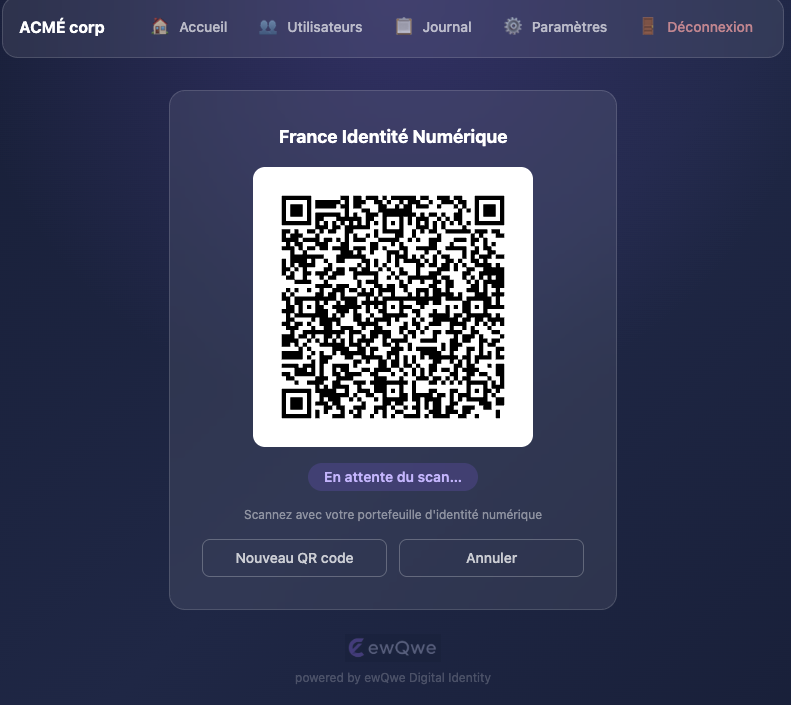
- A QR code is displayed for the selected credential type. The holder scans it with their digital wallet; the status badge updates automatically every 2 seconds:
| Status | Meaning |
|---|---|
pending | Waiting for the wallet to scan |
scanned | Wallet received the request |
verified | Credential verified — presentation accepted |
failed | Presentation was rejected |
expired | Transaction timed out (default TTL: 300 s) |
- Once
verified, click New Verification to start another session, or Cancel to return to the credential type selection.
Single-Credential Verifiers
When a user has only one allowed credential type (or the server is configured with a single type), the credential type dropdown and cancel button are hidden and the QR code is generated automatically on page load.
The credential type determines the OpenID4VP profile used:
| Credential Type | Profile | Namespace |
|---|---|---|
proof-of-age | Annex A (EU AV) | eu.europa.ec.av.1 |
mdl | HAIP | org.iso.18013.5.1.mDL |
national-id | HAIP | eu.europa.ec.eudi.pid.1 |
Admin: User Management
Navigate to Users (admin only) to:
- View all accounts, their role and active status.
- Add User — creates a new
verifieroradminaccount. - Edit — update name, role, active status, password, and allowed credential types.
- Delete — removes the account (superadmin is protected).
Password requirements: minimum 12 characters.
Per-User Credential Permissions
Each user can be restricted to specific credential types via the Allowed Credential Types checkboxes in the user modal. When all checkboxes are unchecked, the user inherits the server-level allowed_credential_types setting. When one or more are checked, QR generation is limited to those types only.
This allows an admin to, for example, let one operator verify only proof-of-age while another can also verify mDL and national IDs.
Admin: Settings
Navigate to Settings (admin only) to configure:
- Company Name — displayed in the navigation bar and login screen (default: “ACME.eu”).
- Logo URL — HTTPS URL or a
data:image/png;base64,…data URL. When blank, the built-in ewQwe logo is used. - Language — choose a specific UI language or use the browser default.
- Credential Claims — configure which PID (National ID) and mDL (Driver’s License) claims to request. Claims configuration is stored in the browser’s
localStorage.
Admin: Journal
Navigate to Journal (admin only) to browse the verification audit log. Each entry is attributed to the Credential Verifier UI user who initiated the transaction.
Available filters:
- Verifier — show entries belonging to a specific operator.
- From / To — date range filter.
Entries are paginated (50 per page). The journal backend must be enabled in the credential-server configuration (see [journal] section).
Internationalisation (i18n)
The UI fetches locale strings from:
GET /api/v1/i18n?lang=<code>
Supported language codes:
| Code | Language |
|---|---|
en | English (default) |
de | German |
fr | French |
it | Italian |
es | Spanish |
sv | Swedish |
pl | Polish |
cs | Czech |
hr | Croatian |
Language Detection
By default the app detects the browser’s language (navigator.language) and uses the closest supported locale, falling back to English. Users can override this in the Settings page by choosing a specific language from the dropdown, or selecting Default (browser language) to restore automatic detection.
The language preference is stored in localStorage (verifier_ui_lang) and persists across sessions.
Locale files are embedded in the binary at compile time fromcrates/ewqwe-verifier-app/src/static/i18n/ and served via GET /api/v1/i18n?lang=<code>.
API Reference
All API endpoints are under /api/v1/ and require Content-Type: application/json for POST/PUT requests. Sessions are managed via HttpOnly cookies.
Setup
| Method | Path | Body | Description |
|---|---|---|---|
POST | /api/v1/setup/bootstrap | {email, password, first_name, last_name?} | One-time admin creation |
GET | /api/v1/setup/status | — | {"bootstrapped": bool} — public endpoint |
Auth
| Method | Path | Body | Description |
|---|---|---|---|
POST | /api/v1/auth/login | {email, password} | Sign in, sets session cookie |
POST | /api/v1/auth/logout | — | Invalidate session |
GET | /api/v1/auth/me | — | Current user profile |
QR Code
| Method | Path | Body | Description |
|---|---|---|---|
POST | /api/v1/qr/generate | {credential_type?} | Start a new OpenID4VP transaction. credential_type: "proof-of-age" (default), "mdl", or "national-id". |
GET | /api/v1/qr/{id}/status | — | Poll transaction status |
generate response:
{
  "transaction_id": "...",
  "qr_code_data_url": "data:image/png;base64,...",
  "authorization_request_uri": "openid4vp://...",
  "expires_in": 300
}
Settings (public)
| Method | Path | Body | Description |
|---|---|---|---|
GET | /api/v1/settings | — | {"app_name": "...", "logo_url": "...|null", "allowed_credential_types": [...]} |
Admin Settings
Use these endpoints to manage the display settings for the credential verifier UI.
| Method | Path | Body | Description |
|---|---|---|---|
PUT | /api/v1/admin/settings | {app_name?, logo_url?} | Persist display settings |
status response:
{
  "status": "pending | scanned | verified | failed | expired",
  "expires_in": 287
}
Admin Users
| Method | Path | Body | Description |
|---|---|---|---|
GET | /api/v1/admin/users | — | List all users |
POST | /api/v1/admin/users | {email, password, first_name, last_name?, role?, allowed_credential_types?} | Create user |
PUT | /api/v1/admin/users/{id} | {first_name?, last_name?, role?, is_active?, new_password?, allowed_credential_types?} | Update user |
DELETE | /api/v1/admin/users/{id} | — | Delete user |
Admin Journal
| Method | Path | Query | Description |
|---|---|---|---|
GET | /api/v1/admin/journal | user_id, limit (≤200), offset | List journal entries attributed to QR app users |
i18n
| Method | Path | Query | Description |
|---|---|---|---|
GET | /api/v1/i18n | lang | Get locale strings JSON |